

- Keep everything. Your organization, your workspaces, your role and your leads stay with your account.
- Sign in with the new address. After you confirm, you use the new address from then on.
- Stay safe. A link sent to the new address proves that you own it.
- To be signed in to AskFunnel.
- Access to the inbox of your new address, because that is where the confirmation link goes.
- Access to how you signed in now: your Google account, or the inbox of your current address.
Important to note
Change your email address
1
Open your profile
Click your profile picture in the top right corner. Under Account, click “Profile”.
2
Type your new address
Next to Email, replace your address with the new one. A note appears under the box: A verification link will be sent to this address to confirm the change. Below it, a button says Verify it’s you.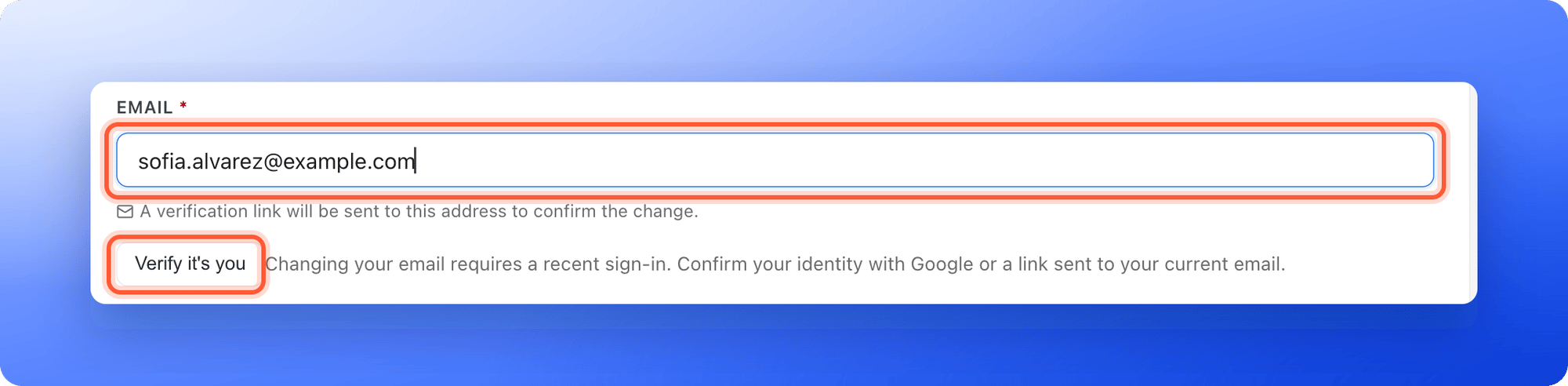
3
Confirm that it is you
Click “Verify it’s you”.
- If you sign in with Google, a Google window opens. Choose your account. You see Identity confirmed. Save your email change within five minutes.
- If you sign in with an email link, we send a sign in link to your current address. You see Check your current email for a sign-in link. Open the email and click the link. It brings you back to your profile. Type your new address again if the box is empty, then continue within five minutes.
4
Save the change
Click “Save changes” in the bar at the top. A message says A verification link has been sent to your new address, and that your email will be updated after you click the link. Any other changes you made on the page, such as your name, are saved too.
5
Click the link in the email
- Open the inbox of your new address. Look for the email with the subject Confirm your new email address.
- Click Confirm email change. The link works for one hour.
- A page says Email updated and shows your new address. Click “Sign in” and sign in with the new address.
How do I know it is working?
- After you save, a message shows the new address and says a verification link was sent.
- The email arrives in the inbox of the new address.
- After you click the link, the page says Email updated. When you sign in again, Profile shows your new address.
Troubleshooting
I see Sign in again before changing your email address
I see Sign in again before changing your email address
Your last sign in is too old. Click “Verify it’s you” below the Email box, then click “Save changes” within five minutes.
I see This email address is already in use by another account
I see This email address is already in use by another account
The new address already has its own AskFunnel account. Use a different address, or sign in to that account instead.
The confirmation email does not arrive
The confirmation email does not arrive
Check the spam or junk folder of the new address, and check that you typed it correctly. If it still does not come, go back to Profile, confirm that it is you again and save the change again. A new request replaces the old link.
The link says it has expired
The link says it has expired
The link works for one hour. Go to Profile and start again. A message says This verification link has expired. Please request a new one from your profile settings.
The link says Invalid or already used verification link
The link says Invalid or already used verification link
The link was already used, or you asked for a newer one that replaced it. Open the newest email, or start again from Profile.
I see Couldn't send the verification email
I see Couldn't send the verification email
Click “Save changes” again. If it keeps failing, email support.
I see Complete the email verification already in progress
I see Complete the email verification already in progress
An earlier change is still finishing. Open the confirmation email you received for it and click its link again.
The Google window does not open
The Google window does not open
Allow pop-ups for dash.askfunnel.com in your browser and click “Verify it’s you” again.
I still see my old address after confirming
I still see my old address after confirming
Sign in again. AskFunnel signs you out when the change is done, so an old page can still show the old address.
What to do next
Create your account
How signing in works, with Google or an email link.
Invite a teammate
Give your team access to your workspace.
Contact support
Ask us for help with your account.