

Available on: all plans (Starter, Growth, Scale and Enterprise).
- Start in one minute. Paste your Measurement ID. There is nothing to map, because AskFunnel uses event names GA4 accepts.
- See the path through your funnel. Every page, answer, button click, form start and form submission arrives as its own event.
- Count your leads. Each submitted form is sent as a generate_lead event, the event name GA4 uses for leads.
- Use your existing reports. The events show up next to the rest of your GA4 data.
- A GA4 property with a Web data stream. Its Measurement ID starts with G-. Old Universal Analytics IDs that start with UA- do not work. If you have no property yet, create one in Google Analytics and add a Web data stream, using your funnel’s address as the website.
- A funnel to track. See Launch your first funnel.
Important to note
Setup
1
Open the Google Analytics settings
- From your main dashboard, find the funnel you want to track.
- Click the three small dots (…) on that funnel’s row, then click “Funnel Settings”.
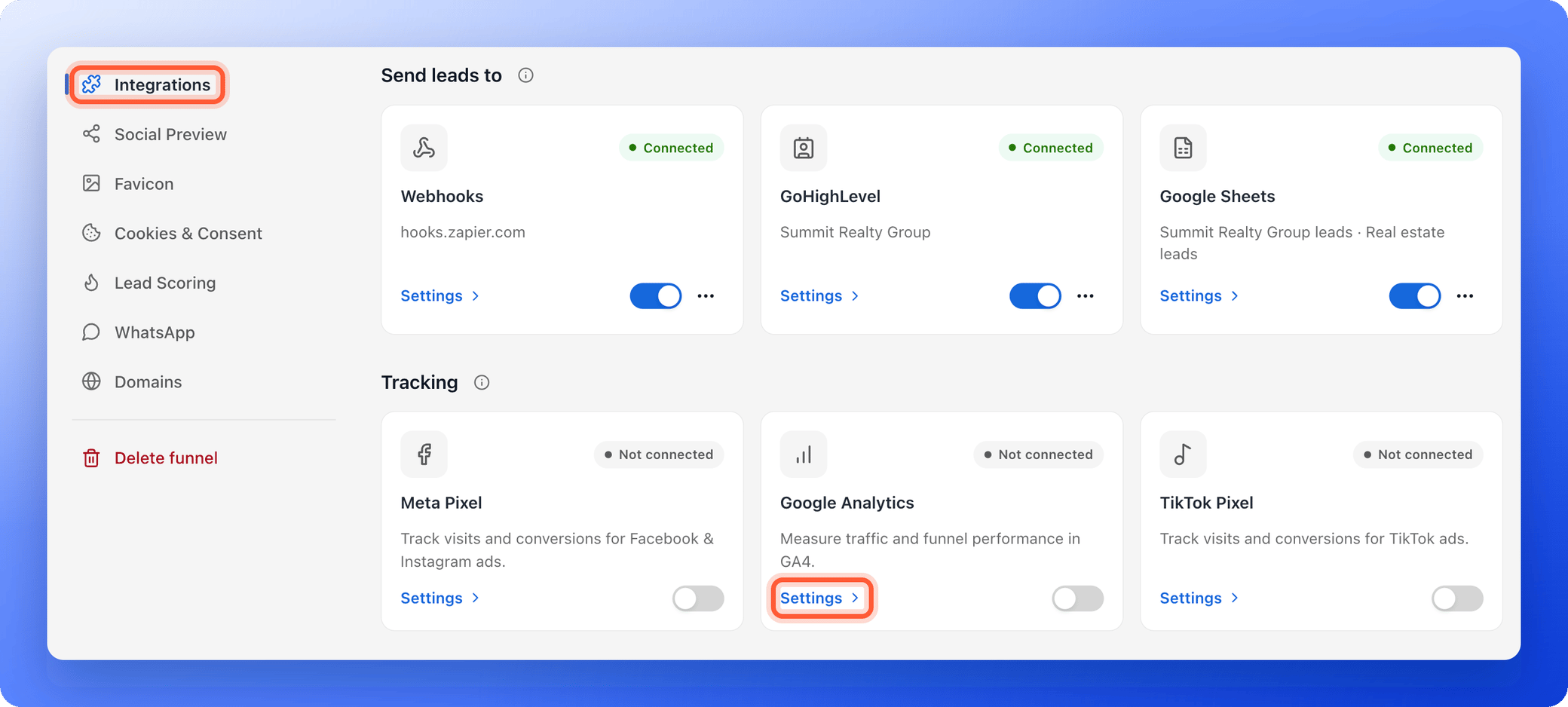
- On the left side menu, click “Integrations”.
- Under Tracking, on the Google Analytics card, click “Settings”.
2
Paste your Measurement ID
- In Google Analytics, click the gear icon (Admin) at the bottom left.
- Under Data collection and modification, click Data streams, then click your web stream.
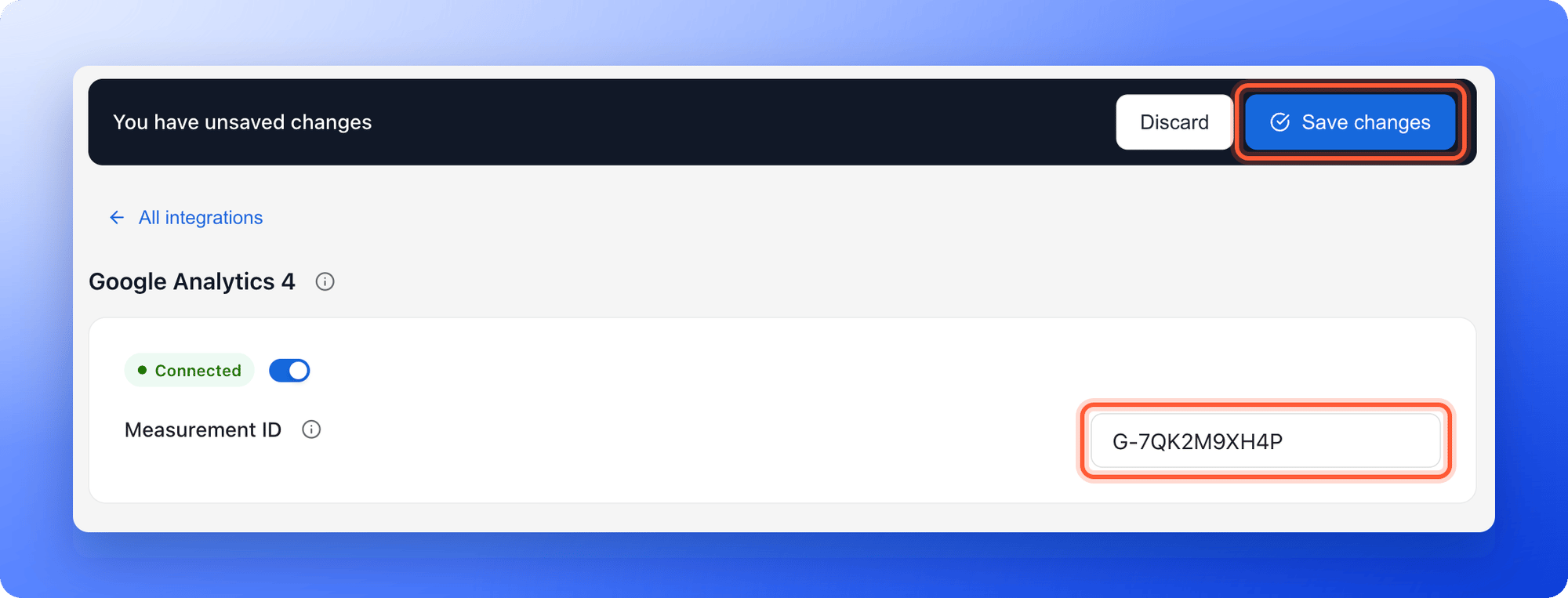
- At the top right of the stream details, copy the Measurement ID. It looks like G-XXXXXXXXXX.
- Back in AskFunnel, paste it into Measurement ID.
3
Save your changes
In the bar that appears at the top, click “Save changes”. If your funnel is published, AskFunnel shows Settings saved. Your live funnel is updated.If you see Expected format: G- followed by letters or digits, check that you copied the whole Measurement ID.
How do I know it is working?
- The Google Analytics card shows Connected, and its switch is on.
- In Google Analytics, open Reports, then Realtime. Open your funnel in another tab, accept the cookies and click through it. You should appear within a minute, with events such as funnel_page_view and answer_click.
- Standard reports can take a day to update.
Troubleshooting
I do not see any data in Google Analytics
I do not see any data in Google Analytics
Check these, in order:
- The card shows Connected, not Paused or Not connected.
- You clicked “Save changes” after pasting the Measurement ID.
- The Measurement ID belongs to a GA4 property and matches the web stream for your funnel.
- You accepted analytics cookies on the funnel, if your cookie banner is on.
- Your ad blocker or browser privacy setting is off for the test.
- For standard reports, a day has passed. Use Realtime to check right away.
I see Expected format: G- followed by letters or digits
I see Expected format: G- followed by letters or digits
The Measurement ID must start with G-. You may have pasted the Stream ID, a UA- ID or a space. Copy the Measurement ID again from your web stream.
The card says Paused
The card says Paused
The switch on the card is off. Your setup is kept. Turn the switch on and click “Save changes”.
I want to rename the events or map them
I want to rename the events or map them
You cannot. Google Analytics uses fixed event names, listed under What gets sent to Google Analytics. Meta and TikTok can be mapped. See Map your funnel steps to standard events.
What gets sent to Google Analytics
Google’s own tag records a standard page_view when your funnel opens. On top of that, AskFunnel sends these events. Each is sent once per visit, so going back to a page does not count it again.
The funnel_label is sent as an event parameter. To use it in reports, add it as a custom dimension (an extra column for your reports) in GA4.
Event mapping is not available for Google Analytics, because GA4 only accepts event names made of letters, numbers and underscores. To rename steps for Meta or TikTok, see Map your funnel steps to standard events.
Tracking where your leads come from
There is nothing to set up. UTM parameters are tags on your link that show where a visit came from, and the referrer is the page a visitor came from. Google Analytics reads both from your funnel’s address by itself, so your campaigns show up in its acquisition reports. AskFunnel also keeps them with each lead. See Lead insights.Manage the integration
- Pause it: turn off the switch on the Google Analytics card, then click “Save changes”. Your Measurement ID is kept.
- Change the property: replace the Measurement ID and click “Save changes”.
- Remove it from the funnel: clear the Measurement ID and click “Save changes”. The card goes back to Not connected.
What to do next
Track your Facebook and Instagram ads
Connect Meta Pixel to see which ads bring leads.
Track your TikTok ads
Connect TikTok Pixel to see which ads bring leads.
See how your funnel performs
Visitors, conversions and where people drop off.