

Available on: all plans (Starter, Growth, Scale and Enterprise).
- Choose the event for any step. Pick a page view, an answer, a button click, or the start or end of your lead form.
- Map each platform on its own. The same step can send Contact to Meta and SubmitForm to TikTok.
- Map only what matters. Steps you do not map are still sent as custom events, so nothing is lost.
- A saved Pixel ID in Meta Pixel for Facebook and Instagram ads, or in TikTok Pixel for TikTok ads. A mapping only works once that platform’s Pixel ID is saved.
- Mapping is not available for Google Analytics, which uses fixed event names.
Important to note
Setup
1
Open the pixel's settings
- From your main dashboard, find the funnel you want to change.
- Click the three small dots (…) on that funnel’s row, then click “Funnel Settings”.
- On the left side menu, click “Integrations”.
- Under Tracking, click “Settings” on the Meta Pixel or TikTok Pixel card.
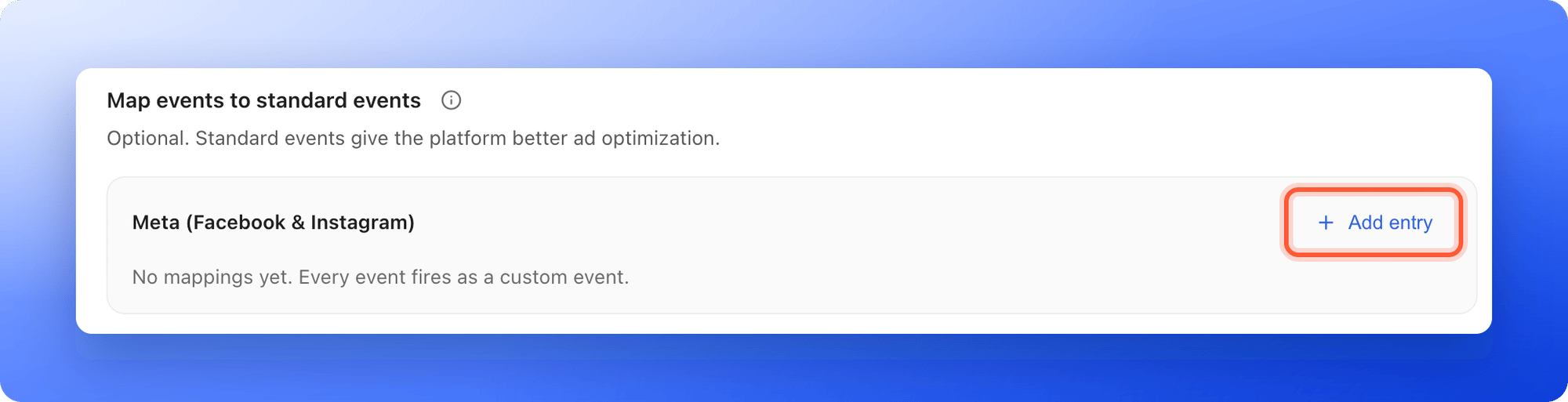
- Scroll down to Map events to standard events.
2
Add an entry
- Click “Add entry”.
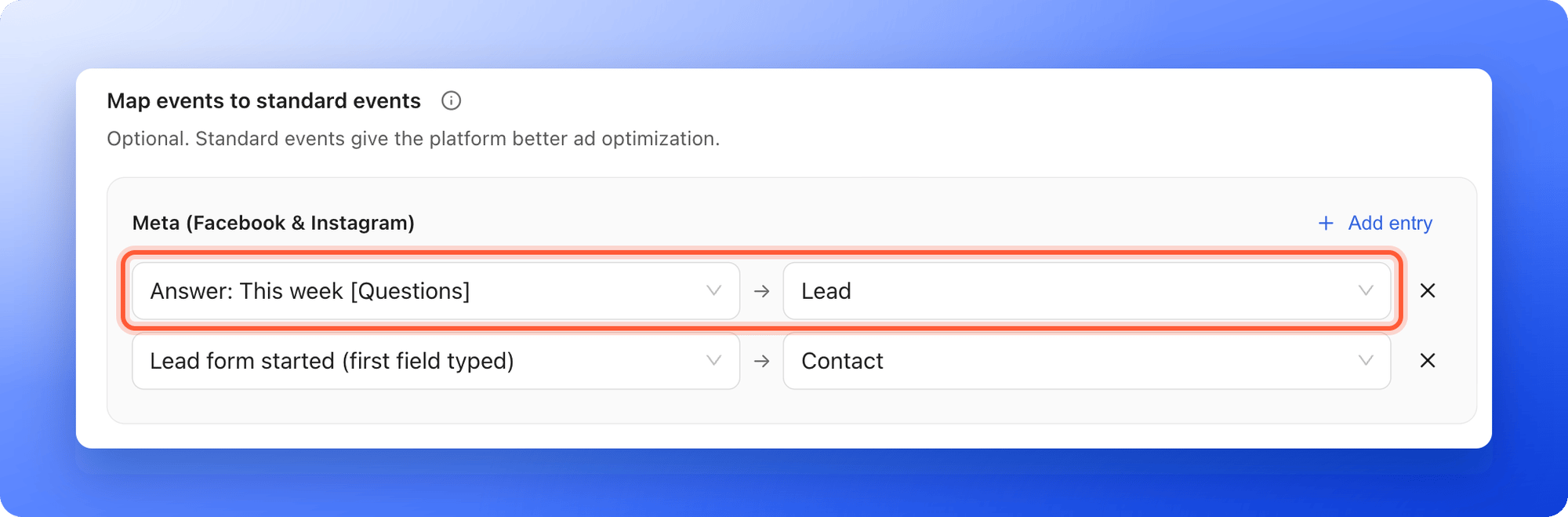
- In the first dropdown, Funnel event, pick the step. You can type to search.
- In the second dropdown, Standard event, pick what the platform should call it, for example Contact or Lead.
- Add more entries for more steps. To remove one, click the X at the end of its row.
3
Save your changes
Click “Save changes” in the bar at the top. If your funnel is published, AskFunnel shows Settings saved. Your live funnel is updated.
How do I know it is working?
- The mapping rows are still there after you save and reopen the settings.
- Open your funnel in another tab, accept the cookies and click through to the mapped step. In Meta Events Manager or TikTok Events Manager, open your pixel’s Test events tab. The step arrives under the standard event you chose, not as a custom event.
Troubleshooting
My mapped event does not show in Meta or TikTok
My mapped event does not show in Meta or TikTok
Check these, in order:
- The pixel card shows Connected, and a Pixel ID is saved. Without one, AskFunnel warns that mappings do not take effect.
- Both dropdowns of the entry are filled in. A half-filled entry is ignored.
- You clicked “Save changes”.
- You accepted marketing cookies on the funnel, if your cookie banner is on.
- You reached the step in that visit. Each step is sent when the visitor gets there.
The first dropdown shows (removed funnel action)
The first dropdown shows (removed funnel action)
The page, answer or button that entry pointed to was deleted from your funnel. Click the X to remove the entry, or pick another step.
I mapped the same step twice
I mapped the same step twice
If two entries use the same step, only the last one is used. Remove the one you do not want.
I want to map Google Analytics events
I want to map Google Analytics events
You cannot. Google Analytics only accepts event names made of letters, numbers and underscores, so AskFunnel sends fixed names such as generate_lead for you. See Tracking your traffic with Google Analytics.
Buyers are counted twice in Meta
Buyers are counted twice in Meta
You have an entry mapped to Purchase and Meta revenue tracking is on, so both send a Purchase. AskFunnel warns you when this happens. Change the entry to another event, such as Lead or InitiateCheckout. See Meta Pixel.
Manage your mappings
- Change a mapping: pick another event in the second dropdown and click “Save changes”.
- Remove a mapping: click the X at the end of its row and click “Save changes”. The step goes back to being sent as a custom event.
- Pause tracking: turn off the switch on the pixel’s card. Your mappings are kept.
The funnel steps you can map
The first dropdown lists the steps of your funnel. Each one is named like this:- Page view: Property type. One entry for each page and result page. A page without a name is called Untitled page 1, Untitled page 2 and so on, by its position.
- Answer: Buy a home [What are you looking to do?]. One entry for each answer of a quiz question, followed by its page in square brackets.
- Button: Learn more [Welcome]. One entry for each button, followed by its page. Buttons inside your lead form are not listed, because the form has its own two entries below.
- Lead form started (first field typed). The visitor typed in the first field of your lead form.
- Lead form submitted (new lead). The visitor submitted the form and a lead was created.
What each step sends when you do not map it
Event names are cut to 50 characters. Each step is sent once per visit, so going back to a page or clicking the same answer again does not send it twice.
The standard events you can pick
- Meta: Lead, CompleteRegistration, Contact, Schedule, SubmitApplication, StartTrial, Subscribe, ViewContent, Search, AddToCart, AddToWishlist, InitiateCheckout, AddPaymentInfo, Purchase, Donate, CustomizeProduct and FindLocation.
- TikTok: SubmitForm, CompleteRegistration, Contact, Subscribe, ViewContent, ClickButton, Search, AddToWishlist, AddToCart, InitiateCheckout, AddPaymentInfo, CompletePayment, PlaceAnOrder and Download.
- Meta: Lead form started (first field typed) to Contact, to see who shows intent before they submit. The form submission already sends Lead without any mapping.
- TikTok: Lead form started (first field typed) to Contact. The form submission already sends SubmitForm without any mapping.
- Either: an answer that marks a hot lead, such as Answer: Buy within 3 months, to Lead or Schedule.
What to do next
See how your funnel performs
Visitors, conversions and where people drop off.
Download your analytics as CSV
Get your funnel numbers as a file.