

- A funnel with leads in its Leads tab. See View and manage your leads.
Important to note
Export the leads in your table
The file matches your current view, so set it up first. Use search and filters to choose which leads go in, and use Fields to show the columns you want.1
Open the View options menu
Open your funnel’s Leads tab and click the three vertical dots (View options) in the toolbar.
2
Choose a file format
Click “Export N leads (CSV)” for a file that works almost everywhere, or “Export N leads (Excel)” for an Excel workbook. N is the number of leads in your current view.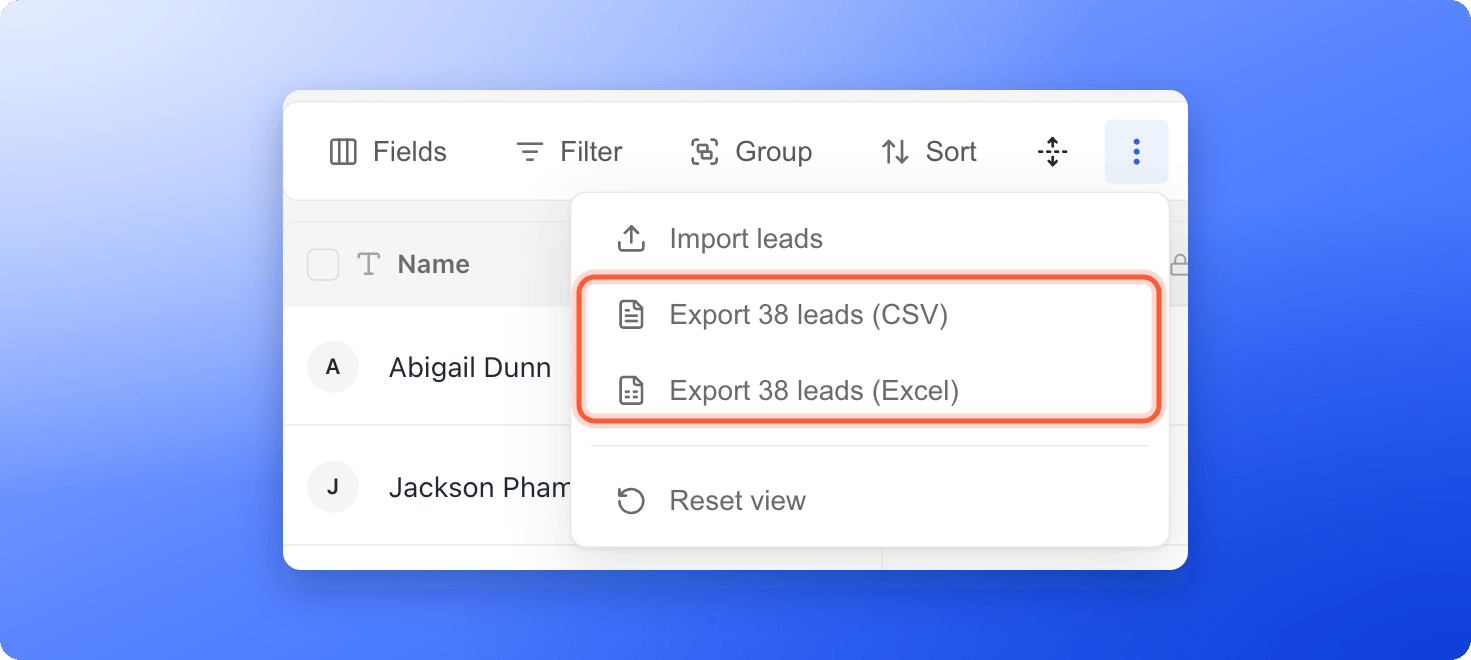
3
Open the file
Your browser downloads leads-export.csv or leads-export.xlsx. Open it in Excel, Google Sheets or any other tool.
Export only some leads
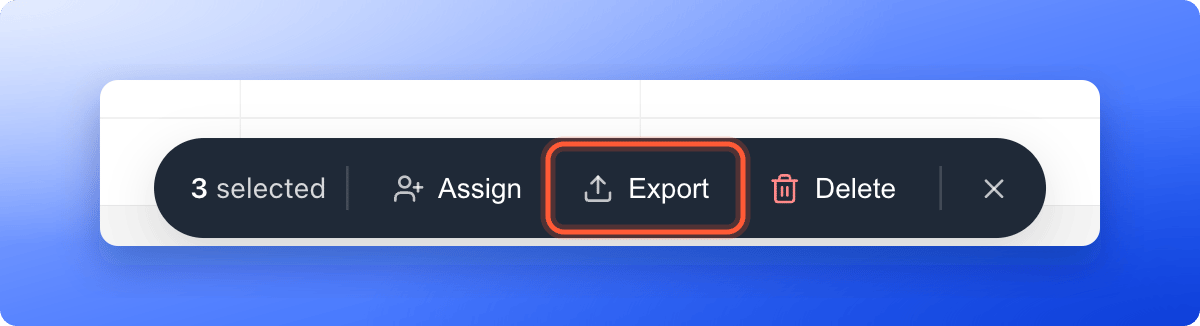
- Hover over a lead’s avatar in the Name column to show its checkbox, then tick each lead you want. To tick every lead in the table, use the checkbox in the header row.
- A bar appears at the bottom of the screen with the number of leads selected. Click “Export”.
What is in the file
- One column for each field you can see, in the same order as the table, with a header row. Hidden fields are left out.
- Choices appear as their names, checkboxes as Yes or No, and dates in the same format as the table. Fields with several choices list them separated by commas.
- The Score column exports as a number, not as Hot, Warm or Cold.
- Locked leads (leads over your plan’s monthly limit) are not included.
Troubleshooting
A column is missing from my file
A column is missing from my file
Hidden fields are not exported. Click Fields, turn the field on and export again.
Some cells start with an apostrophe
Some cells start with an apostrophe
If a value starts with an equals, plus, minus or at sign, AskFunnel adds an apostrophe so spreadsheet apps show it as text instead of running it as a formula.
The export did not start
The export did not start
A notice says Couldn’t export your leads. Click Try again. If nothing downloads, check that your browser is allowed to download files from dash.askfunnel.com.
My file has only some of my leads
My file has only some of my leads
Clear your search and filters first, then open View options and check the number in the export option.
What to do next
Delete leads
Remove spam, tests and leads you do not need. Export first to keep a copy.
Download your analytics as CSV
Get your funnel numbers instead of your leads.
Send leads to Google Sheets
Skip manual exports and send every new lead to a spreadsheet.