

- A published funnel and its link. See Find and share your funnel link.
- To read the results, a role that can see leads and analytics: Global Admin, Workspace Admin or Contacts Manager.
Important to note
The five UTM tags
You add them to your link one after the other, each written as a name, an equals sign and a value.
Start with
utm_source, utm_medium and utm_campaign. Add the other two only if you need them.
Add UTM tags to your link
1
Copy your funnel link
Copy the link of your live funnel. Your link looks like this:
https://summit-realty.askfunnel.com/home-valuation-x7k2m9p4qaIf you use your own domain, the link starts with your domain. See Connect your custom domain.2
Add the tags to the end
Type a question mark (?) after the link, then your tags with an ampersand (&) between them. For example:
https://summit-realty.askfunnel.com/home-valuation-x7k2m9p4qa?utm_source=facebook&utm_medium=paid_social&utm_campaign=spring_open_houseIf your link already has a question mark, add your tags with an ampersand instead. Write the tag names in lowercase, and write the values the same way every time, for example always facebook, never Facebook in one link and facebook in another.3
Use the tagged link where people will click it
Use it as the destination of your ad, your email button or your bio link. Make one link for each source and campaign, so the results stay separate. Many ad platforms also have a field for URL parameters in the ad setup, where you can paste the tags instead of adding them to the link.
4
Test it yourself
- Open the tagged link in a private browser window.
- Go through your funnel and submit the form with details you will recognize.
- In the dashboard, open your funnel’s Leads tab and open your test lead.
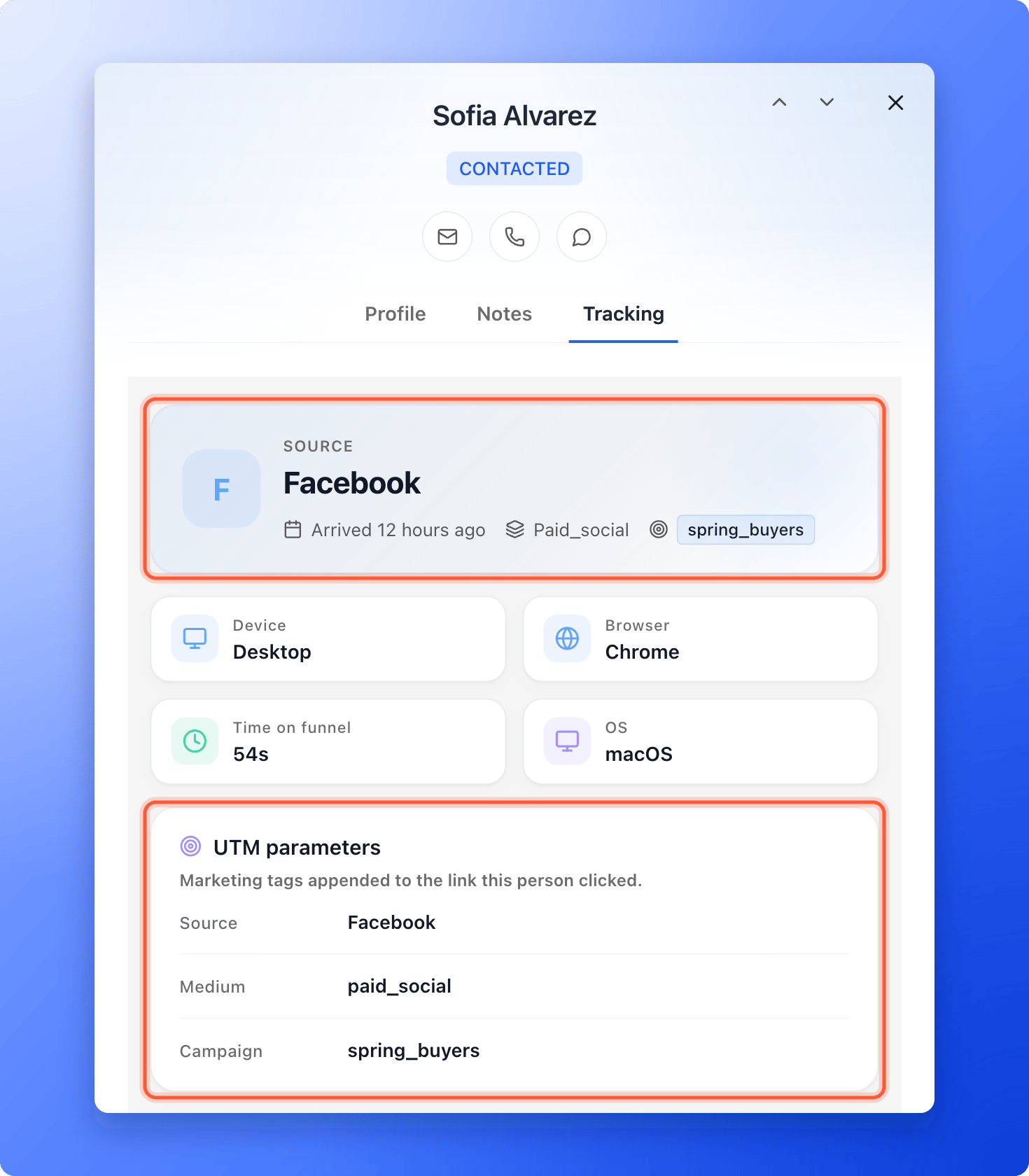
- Click the Tracking tab. Check that Source shows the source you typed after
utm_source, and that UTM parameters lists your tags. AskFunnel may show a known source with a capital letter, sofacebookappears as Facebook.
Where you see the results
- On every lead. Open a lead and click Tracking. Source shows the
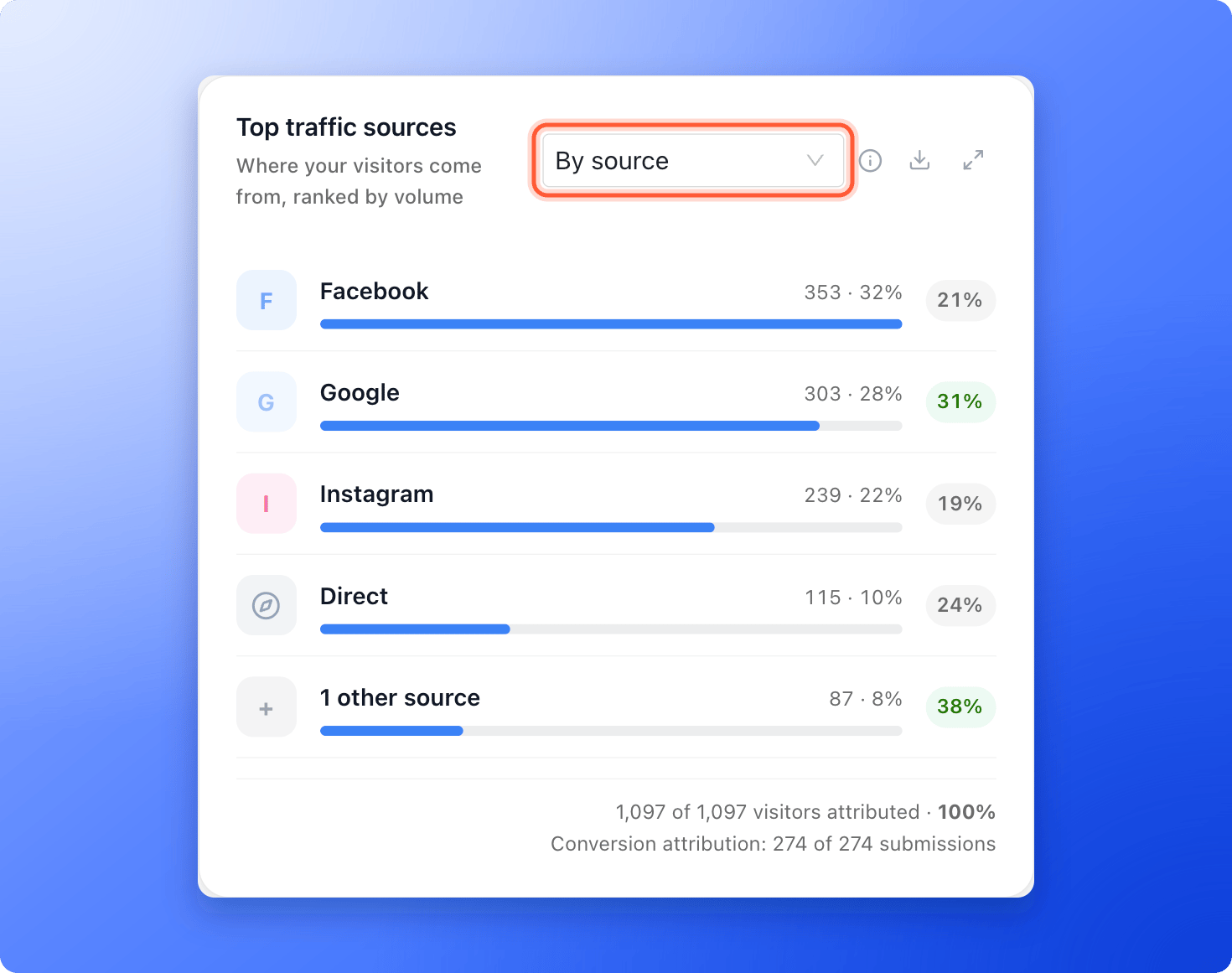
utm_source, with the medium and campaign next to it. UTM parameters lists every tag. Sources AskFunnel knows, such as Facebook, Google and Instagram, show with their brand name, and other values show as you typed them. The medium next to the source can start with a capital letter, for example Paid_social, while UTM parameters shows it as you typed it. With noutm_source, AskFunnel shows the website the visitor came from, or Direct / Unknown. See See where a lead came from. - In your funnel analytics. Top traffic sources ranks your sources by visitors, with the conversion rate of each. The card names your four biggest sources and groups the rest in one row, such as 3 other sources. Open the card full screen to see every source. Use Group traffic sources by to switch between By source, By medium, By campaign, By referrer, By country and By browser language. See Read your funnel analytics.
- In Google Sheets. Keep Include UTM parameters and referrer on in the Google Sheets settings to add them to each row. See Send leads to Google Sheets.
- In HighLevel. Match a tag, such as UTM source, to a HighLevel field. See Send your leads to HighLevel.
- In a webhook. The tags arrive in the
attributionpart of each lead. See What AskFunnel sends. - On another page. A button can pass the tags on to a booking page or another website. See Pass UTM and custom URL parameters on to another page. You can also show a tag inside your funnel text. See Personalize your funnel text with variables.
How do I know it is working?
- Your test lead shows the source, medium and campaign you typed.
- In Analytics, Top traffic sources shows your campaign after a few visits, instead of No data for this dimension.
Troubleshooting
The lead's source says Direct / Unknown
The lead's source says Direct / Unknown
The visitor arrived without tags and without a known referrer (the website that sent them). Check that the link you shared has the tags, and open it yourself to test. Link shorteners, redirects and some apps drop the part after the question mark, so test the exact link you use in your ad or message.
Top traffic sources says No data for this dimension
Top traffic sources says No data for this dimension
The card also says Tag your campaign URLs with UTM parameters to see attribution here. No visitor has arrived with a
utm_source yet, or the visitors did not accept analytics cookies on a funnel with a cookie banner. Tag your links, test them, and give it a little time. Until then, try By referrer to see where visitors come from.One source shows up twice
One source shows up twice
The tags are saved exactly as you typed them, so
Facebook and facebook can look like two sources. Write your tags the same way every time.My numbers differ from Meta Ads Manager
My numbers differ from Meta Ads Manager
The two tools count in different ways. See Why your lead and analytics numbers differ.
What to do next
See where a lead came from
Read a lead’s source, device and time on your funnel.
Read your funnel analytics
Compare your campaigns and find where visitors leave.
Track your Facebook and Instagram ads
Connect Meta Pixel to see which ads bring leads.
Set up cookies and consent
Choose when tracking starts for your visitors.