> ## Documentation Index
> Fetch the complete documentation index at: https://help.askfunnel.com/llms.txt
> Use this file to discover all available pages before exploring further.
# Resend or cancel a pending invite
> Send an invitation again, or cancel it, before your teammate joins.
An invitation stays pending until the person accepts it. From the **Pending invites** tab you can send it again if they cannot find the email or the link ran out, or cancel it if you no longer want them to join.
**Before you start**, you need:
* An invitation that has not been accepted yet. See [Invite a teammate or client](/workspaces/give-access).
* To be the person who sent the invitation, or a Global Admin. Only they can resend or cancel it.
## Important to note
* An invitation link works for 7 days. Resending sends a new link that works for 7 days from that moment, and the old link stops working.
* A role that uses a team seat reserves the seat while the invitation is pending. Cancelling frees it.
## Manage a pending invite
1. Click your profile picture in the top right corner, then click **"Members"**.
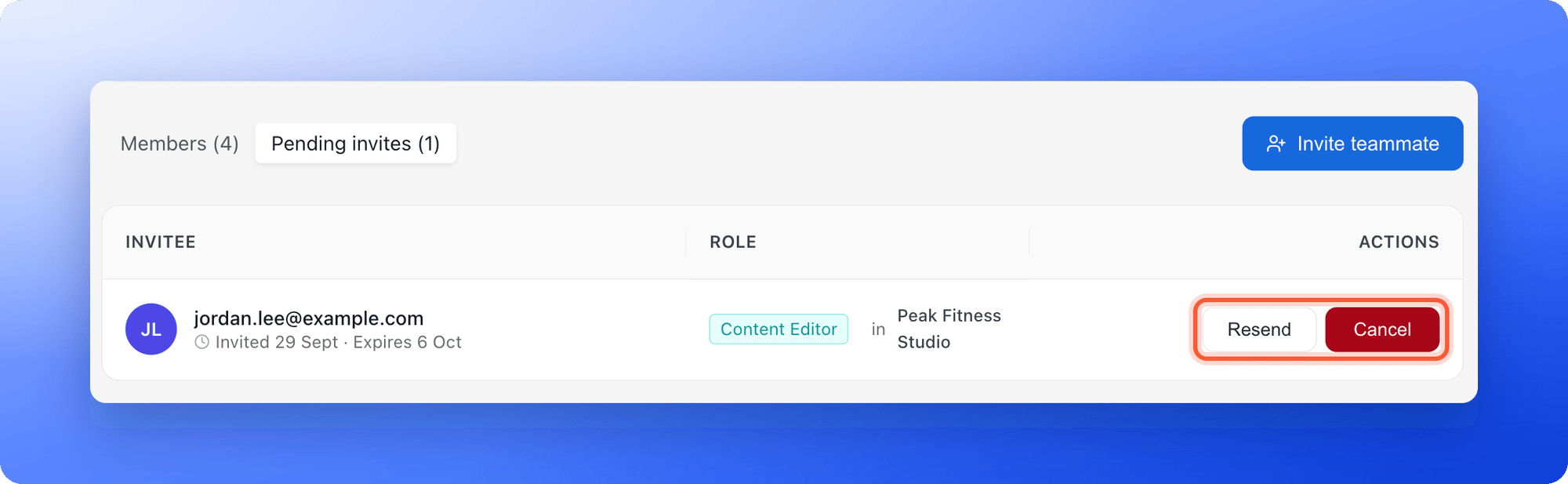
2. Click the **Pending invites** tab. The number in brackets is how many invitations are waiting.
Workspace Admins: click the **...** menu on your workspace card, then **"Workspace settings"**, then **Members**, then **Pending invites**.
 Each row shows the email, when it was invited and when it expires, the role and the workspace.
Use the buttons in the **Actions** column:
* **Resend:** Click **"Resend"** to email a new link. You see a message such as "Invitation resent to [sofia.alvarez@example.com](mailto:sofia.alvarez@example.com)."
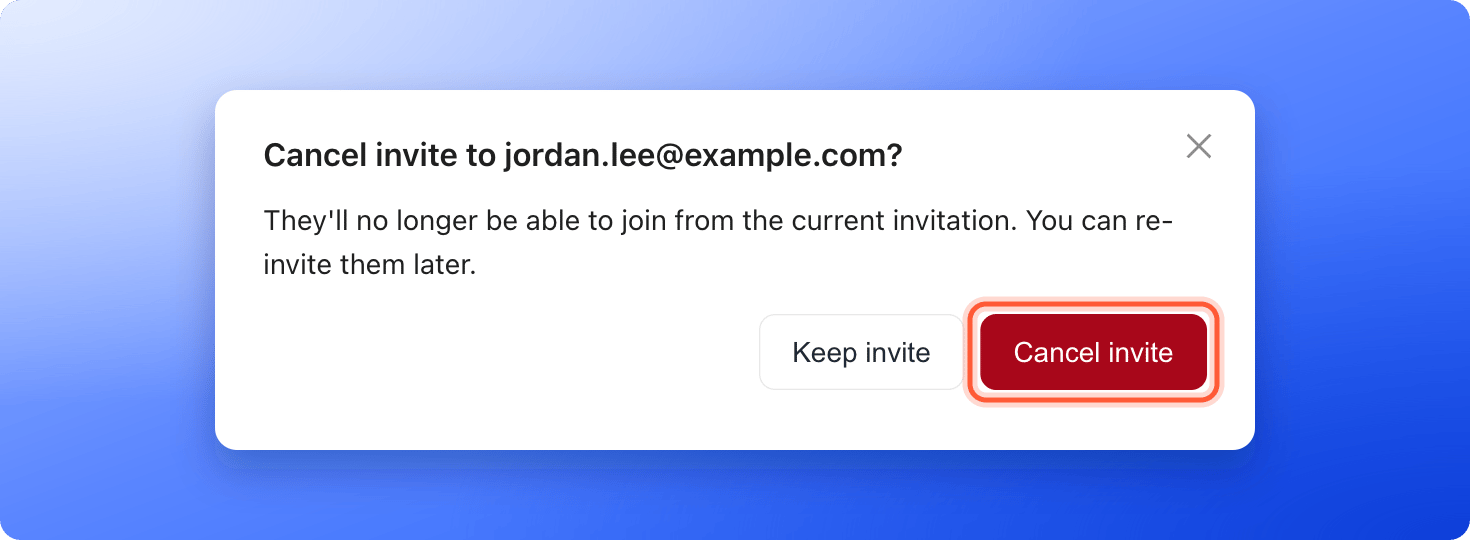
* **Cancel:** Click **"Cancel"**. A window asks **Cancel invite to [sofia.alvarez@example.com](mailto:sofia.alvarez@example.com)?** Click **"Cancel invite"** to confirm, or **"Keep invite"** to go back. You then see "Invitation to [sofia.alvarez@example.com](mailto:sofia.alvarez@example.com) cancelled."
Each row shows the email, when it was invited and when it expires, the role and the workspace.
Use the buttons in the **Actions** column:
* **Resend:** Click **"Resend"** to email a new link. You see a message such as "Invitation resent to [sofia.alvarez@example.com](mailto:sofia.alvarez@example.com)."
* **Cancel:** Click **"Cancel"**. A window asks **Cancel invite to [sofia.alvarez@example.com](mailto:sofia.alvarez@example.com)?** Click **"Cancel invite"** to confirm, or **"Keep invite"** to go back. You then see "Invitation to [sofia.alvarez@example.com](mailto:sofia.alvarez@example.com) cancelled."
 ## How do I know it is working?
* After a resend, the person receives a new email with a new link.
* After a cancel, the invitation leaves the list, its link stops working and the seat it reserved is free again. You can invite the person again later.
* When someone accepts, they move from **Pending invites** to the **Members** tab.
## Troubleshooting
Only the person who sent the invitation or a Global Admin can resend or cancel it. Ask one of them to do it.
The invitation may have expired, been cancelled or already been accepted. Check the **Members** tab, and if they are not there, click **"Resend"** on the **Pending invites** tab.
AskFunnel limits how many invitations and resends you can send in an hour. Wait a little and try again.
## What to do next
Send a new invitation and choose a role.
See which roles use a seat.
Need help? Email [support@askfunnel.com](mailto:support@askfunnel.com).
## How do I know it is working?
* After a resend, the person receives a new email with a new link.
* After a cancel, the invitation leaves the list, its link stops working and the seat it reserved is free again. You can invite the person again later.
* When someone accepts, they move from **Pending invites** to the **Members** tab.
## Troubleshooting
Only the person who sent the invitation or a Global Admin can resend or cancel it. Ask one of them to do it.
The invitation may have expired, been cancelled or already been accepted. Check the **Members** tab, and if they are not there, click **"Resend"** on the **Pending invites** tab.
AskFunnel limits how many invitations and resends you can send in an hour. Wait a little and try again.
## What to do next
Send a new invitation and choose a role.
See which roles use a seat.
Need help? Email [support@askfunnel.com](mailto:support@askfunnel.com).