> ## Documentation Index
> Fetch the complete documentation index at: https://help.askfunnel.com/llms.txt
> Use this file to discover all available pages before exploring further.
# Delete a workspace
> Remove a workspace you no longer need, and see what happens to its funnels, leads and team.
Available to: **Global Admins**, on every plan.
Delete a workspace when a client has left or a brand has closed. The workspace disappears from **Your workspaces**, its funnels stop working and its team loses access to it. This page shows how to do it, what to do first and what to expect.
**Before you start**, you need:
* A Global Admin role. Only Global Admins see **"Delete workspace"**. Workspace Admins can edit a workspace and open its settings, but not delete it.
* An active plan or free trial.
* At least one other workspace. You cannot delete your last one.
## Important to note
* There is no undo button in the app. The workspace, its funnels and their leads are permanently deleted after 30 days. If you delete a workspace by mistake, email [support@askfunnel.com](mailto:support@askfunnel.com) before then.
* You can no longer open the workspace, its funnels or its leads in the dashboard. [Export your leads](/leads/export-contacts) first if you may need them.
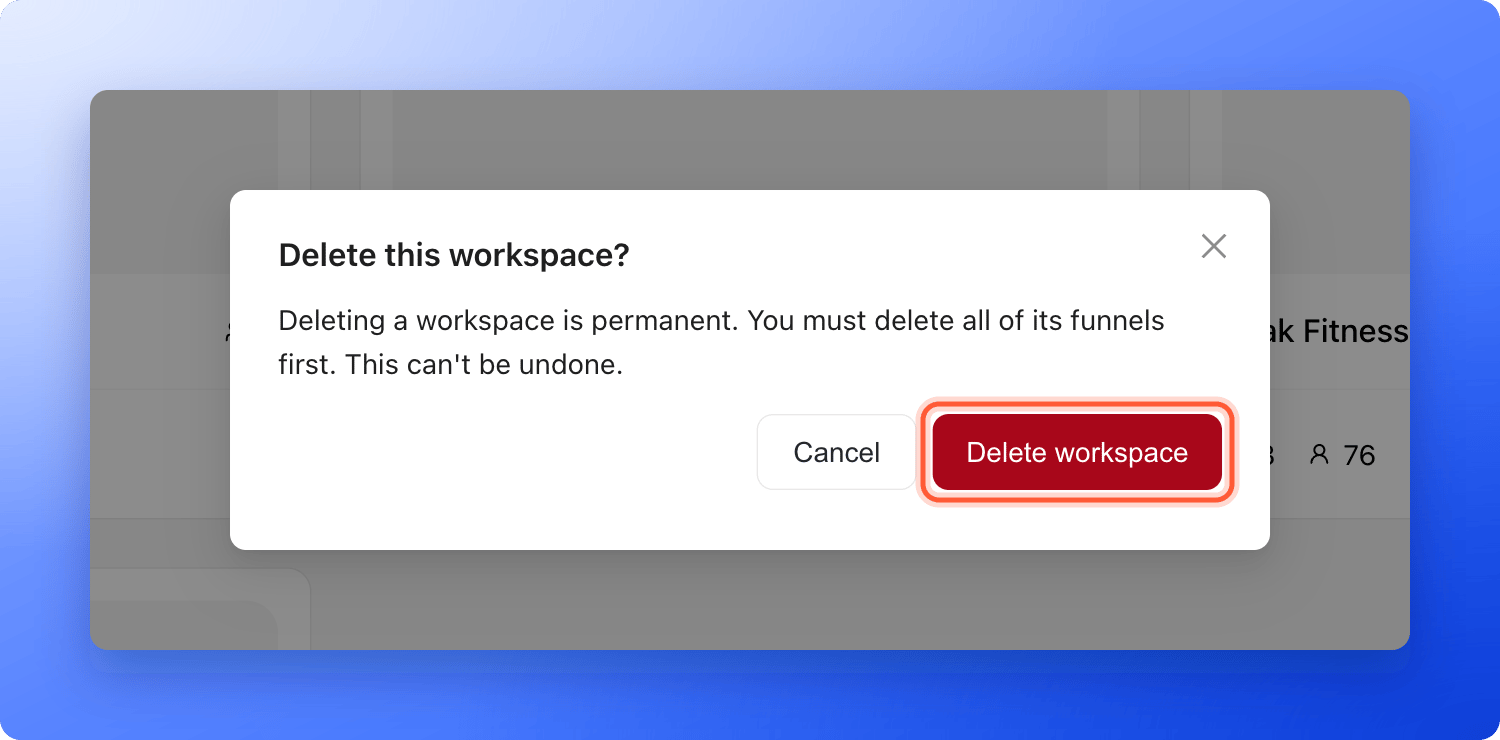
* The confirmation window says you must delete all of the workspace's funnels first. That is not required. You can delete a workspace that still has funnels in it.
* Live funnels stop working, and visitors can no longer send leads through them. Take your live funnels offline first, so none of them keeps counting toward your plan's live funnel limit.
* Leads you already sent to other tools, such as HighLevel, Google Sheets or a webhook, stay there.
## What happens when you delete a workspace
* **The workspace card disappears** from **Your workspaces** right away.
* **Its funnels stop working.** Live funnels can no longer be opened at their AskFunnel address, and new visitors cannot leave a lead.
* **Its team loses access to it.** Global Admins keep their access to every other workspace. If this workspace was the only place where someone had a Workspace Admin or Content Editor role, their team seat is freed. See [How team seats work](/workspaces/team-seats).
* **Its subdomain can be used again.** The subdomain is the first part of the workspace's web address, and you can give the same one to a new workspace. See [Create a workspace](/workspaces/create-workspace).
* **Your other workspaces are not touched.** Their funnels, leads and teams stay as they are.
## Delete a workspace
1. [Export your leads](/leads/export-contacts) from each funnel you may need later.
2. Take live funnels offline. Click the three dots (**...**) on a funnel's row, then **"Unpublish Funnel"**. See [Publish, unpublish and restore an earlier version](/funnels/publish-and-restore).
3. Tell the people who use the workspace, such as a client, that it is going away.
1. Click the home icon in the top left corner to open **Your workspaces**.
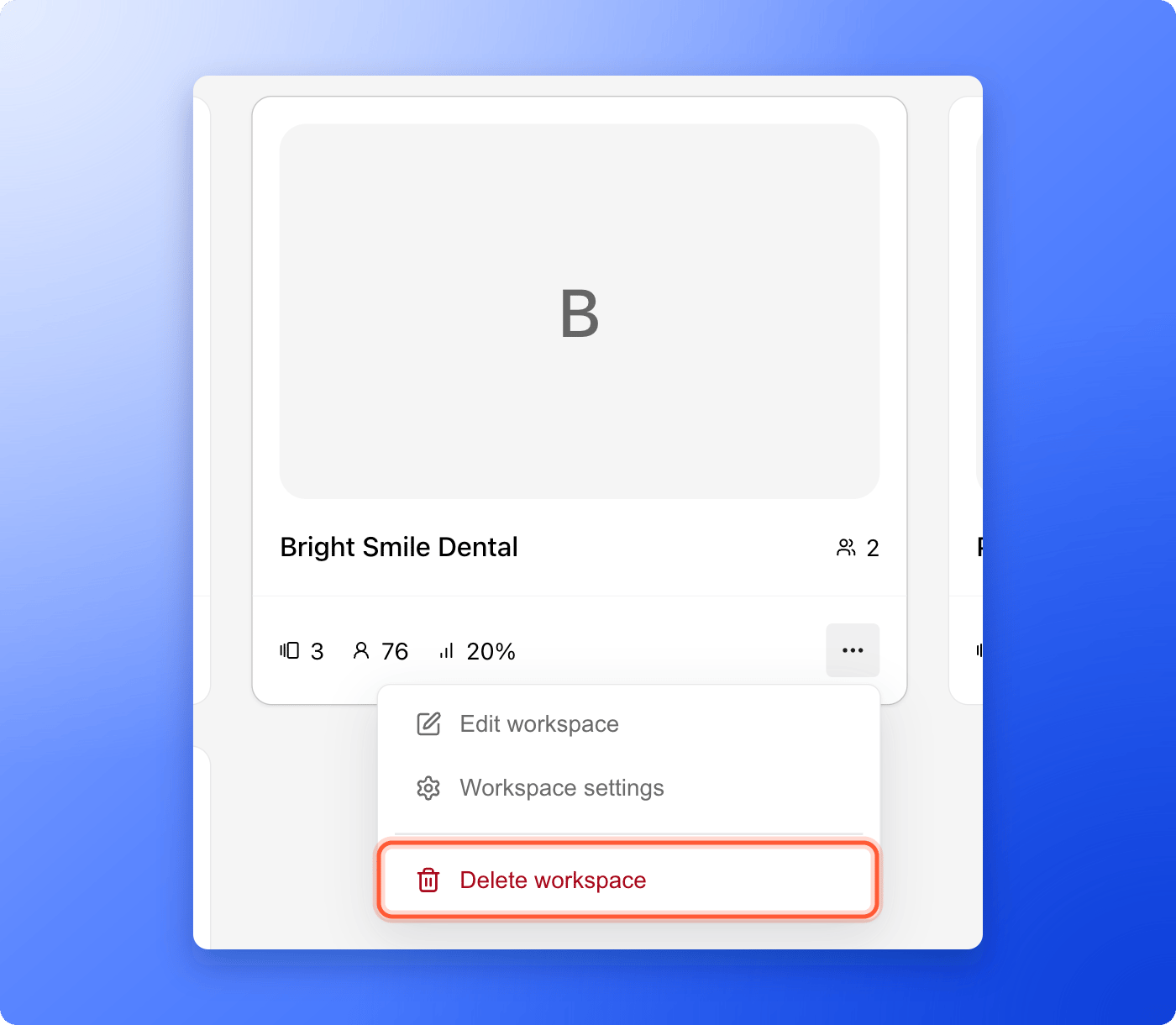
2. On the card of the workspace you want to remove, click the three dots (**...**) at the bottom right.
3. Click **"Delete workspace"**. It is the red item at the bottom of the menu.
 A window titled **Delete this workspace?** asks you to confirm. Check that you picked the right workspace, then click **"Delete workspace"**. Click **"Cancel"** to keep it.
 You see **Workspace has been deleted successfully**.
## How do I know it is working?
* You see **Workspace has been deleted successfully**, and the card is gone from **Your workspaces**.
* The funnels of that workspace no longer open at their address.
* If you deleted the only place where a teammate had a seat, **Members** shows one less seat in use.
## Troubleshooting
Only Global Admins can delete workspaces. Workspace Admins see **"Edit workspace"** and **"Workspace settings"** in the menu. Ask a Global Admin, or ask to be promoted. See [Invite a teammate or client to a workspace](/workspaces/give-access).
Your account needs at least one workspace. Create another one first, then delete this one. See [Create a workspace](/workspaces/create-workspace).
You do not have to. AskFunnel deletes the workspace even when it still has funnels. Take the live ones offline first, as described above.
Deleting a workspace needs an active plan or free trial. If your trial or subscription has ended, subscribe first. See [Upgrade your plan](/billing/upgrade). If that is not the reason, email support.
The delete did not go through, so AskFunnel put the card back. Try again in a minute. If it keeps happening, email support and tell us the name of the workspace.
There is no undo button. Within 30 days, email [support@askfunnel.com](mailto:support@askfunnel.com) with the name and the subdomain of the workspace, and we can restore it with its funnels and leads. Its members need to be invited again, its funnels published again, and its integrations reconnected. After 30 days it is permanently deleted and cannot be restored.
A live funnel in a workspace you deleted can keep counting toward your plan's live funnel limit. Email support and tell us which workspace you deleted.
## What to do next
Add a workspace for a new brand or client.
Keep a copy of your leads before you delete.
Open the workspace you want to work in.
Need help? Email [support@askfunnel.com](mailto:support@askfunnel.com).
You see **Workspace has been deleted successfully**.
## How do I know it is working?
* You see **Workspace has been deleted successfully**, and the card is gone from **Your workspaces**.
* The funnels of that workspace no longer open at their address.
* If you deleted the only place where a teammate had a seat, **Members** shows one less seat in use.
## Troubleshooting
Only Global Admins can delete workspaces. Workspace Admins see **"Edit workspace"** and **"Workspace settings"** in the menu. Ask a Global Admin, or ask to be promoted. See [Invite a teammate or client to a workspace](/workspaces/give-access).
Your account needs at least one workspace. Create another one first, then delete this one. See [Create a workspace](/workspaces/create-workspace).
You do not have to. AskFunnel deletes the workspace even when it still has funnels. Take the live ones offline first, as described above.
Deleting a workspace needs an active plan or free trial. If your trial or subscription has ended, subscribe first. See [Upgrade your plan](/billing/upgrade). If that is not the reason, email support.
The delete did not go through, so AskFunnel put the card back. Try again in a minute. If it keeps happening, email support and tell us the name of the workspace.
There is no undo button. Within 30 days, email [support@askfunnel.com](mailto:support@askfunnel.com) with the name and the subdomain of the workspace, and we can restore it with its funnels and leads. Its members need to be invited again, its funnels published again, and its integrations reconnected. After 30 days it is permanently deleted and cannot be restored.
A live funnel in a workspace you deleted can keep counting toward your plan's live funnel limit. Email support and tell us which workspace you deleted.
## What to do next
Add a workspace for a new brand or client.
Keep a copy of your leads before you delete.
Open the workspace you want to work in.
Need help? Email [support@askfunnel.com](mailto:support@askfunnel.com).