> ## Documentation Index
> Fetch the complete documentation index at: https://help.askfunnel.com/llms.txt
> Use this file to discover all available pages before exploring further.
# Keep your emails out of spam
> Best practices to avoid bounces, blocks and spam folders, and what AskFunnel does to protect your sending.
Keep your emails out of the spam folder so your leads actually see them. Deliverability means how many of your emails reach the inbox. Email flows only work if your messages get there. These habits keep your bounce rate (emails that could not be delivered) and spam rate (people marking your email as spam) low, and AskFunnel adds a few protections of its own.
## Send from your own verified domain
* **Use your own domain:** send from an address such as [hello@yourcompany.com](mailto:hello@yourcompany.com). Free addresses from Gmail, Yahoo or Outlook cannot be verified, and AskFunnel does not accept them as senders.
* **Finish the domain setup:** add every DNS record AskFunnel shows you. DNS records are settings at your domain provider. The records listed under **Recommended: improves inbox placement** are optional, but adding them helps your emails reach the inbox.
* **Use a sender name people recognize:** for example "Jane from Acme". Avoid emoji in the name, which can look spammy and may be stripped.
See [Add and verify a sender email](/messages/custom-sender-email) for the steps.
## Write emails people want to open
* **Keep the subject short and plain:** AskFunnel shows a soft warning under the subject when it is mostly capital letters, contains an emoji, contains a common spam word (such as free, act now, limited time, click here, buy now, guarantee, winner or urgent) or is longer than 120 characters.
* **Match the email to the lead:** send follow-ups that fit what the lead answered, and use **@** to add their name.
* **Keep it light on links and exclamation marks:** emails full of links and capital letters are more likely to be filtered.
* **Give people a way out:** every email already has an unsubscribe link in its footer, and you cannot remove it. This keeps people from marking your messages as spam.
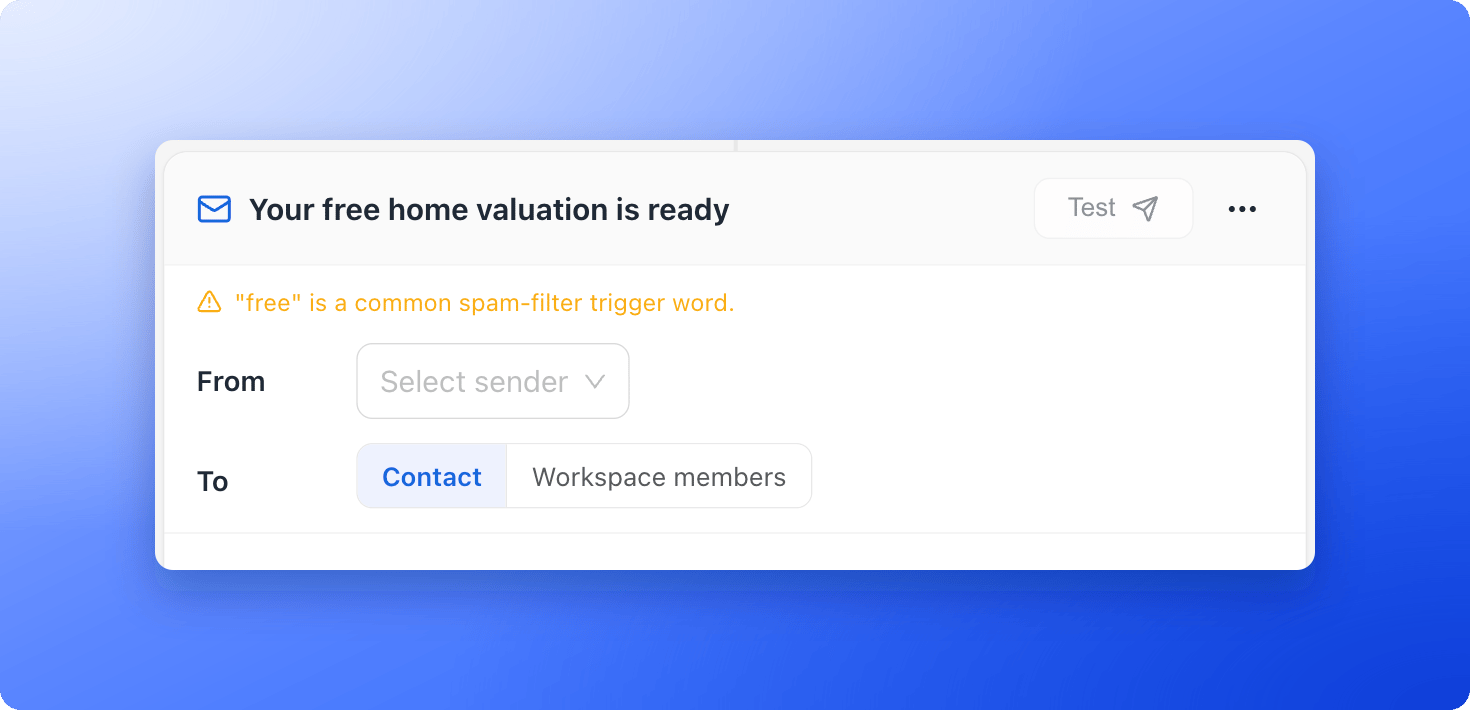 The warnings are only advice. They never block a test or a publish.
## Keep your list clean
* **Collect real addresses:** use the **Email** field in your lead form, which checks that an address looks valid. See [Lead capture forms](/funnels/lead-capture-forms).
* **Delete junk leads:** remove test and spam leads so you do not email them. See [Delete leads](/leads/delete-leads).
* **Watch your email results:** after a flow has sent, each email shows how many were **Delivered** and **Bounced**. A rising number of bounces means your list needs attention.
## What AskFunnel does for you
* **Unsubscribes, bounces and spam complaints are respected:** someone who unsubscribes, whose address permanently bounces or who marks an email as spam is skipped in future flows from that workspace.
* **Sending can pause to protect you:** if too many emails bounce or are marked as spam, AskFunnel pauses sending for the workspace. The workspace's admins get an **Email sending paused** notification that says whether bounces or spam complaints caused it, and leads show **Sending paused to protect deliverability** in their **Email flows** section. Emails are not lost: they are retried every few hours.
* **Every email includes the legal footer:** it has the signup and unsubscribe lines.
## Troubleshooting
Open the leads whose **Email flows** section shows **Bounced** or **Marked as spam**, then fix or delete those addresses. Review your subject lines and content against the tips above. Then email [support@askfunnel.com](mailto:support@askfunnel.com) and we will help you get sending again.
Check the optional records under **Recommended: improves inbox placement** in your sender's DNS window. Then review the subject line and the email for capital letters, spam words and too many links, and ask recipients to mark your emails as "not spam".
## What to do next
Build a flow with your verified sender.
Chat with leads who prefer WhatsApp.
Let leads pick a time with you.
Need help? Email [support@askfunnel.com](mailto:support@askfunnel.com).
The warnings are only advice. They never block a test or a publish.
## Keep your list clean
* **Collect real addresses:** use the **Email** field in your lead form, which checks that an address looks valid. See [Lead capture forms](/funnels/lead-capture-forms).
* **Delete junk leads:** remove test and spam leads so you do not email them. See [Delete leads](/leads/delete-leads).
* **Watch your email results:** after a flow has sent, each email shows how many were **Delivered** and **Bounced**. A rising number of bounces means your list needs attention.
## What AskFunnel does for you
* **Unsubscribes, bounces and spam complaints are respected:** someone who unsubscribes, whose address permanently bounces or who marks an email as spam is skipped in future flows from that workspace.
* **Sending can pause to protect you:** if too many emails bounce or are marked as spam, AskFunnel pauses sending for the workspace. The workspace's admins get an **Email sending paused** notification that says whether bounces or spam complaints caused it, and leads show **Sending paused to protect deliverability** in their **Email flows** section. Emails are not lost: they are retried every few hours.
* **Every email includes the legal footer:** it has the signup and unsubscribe lines.
## Troubleshooting
Open the leads whose **Email flows** section shows **Bounced** or **Marked as spam**, then fix or delete those addresses. Review your subject lines and content against the tips above. Then email [support@askfunnel.com](mailto:support@askfunnel.com) and we will help you get sending again.
Check the optional records under **Recommended: improves inbox placement** in your sender's DNS window. Then review the subject line and the email for capital letters, spam words and too many links, and ask recipients to mark your emails as "not spam".
## What to do next
Build a flow with your verified sender.
Chat with leads who prefer WhatsApp.
Let leads pick a time with you.
Need help? Email [support@askfunnel.com](mailto:support@askfunnel.com).