> ## Documentation Index
> Fetch the complete documentation index at: https://help.askfunnel.com/llms.txt
> Use this file to discover all available pages before exploring further.
# Show, hide and reorder lead fields
> Choose which fields appear as columns in your Leads table and in what order.
Fields are the columns of the table. AskFunnel builds most of them for you from your funnel, and you decide which ones to show.
**Before you start**, you need:
* A funnel with leads, and a role that can see them: Global Admin, Workspace Admin or Contacts Manager. See [View and manage your leads](/leads/view-and-manage-leads).
## Important to note
* Hiding a field only changes your view, in this browser. Teammates keep their own view, and the data is not deleted. A hidden field still appears in a lead's **Profile** tab.
* Exports follow your view. Hidden fields are left out of a [CSV or Excel export](/leads/export-contacts), so show a field first if you need it in the file.
## Show, hide and reorder fields
Click **Fields** in the toolbar above the table. A panel lists every field. Type in **Search fields** to find one.
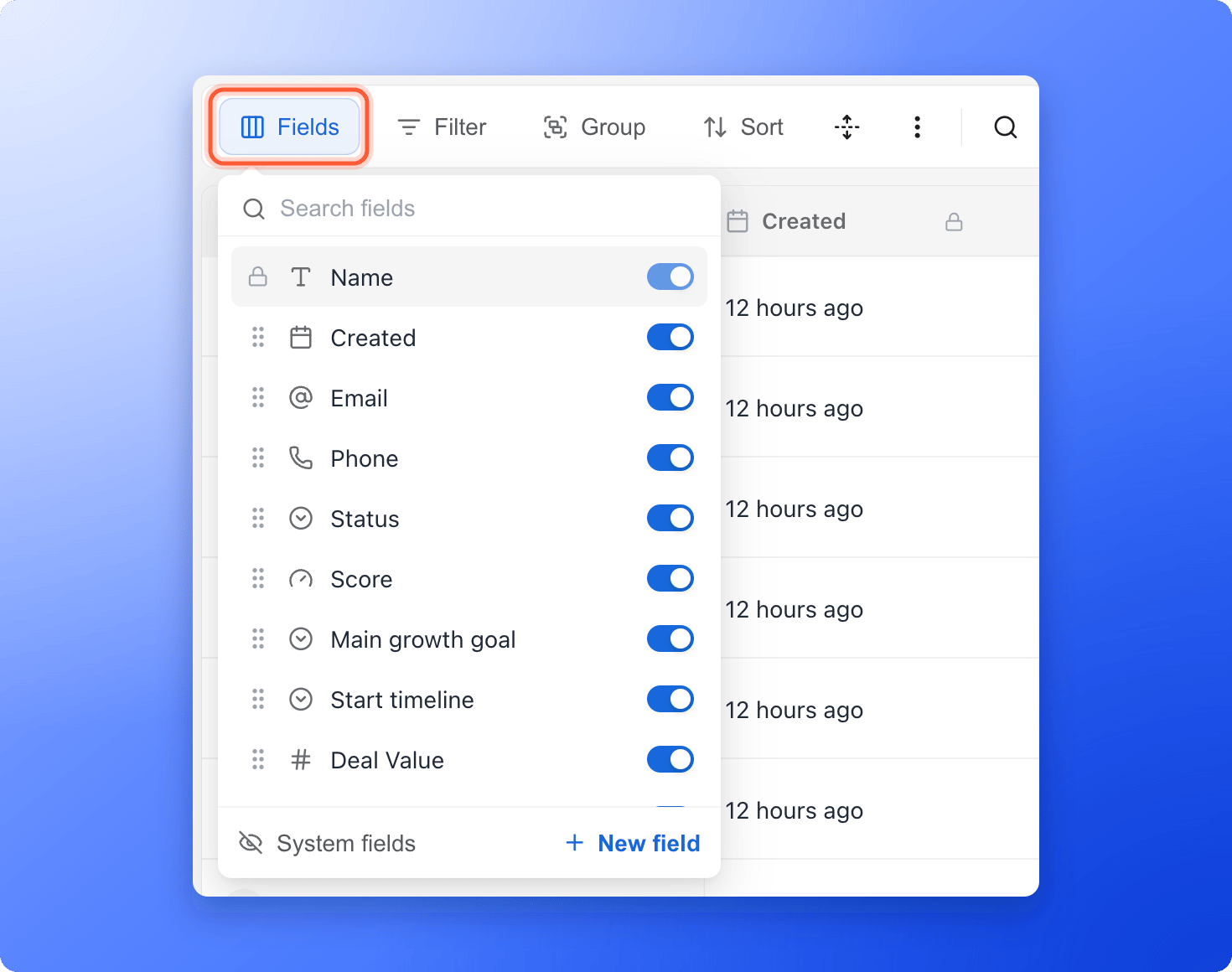 Use the switch next to a field to show or hide its column. The **Fields** button shows how many fields are hidden. **Name** is pinned to the left and always stays visible.
Drag a field by the six dots at its left to move its column. You can also drag the fields in a lead's **Profile** tab, and the table columns follow.
Click **System fields** at the bottom of the panel to show or hide the built-in fields (**Created**, **Status**, **Score** and **Updated**) in this list. To start over, click **View options** (three vertical dots), then **"Reset view"**.
## Use a column's menu
Hover over a column header and click the small arrow that appears to open the column's menu.
Use the switch next to a field to show or hide its column. The **Fields** button shows how many fields are hidden. **Name** is pinned to the left and always stays visible.
Drag a field by the six dots at its left to move its column. You can also drag the fields in a lead's **Profile** tab, and the table columns follow.
Click **System fields** at the bottom of the panel to show or hide the built-in fields (**Created**, **Status**, **Score** and **Updated**) in this list. To start over, click **View options** (three vertical dots), then **"Reset view"**.
## Use a column's menu
Hover over a column header and click the small arrow that appears to open the column's menu.
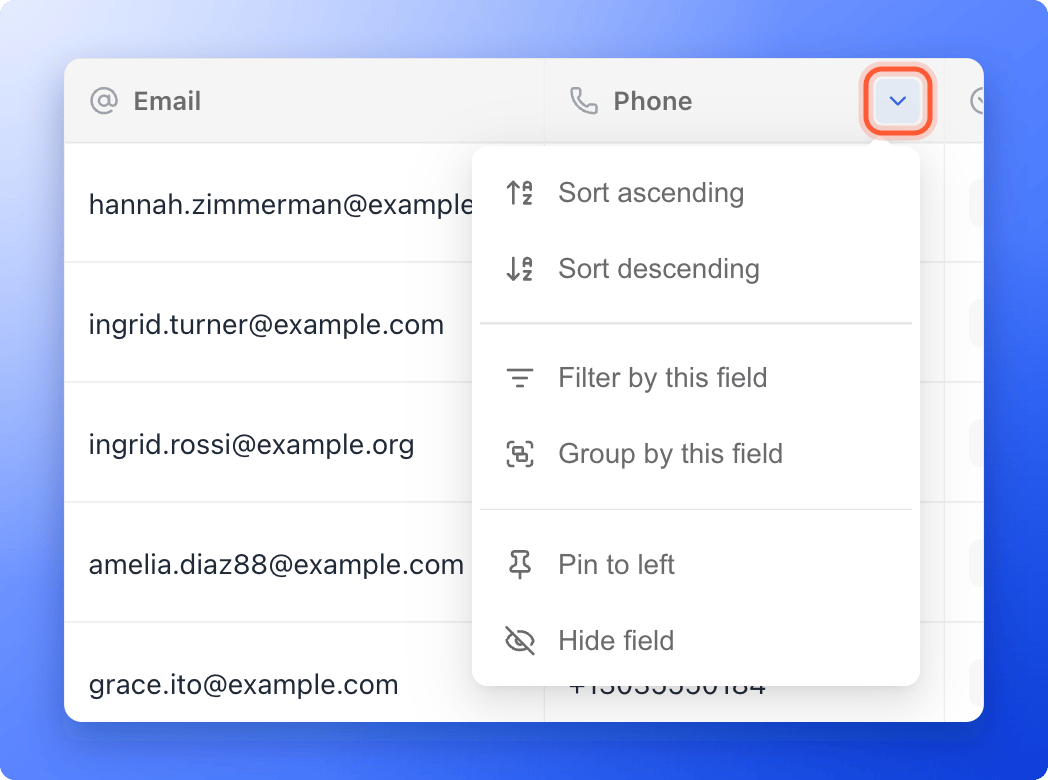 The menu has these options:
* **Sort ascending** and **Sort descending**
* **Filter by this field:** adds a filter for this field and opens the filter panel.
* **Group by this field** or **Remove grouping**
* **Pin to left** or **Unpin from left:** choose which column stays in view on the left. **Name** is pinned by default.
* **Hide field**
* **Edit field** and **Delete field:** only for fields you created yourself.
## Fields AskFunnel creates
A lock icon means a field is read only. **Created**, **Score**, **Updated** and **Appointment** are filled in by AskFunnel.
* **Contact fields:** **Name**, **Email** and **Phone**, taken from the matching fields in your lead form. If your form has a time field, you also get **Preferred time**.
* **One field for every question and form field** in your funnel. The field is named after the question or the form field's placeholder text, and it holds each lead's answer.
* **Built-in fields:** **Created**, **Status**, **Updated** and, when [lead scoring](/funnel-settings/lead-scoring) is on, **Score**. If a form on your funnel has booking turned on, you also get **Appointment**.
* **Fields added with your first lead:** **Assigned To**, **Tags** and **Deal Value**. **Deal Value** is what a lead is worth. It is used by Meta revenue tracking, so it cannot be deleted, but you can hide it.
* **Your own custom fields.** See [Create a custom field](/leads/custom-contact-fields).
If you later remove a question from your funnel, its column stays in the table with an **Archived** label. The answers already collected are kept, and new leads leave the column empty.
## What to do next
Add your own column for notes, budgets or internal IDs.
Download the columns you chose as a file.
Need help? Email [support@askfunnel.com](mailto:support@askfunnel.com).
The menu has these options:
* **Sort ascending** and **Sort descending**
* **Filter by this field:** adds a filter for this field and opens the filter panel.
* **Group by this field** or **Remove grouping**
* **Pin to left** or **Unpin from left:** choose which column stays in view on the left. **Name** is pinned by default.
* **Hide field**
* **Edit field** and **Delete field:** only for fields you created yourself.
## Fields AskFunnel creates
A lock icon means a field is read only. **Created**, **Score**, **Updated** and **Appointment** are filled in by AskFunnel.
* **Contact fields:** **Name**, **Email** and **Phone**, taken from the matching fields in your lead form. If your form has a time field, you also get **Preferred time**.
* **One field for every question and form field** in your funnel. The field is named after the question or the form field's placeholder text, and it holds each lead's answer.
* **Built-in fields:** **Created**, **Status**, **Updated** and, when [lead scoring](/funnel-settings/lead-scoring) is on, **Score**. If a form on your funnel has booking turned on, you also get **Appointment**.
* **Fields added with your first lead:** **Assigned To**, **Tags** and **Deal Value**. **Deal Value** is what a lead is worth. It is used by Meta revenue tracking, so it cannot be deleted, but you can hide it.
* **Your own custom fields.** See [Create a custom field](/leads/custom-contact-fields).
If you later remove a question from your funnel, its column stays in the table with an **Archived** label. The answers already collected are kept, and new leads leave the column empty.
## What to do next
Add your own column for notes, budgets or internal IDs.
Download the columns you chose as a file.
Need help? Email [support@askfunnel.com](mailto:support@askfunnel.com).