> ## Documentation Index
> Fetch the complete documentation index at: https://help.askfunnel.com/llms.txt
> Use this file to discover all available pages before exploring further.
# Read your webhook delivery log and send failed leads again
> See what happened to every lead sent to a webhook, read why a lead failed and send failed leads again once you fix the problem.
Available on: **the Growth plan and above**. Only Global Admins and Workspace Admins can open it.
Each webhook has a delivery log. It lists the leads AskFunnel sent to that webhook, whether the receiving tool accepted each one, and every attempt along the way. Use it to check that a lead arrived, to find out why one did not, and to send failed leads again after you fix the problem. A [webhook](/integrations/webhooks) is a web address that receives each new lead.
With the delivery log, you can:
* **Check a lead.** See whether it was **Delivered**, is still being retried, or **Failed**.
* **Read the reason.** Every failed lead shows what the receiving server answered.
* **See every attempt.** Open a lead to see the time and result of each try, and when the next one is planned.
* **Send leads again.** Retry one lead or all failed leads with one click.
**Before you start**, you need:
* A webhook added to a funnel. See [Send your leads to a webhook](/integrations/webhooks).
* A Workspace Admin or Global Admin role.
* The Growth plan or above to send leads again. Reading the log works on any plan.
## Important to note
* Only new leads are sent to a webhook, so the log starts with the first lead after you added it. Leads that arrived earlier, while the webhook was paused, or while your plan did not include webhooks are not in it and are not sent later.
* A lead you send again can reach your tool a second time. It arrives with the same ID, so your tool can ignore repeats. See [Retries and what counts as success](/integrations/webhook-reference#retries-and-what-counts-as-success).
* The log shows the last 30 days. Older entries disappear, and so does the chance to send them again.
* Every webhook has its own log. If a funnel has several webhooks, open the log of the one you care about.
## Open and read the log
1. From your main dashboard, find the funnel. Click the three small dots (**...**) on its row, then click **"Funnel Settings"**.
2. On the left side menu, click **"Integrations"**.
3. Under **Send leads to**, on the **Webhooks** card, click **"Settings"**.
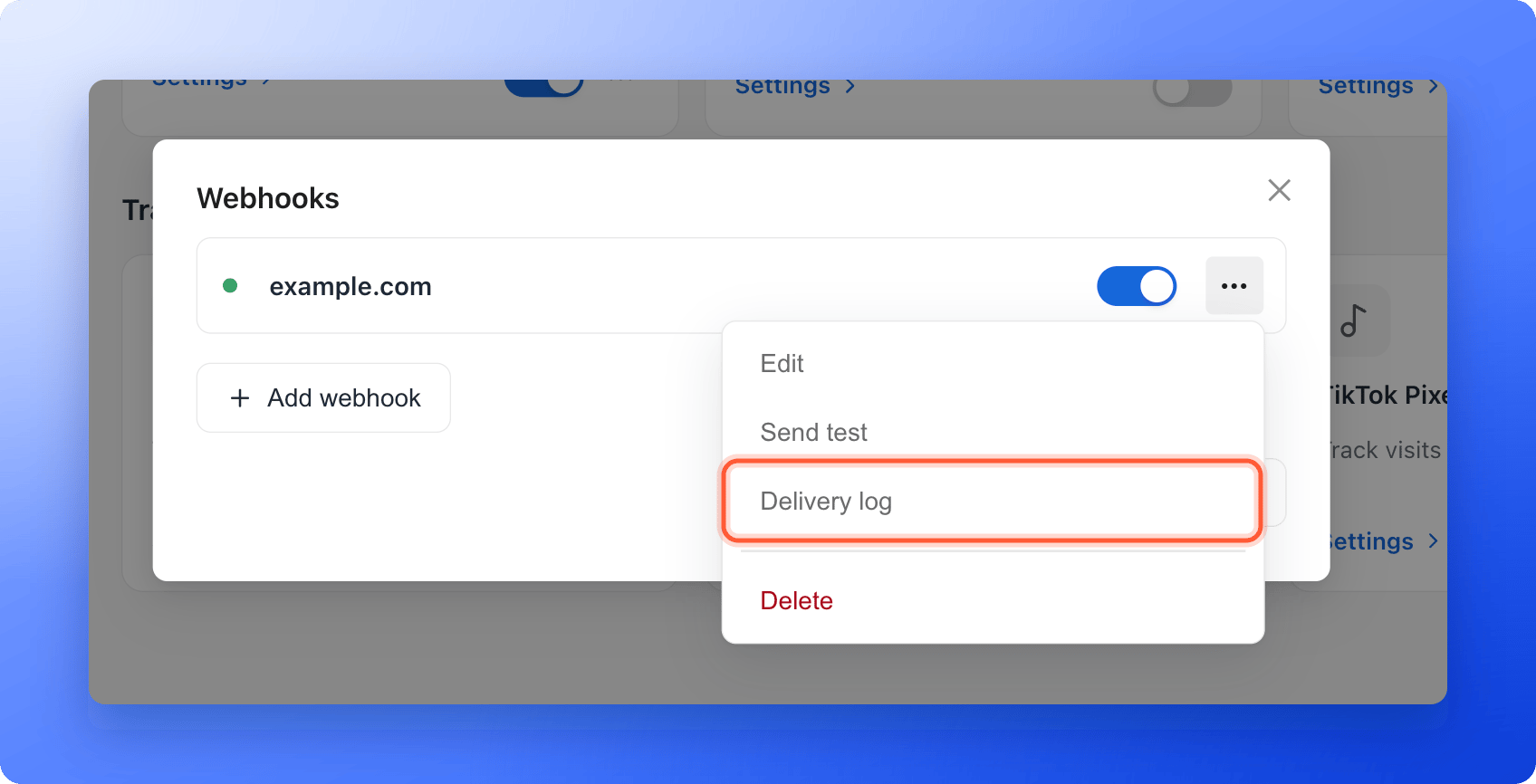
4. Click the three dots (**...**) on the webhook, then **"Delivery log"**. The window is titled **Delivery log** followed by the name of the webhook.
If a webhook shows **Needs attention**, click **"View delivery log"** under its name instead. To go back to your webhooks, click **"Webhooks"** at the top left of the log.
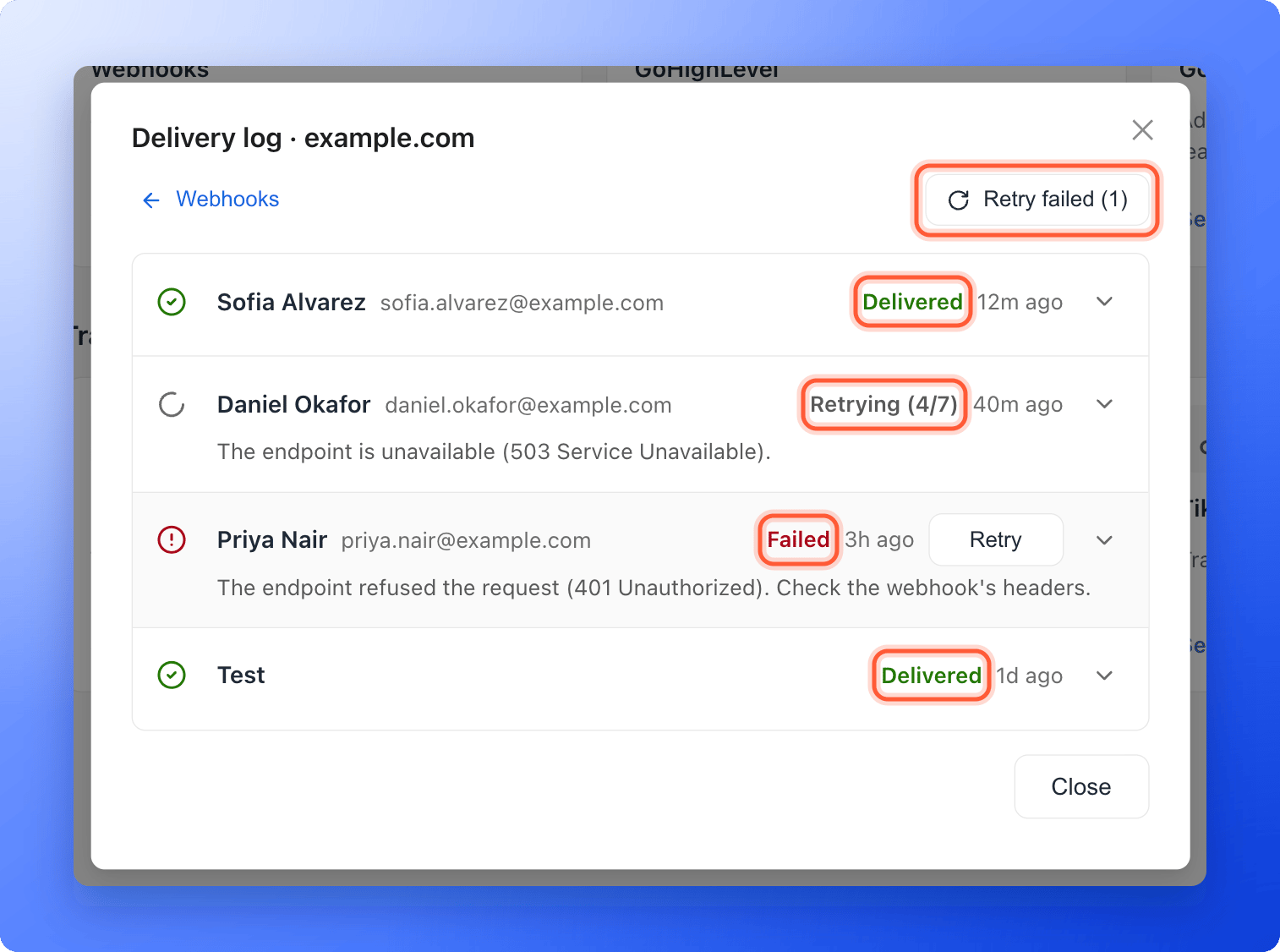
 Each row is one lead. From left to right you see:
* **The lead.** Their name and, next to it, their email or phone. Click the name to open the lead in a new tab. A lead you deleted shows as **Deleted lead**, and a test shows as **Test**.
* **The status.** See the table below.
* **The time** the lead was sent. Point at it to see the exact time.
* **"Retry"**, on failed leads.
* **An arrow** that opens the details of the lead.
A failed lead, or one being retried, shows the reason under its name.
Each row is one lead. From left to right you see:
* **The lead.** Their name and, next to it, their email or phone. Click the name to open the lead in a new tab. A lead you deleted shows as **Deleted lead**, and a test shows as **Test**.
* **The status.** See the table below.
* **The time** the lead was sent. Point at it to see the exact time.
* **"Retry"**, on failed leads.
* **An arrow** that opens the details of the lead.
A failed lead, or one being retried, shows the reason under its name.
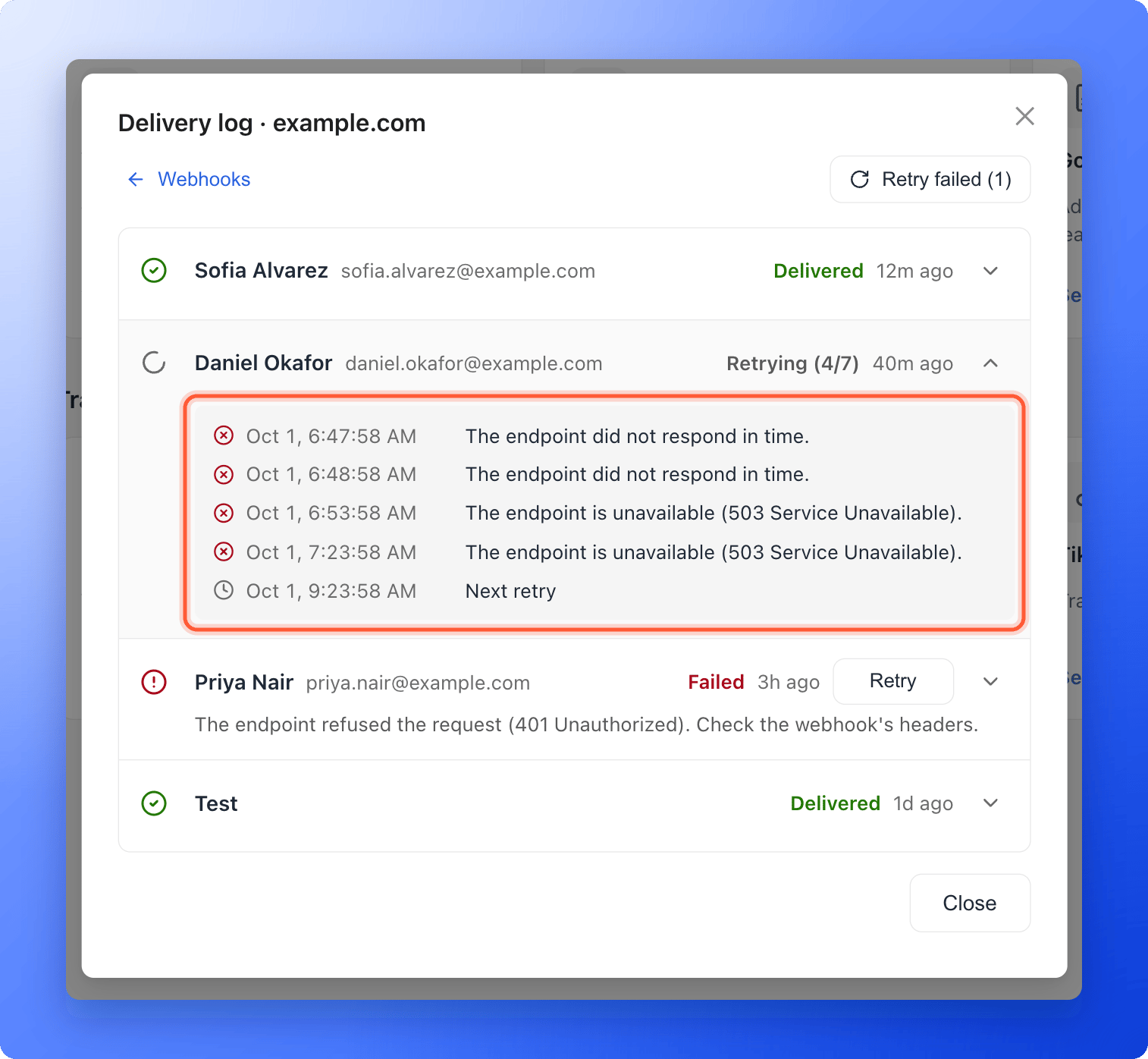
 Click the arrow at the right of a row. The lead opens to show one line per attempt, with the exact time and the result, for example **Delivered (200 OK).** or the reason it failed. If another try is planned, a last line shows **Next retry** and its time.
 ## What the statuses mean
| Status | What it means |
| - | - |
| **Queued** | The lead is waiting to be sent for the first time. |
| **Sending** | AskFunnel is sending it right now. |
| **Retrying (2/7)** | The last try failed, and AskFunnel will try again. The numbers show the try it is on and the most tries it will make. |
| **Delivered** | Your tool answered with a success code, so the lead counts as received. |
| **Failed** | AskFunnel stopped trying. Read the reason, fix it, then send the lead again. |
| **Test** | A sample lead sent with **Send test**. Tests cannot be retried. |
AskFunnel retries on its own, after 1 minute, 5 minutes, 30 minutes, 2 hours, 6 hours and 12 hours, for up to 7 tries in all and never after more than 72 hours. See [Retries and what counts as success](/integrations/webhook-reference#retries-and-what-counts-as-success) for what your server must answer.
## Fix a failed lead and send it again
Open the lead with the arrow, or read the reason under its name. The messages and their fixes are the same as for a failed test. See [Troubleshooting](/integrations/webhooks#troubleshooting).
Change what the reason points to: the webhook address, a header such as an API key, or your own server or automation. If you change the address or a header, click the webhook's name to open **"Edit webhook"** and click **"Save"**.
When you save a change to a webhook that needs attention, AskFunnel clears the warning and sends its failed leads again by itself.
Click the three dots (**...**) on the webhook, then **"Send test"**. When you see **Test delivered**, the webhook works again, and a failing webhook stops showing **Needs attention**.
Open the delivery log.
* To retry one lead, click **"Retry"** on its row. You see **Retrying 1 lead.**
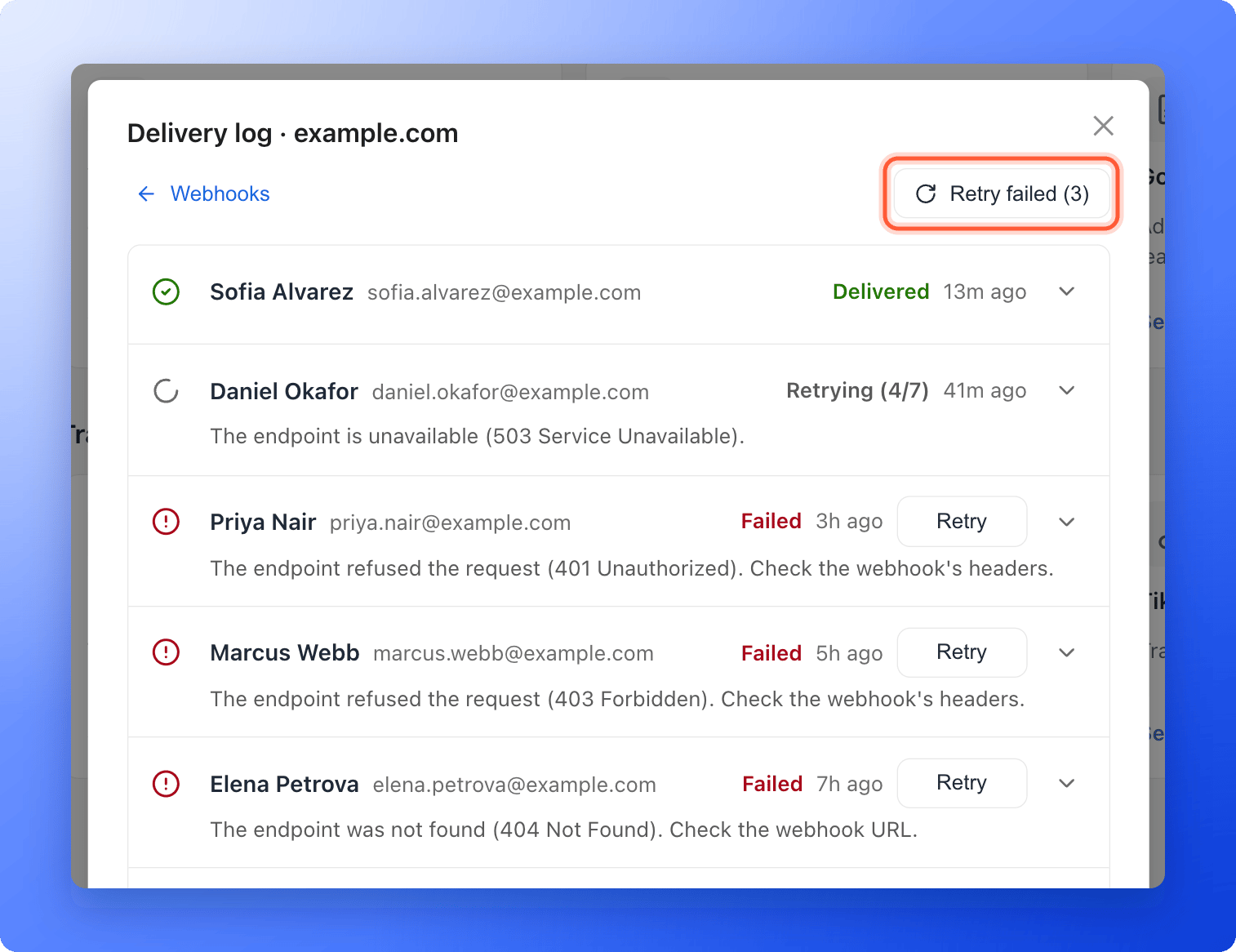
* To retry all failed leads, click **"Retry failed"** at the top right. The button shows how many, for example **Retry failed (3)**. A plus sign, such as **(20+)**, means more failed leads are further down the list. You see **Retrying 3 leads.** It sends up to 500 leads each time. If there is nothing to send, you see **There is nothing to retry.**
Each lead starts a fresh set of up to 7 tries.
## What the statuses mean
| Status | What it means |
| - | - |
| **Queued** | The lead is waiting to be sent for the first time. |
| **Sending** | AskFunnel is sending it right now. |
| **Retrying (2/7)** | The last try failed, and AskFunnel will try again. The numbers show the try it is on and the most tries it will make. |
| **Delivered** | Your tool answered with a success code, so the lead counts as received. |
| **Failed** | AskFunnel stopped trying. Read the reason, fix it, then send the lead again. |
| **Test** | A sample lead sent with **Send test**. Tests cannot be retried. |
AskFunnel retries on its own, after 1 minute, 5 minutes, 30 minutes, 2 hours, 6 hours and 12 hours, for up to 7 tries in all and never after more than 72 hours. See [Retries and what counts as success](/integrations/webhook-reference#retries-and-what-counts-as-success) for what your server must answer.
## Fix a failed lead and send it again
Open the lead with the arrow, or read the reason under its name. The messages and their fixes are the same as for a failed test. See [Troubleshooting](/integrations/webhooks#troubleshooting).
Change what the reason points to: the webhook address, a header such as an API key, or your own server or automation. If you change the address or a header, click the webhook's name to open **"Edit webhook"** and click **"Save"**.
When you save a change to a webhook that needs attention, AskFunnel clears the warning and sends its failed leads again by itself.
Click the three dots (**...**) on the webhook, then **"Send test"**. When you see **Test delivered**, the webhook works again, and a failing webhook stops showing **Needs attention**.
Open the delivery log.
* To retry one lead, click **"Retry"** on its row. You see **Retrying 1 lead.**
* To retry all failed leads, click **"Retry failed"** at the top right. The button shows how many, for example **Retry failed (3)**. A plus sign, such as **(20+)**, means more failed leads are further down the list. You see **Retrying 3 leads.** It sends up to 500 leads each time. If there is nothing to send, you see **There is nothing to retry.**
Each lead starts a fresh set of up to 7 tries.
 ## When you get an email about it
When a lead fails for good, the webhook shows **Needs attention** with the reason, and so does the **Webhooks** card. AskFunnel also emails the organization owner with the subject **An integration needs your attention**. It sends at most one email a day for each destination, and the email links to your integration settings. The warning goes away after the next delivered lead, a successful test or a saved fix.
## How do I know it is working?
* A new lead shows at the top of the log with **Delivered**, and its details say **Delivered (200 OK).** or another success code.
* The webhook in the list and its card show **On** or **Connected**, without **Needs attention**.
* The lead appears in your receiving tool, for example in your Zap's run history.
## Troubleshooting
No lead has arrived since you added the webhook. Click **"Send test"** to see a **Test** row. Real leads show up as soon as someone submits your live funnel.
Check that the webhook existed and was on when the lead arrived, that your plan included webhooks, and that the lead is not older than 30 days. A lead that is locked because you reached your monthly lead limit is never sent. See [What happens when you reach your monthly lead limit](/billing/monthly-lead-limit).
AskFunnel is waiting for the next planned try. Open the lead to read the reason and the time of **Next retry**. If you have already fixed the cause, you do not need to wait: click **"Retry"** once the lead shows **Failed**.
Sending leads again needs the Growth plan or above. Point at the button to see **Upgrade to Growth to send these leads again.** Test rows have no **Retry** button.
The lead was deleted, or it was too large to send (over 256 KB), so there is nothing left to send. Add the contact to your tool by hand if you still need it. Open the lead in your **Leads** tab and use [Export your leads](/leads/export-contacts) if you need the data.
AskFunnel delivers each lead at least once. A slow answer, or a click on **"Retry"**, can send the same lead again with the same ID. Ignore a lead whose ID you already handled.
The log loads 20 leads at a time. Click **"Load more"** at the bottom to see older ones, up to 30 days back.
## What to do next
Add a webhook, headers and a signing secret.
The request, the signature and the retry rules, for developers.
Where leads go, and what each integration tracks.
Need help? Email [support@askfunnel.com](mailto:support@askfunnel.com).
## When you get an email about it
When a lead fails for good, the webhook shows **Needs attention** with the reason, and so does the **Webhooks** card. AskFunnel also emails the organization owner with the subject **An integration needs your attention**. It sends at most one email a day for each destination, and the email links to your integration settings. The warning goes away after the next delivered lead, a successful test or a saved fix.
## How do I know it is working?
* A new lead shows at the top of the log with **Delivered**, and its details say **Delivered (200 OK).** or another success code.
* The webhook in the list and its card show **On** or **Connected**, without **Needs attention**.
* The lead appears in your receiving tool, for example in your Zap's run history.
## Troubleshooting
No lead has arrived since you added the webhook. Click **"Send test"** to see a **Test** row. Real leads show up as soon as someone submits your live funnel.
Check that the webhook existed and was on when the lead arrived, that your plan included webhooks, and that the lead is not older than 30 days. A lead that is locked because you reached your monthly lead limit is never sent. See [What happens when you reach your monthly lead limit](/billing/monthly-lead-limit).
AskFunnel is waiting for the next planned try. Open the lead to read the reason and the time of **Next retry**. If you have already fixed the cause, you do not need to wait: click **"Retry"** once the lead shows **Failed**.
Sending leads again needs the Growth plan or above. Point at the button to see **Upgrade to Growth to send these leads again.** Test rows have no **Retry** button.
The lead was deleted, or it was too large to send (over 256 KB), so there is nothing left to send. Add the contact to your tool by hand if you still need it. Open the lead in your **Leads** tab and use [Export your leads](/leads/export-contacts) if you need the data.
AskFunnel delivers each lead at least once. A slow answer, or a click on **"Retry"**, can send the same lead again with the same ID. Ignore a lead whose ID you already handled.
The log loads 20 leads at a time. Click **"Load more"** at the bottom to see older ones, up to 30 days back.
## What to do next
Add a webhook, headers and a signing secret.
The request, the signature and the retry rules, for developers.
Where leads go, and what each integration tracks.
Need help? Email [support@askfunnel.com](mailto:support@askfunnel.com).