> ## Documentation Index
> Fetch the complete documentation index at: https://help.askfunnel.com/llms.txt
> Use this file to discover all available pages before exploring further.
# Find and share your funnel link
> Publish your funnel, copy its link and share it on social media, messages and ads.
Publish your funnel, copy its link and share it anywhere you want to collect leads: your social media bio, a message to a client, or the landing page of an ad. When you publish a funnel, it goes live on its own web address.
Your link looks like this, with your workspace name first and a unique ending for each funnel:
`https://summit-realty.askfunnel.com/home-valuation-x7k2m9p4qa`
If you connected your own domain, the link starts with your domain instead. See [Connect your custom domain](/funnel-settings/custom-domain).
**Before you start**, you need:
* A funnel you have built. See [Launch your first funnel](/getting-started/launch-your-first-funnel).
* A verified email address. If yours is not verified, AskFunnel shows **Verify your email before publishing this funnel.** Verify it first.
## Important to note
* Only live funnels have a link that works. A funnel that shows **Draft** in your list is not public yet.
* Your plan sets how many funnels can be live at once. See [Choose a plan](/billing/choose-a-plan).
* Your link does not change when you rename the funnel or edit it. After you change a live funnel, click **"Publish Funnel"** again so people see the update.
## Publish your funnel and copy the link
In the builder, click **"Publish Funnel"** at the top right. You see **Your funnel is live.** You can also publish from your funnel list: click the three dots (**...**) at the end of the funnel's row, then click **"Publish Funnel"**.
Go to the **Funnels** page of your workspace. In the **Status** column, the funnel shows a green **Live** badge. Click the eye icon next to it (**View funnel**). Your live funnel opens in a new browser tab.
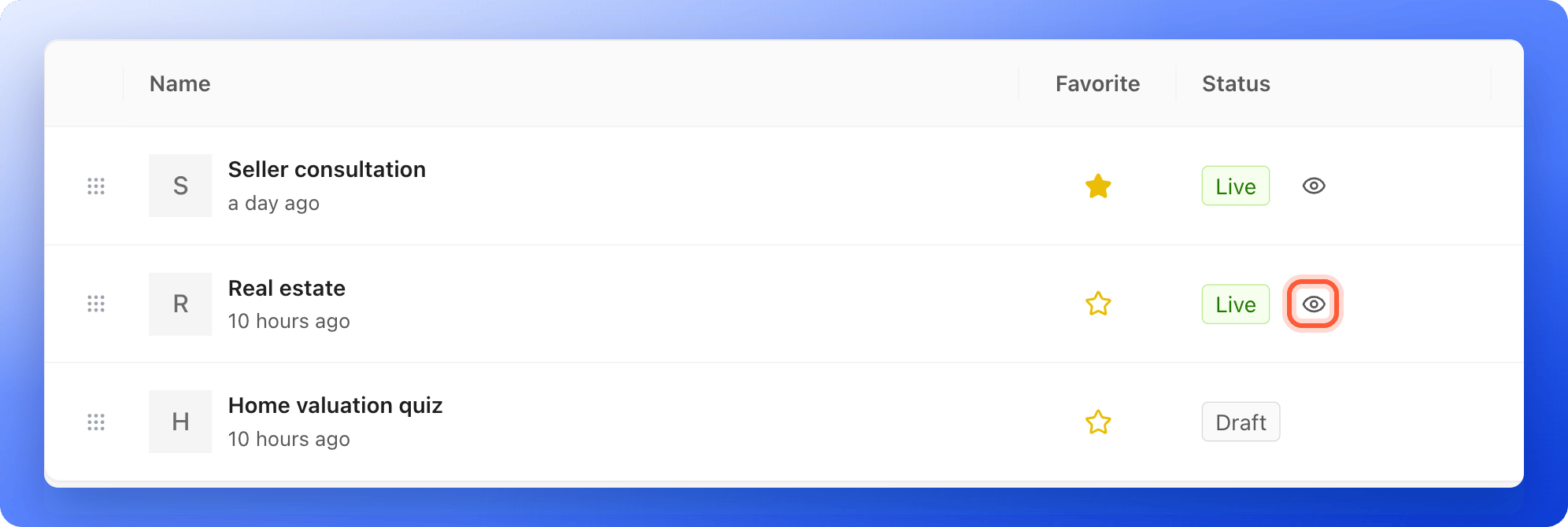 You can also click the three dots (**...**) on the funnel's row and choose **"View Funnel"**. In the builder, open the arrow next to **Publish Funnel** and choose **"View live"**.
Copy the web address from your browser's address bar.
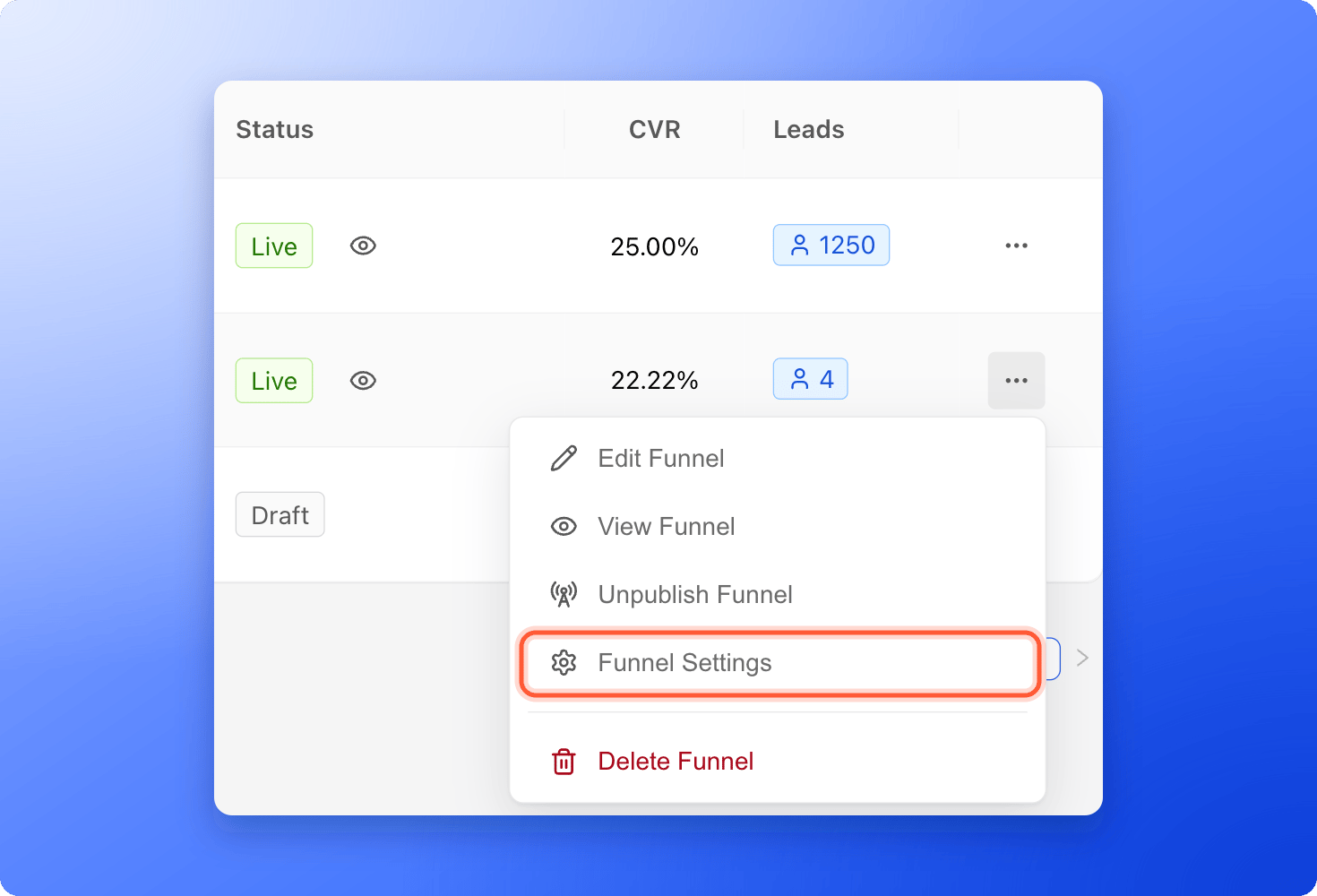
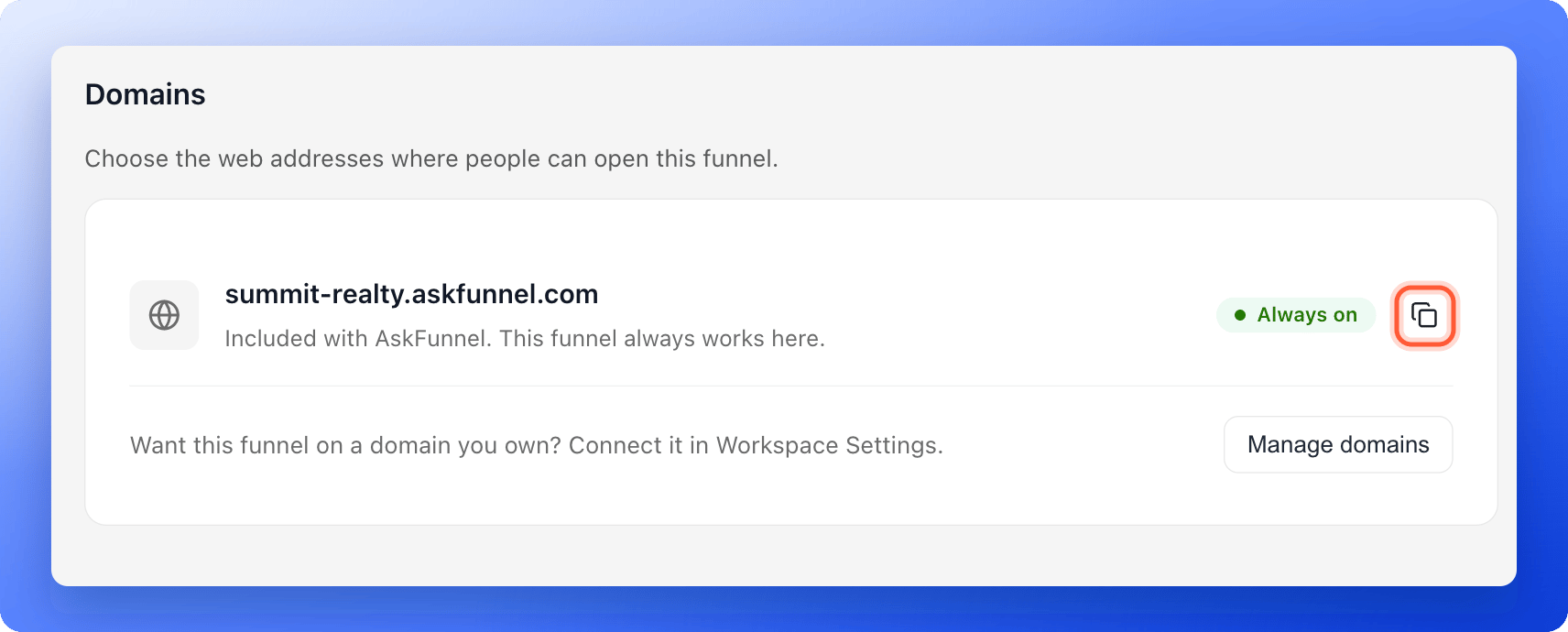
Or copy it without opening the funnel: on the funnel row, click the three dots (**...**), click **"Funnel Settings"**, then click **"Domains"** on the left. Click the copy icon next to the address. You see **Copied**.
You can also click the three dots (**...**) on the funnel's row and choose **"View Funnel"**. In the builder, open the arrow next to **Publish Funnel** and choose **"View live"**.
Copy the web address from your browser's address bar.
Or copy it without opening the funnel: on the funnel row, click the three dots (**...**), click **"Funnel Settings"**, then click **"Domains"** on the left. Click the copy icon next to the address. You see **Copied**.
 ## Where to use your link
* **Social media bios:** add it to your Instagram, TikTok or Facebook profile link.
* **Direct messages:** send it in WhatsApp, Messenger or email.
* **Paid ads:** use it as the destination of your ads.
- **Test it first:** open your live funnel, answer your own questions and submit the form before you send real traffic. See [Set up your lead capture form](/funnels/lead-capture-forms).
- **Track where leads come from:** add UTM parameters (short tags that show where a visit came from) to the end of your link, for example `?utm_source=instagram&utm_campaign=spring-open-house`. AskFunnel reads the UTM source, medium, campaign, term and content from the link.
- **Make it look good when shared:** set a title, a description and a preview image in [Social preview and favicon](/funnel-settings/social-preview-and-favicon).
## How do I know it is working?
* The **Status** column shows **Live** and the eye icon appears.
* Your link opens the funnel in a private browser window, where you are not signed in.
* If the **Live** badge has an orange dot next to it, you have changes that are not published yet. Click **"Publish Funnel"** in the builder to update the live version.
## Troubleshooting
They only show for live funnels. Publish your funnel first. If the row shows **Draft**, the funnel is not live.
In the builder, hover over the button to see why. It says **Make a change, then publish to go live.** for a funnel you have not changed yet, **No new changes to publish.** for a live funnel that is up to date, and **Exit preview to make changes.** when you are viewing an older version. In your funnel list, the **Publish Funnel** menu item is grayed out until your email is verified.
Your plan sets how many funnels can be live at once. Take another funnel offline, or click **"Upgrade plan"**. See [Upgrade your plan](/billing/upgrade).
Click **"Publish Funnel"** again in the builder. Your edits only go live when you publish. Give it a minute, then refresh your live page.
**"Funnel Settings"** is available to Global Admins, Workspace Admins and Content Editors. The three dots menu is hidden for Contacts Managers. You can still open the eye icon link to copy the link.
## Take your funnel offline
Click the three dots (**...**) on the funnel's row and click **"Unpublish Funnel"**. Or, in the builder, open the arrow next to **Publish Funnel** and click **"Unpublish"**, then confirm with **"Take offline"**. People cannot see the funnel until you publish it again. Your earlier versions are kept.
## What to do next
Put your funnels on your own web address.
Choose the title and picture people see when they share your link.
See every lead with its answers.
Connect a pixel to see which ads bring leads.
Need help? Email [support@askfunnel.com](mailto:support@askfunnel.com).
## Where to use your link
* **Social media bios:** add it to your Instagram, TikTok or Facebook profile link.
* **Direct messages:** send it in WhatsApp, Messenger or email.
* **Paid ads:** use it as the destination of your ads.
- **Test it first:** open your live funnel, answer your own questions and submit the form before you send real traffic. See [Set up your lead capture form](/funnels/lead-capture-forms).
- **Track where leads come from:** add UTM parameters (short tags that show where a visit came from) to the end of your link, for example `?utm_source=instagram&utm_campaign=spring-open-house`. AskFunnel reads the UTM source, medium, campaign, term and content from the link.
- **Make it look good when shared:** set a title, a description and a preview image in [Social preview and favicon](/funnel-settings/social-preview-and-favicon).
## How do I know it is working?
* The **Status** column shows **Live** and the eye icon appears.
* Your link opens the funnel in a private browser window, where you are not signed in.
* If the **Live** badge has an orange dot next to it, you have changes that are not published yet. Click **"Publish Funnel"** in the builder to update the live version.
## Troubleshooting
They only show for live funnels. Publish your funnel first. If the row shows **Draft**, the funnel is not live.
In the builder, hover over the button to see why. It says **Make a change, then publish to go live.** for a funnel you have not changed yet, **No new changes to publish.** for a live funnel that is up to date, and **Exit preview to make changes.** when you are viewing an older version. In your funnel list, the **Publish Funnel** menu item is grayed out until your email is verified.
Your plan sets how many funnels can be live at once. Take another funnel offline, or click **"Upgrade plan"**. See [Upgrade your plan](/billing/upgrade).
Click **"Publish Funnel"** again in the builder. Your edits only go live when you publish. Give it a minute, then refresh your live page.
**"Funnel Settings"** is available to Global Admins, Workspace Admins and Content Editors. The three dots menu is hidden for Contacts Managers. You can still open the eye icon link to copy the link.
## Take your funnel offline
Click the three dots (**...**) on the funnel's row and click **"Unpublish Funnel"**. Or, in the builder, open the arrow next to **Publish Funnel** and click **"Unpublish"**, then confirm with **"Take offline"**. People cannot see the funnel until you publish it again. Your earlier versions are kept.
## What to do next
Put your funnels on your own web address.
Choose the title and picture people see when they share your link.
See every lead with its answers.
Connect a pixel to see which ads bring leads.
Need help? Email [support@askfunnel.com](mailto:support@askfunnel.com).