> ## Documentation Index
> Fetch the complete documentation index at: https://help.askfunnel.com/llms.txt
> Use this file to discover all available pages before exploring further.
# Personalize your funnel text with variables
> Insert the visitor's name, an earlier answer or a campaign tag into your headlines and text, with a fallback when it is missing.
Personal words get attention. With a variable, a headline can say "Thanks, Sofia, we will call you tomorrow" or "Your Facebook offer" instead of the same words for everyone. A variable is a small placeholder in your text, such as **@Name**. On your live funnel, AskFunnel swaps it for the real value for each visitor. If the value is missing, AskFunnel shows a fallback text that you choose, so a sentence never has a hole in it.
With variables, you can:
* **Use the visitor's details.** Insert the name, email or phone they typed into your form earlier.
* **Repeat an earlier answer.** For example "You said you want to **Buy a home**. Here is how we help" after a quiz question.
* **Match your ad.** Insert a campaign tag from the link the visitor clicked, such as the UTM source or campaign.
* **Use your own link tags.** Create a custom tag, such as `ps_city`, and fill it from the link.
**Before you start**, you need:
* A funnel open in the builder. See [Launch your first funnel](/getting-started/launch-your-first-funnel).
* A role that can edit funnels: Global Admin, Workspace Admin or Content Editor.
* For details from your form or quiz, the form field or question must already exist in the funnel, and the text must sit on a later page than the one the visitor answers it on.
## Important to note
* Variables work in **Text** blocks (headlines and text) and in the question of a quiz. They do not work in button labels or in answer options.
* A visitor's answer is only known after they give it. Put a variable on a page after the page that asks the question, for example "Thanks, **@Name**" on your thank you screen.
* Always choose a good fallback, such as "there" for a name. Visitors who skip a question, or who open your link without the tag, see the fallback.
* Only the five UTM tags and tags that start with `ps_` can come from a link. Other parameters in a link are ignored.
* A value is always shown as plain text, so nothing a visitor types can change how your page looks or runs.
## Insert a variable
In the builder, click the headline or text where the variable should go. The text toolbar appears above it. Quiz questions work the same way.
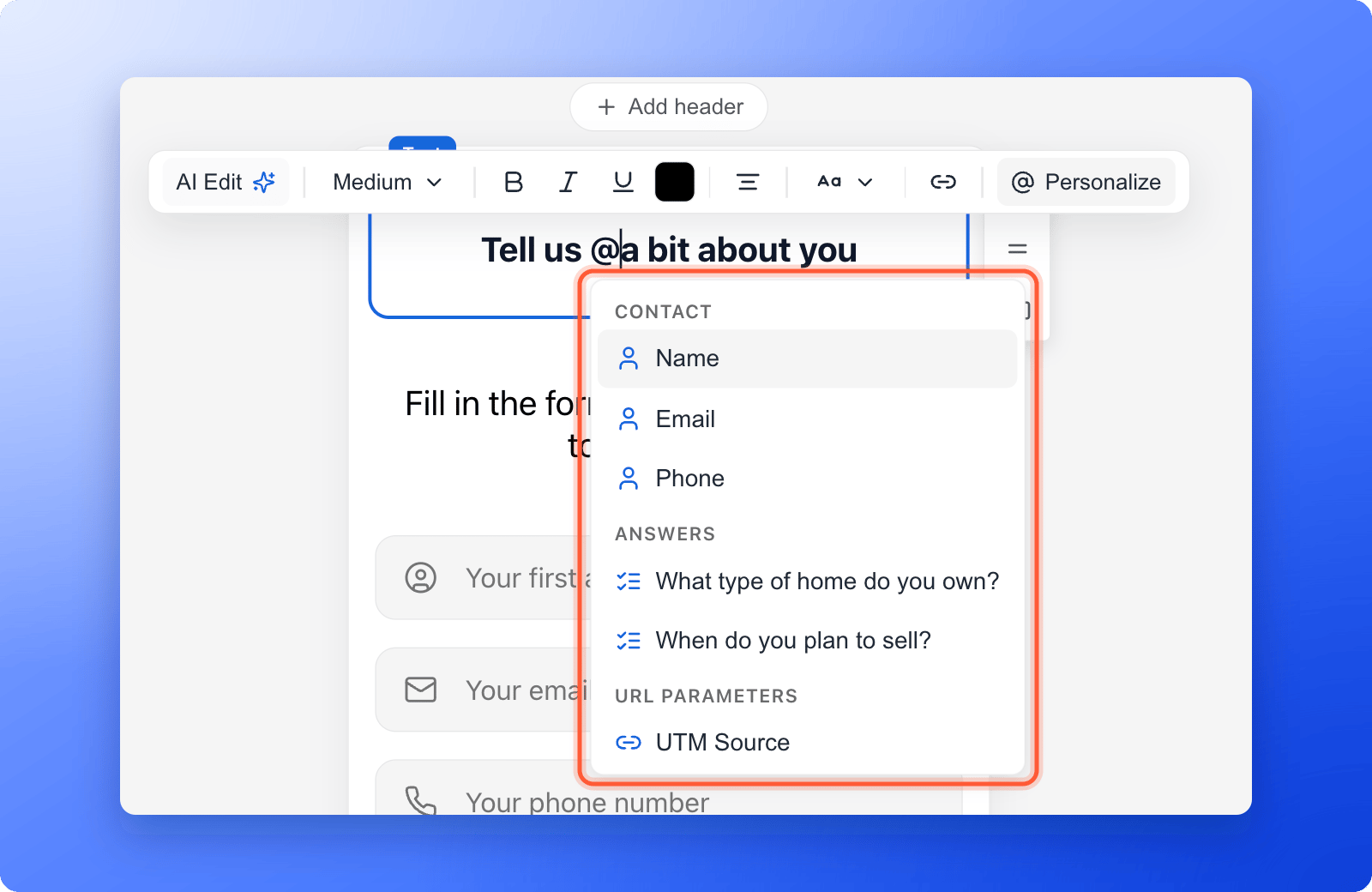
Type **@** where you want the variable, or click **"Personalize"** in the toolbar. A list opens. It has these groups:
* **Contact:** the details from your form, such as **Name**, **Email** and **Phone**, and any other contact field.
* **Answers:** your quiz questions and the other fields of your form.
* **URL parameters:** **UTM Source**, **UTM Medium**, **UTM Campaign**, **UTM Term** and **UTM Content**, from the link the visitor opened.
Keep typing after the @ to narrow the list. If two fields have the same name, a small label next to each helps you tell them apart.
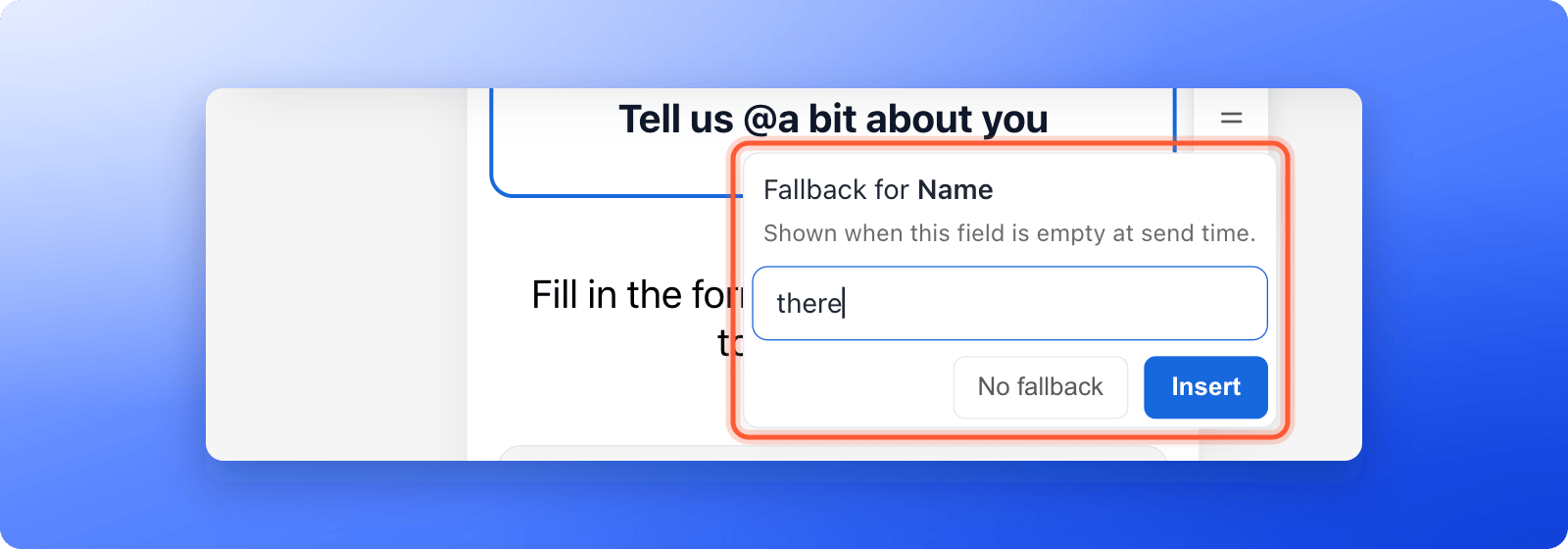
 Click a detail. A small box asks **Fallback for** and the name of the detail, with the hint that the fallback is shown when the field is empty. Type the words to show instead, for example "there", then click **"Insert"**. For a name, AskFunnel suggests "there". Click **"No fallback"** to show nothing when the value is missing.
The variable appears in your text as a pill, such as **@Name**.
Click a detail. A small box asks **Fallback for** and the name of the detail, with the hint that the fallback is shown when the field is empty. Type the words to show instead, for example "there", then click **"Insert"**. For a name, AskFunnel suggests "there". Click **"No fallback"** to show nothing when the value is missing.
The variable appears in your text as a pill, such as **@Name**.
 To use a tag that is not a UTM tag, click **Create custom URL parameter** at the bottom of the list.
1. Type a name, for example "city". AskFunnel shows what it will look for in your link, here `ps_city`. Letters, numbers, underscores and hyphens are kept.
2. Type a fallback. It is required for a custom tag.
3. Click **"Insert"**.
Then add the tag to the end of your funnel link, for example `https://summit-realty.askfunnel.com/home-valuation-x7k2m9p4qa?ps_city=Austin`. The visitor sees "Austin". See [Track campaigns with UTM links](/analytics/utm-tracking) for how to build links.
Click **"Publish Funnel"**, then open your live funnel. Test the real value and the fallback: go through your funnel and give your details, then open the link again in a private window and skip the question. See [Publish, unpublish and restore an earlier version](/funnels/publish-and-restore).
## What each group shows
* **Contact** shows what the visitor typed into your form, for example their name. It is empty until they have filled in the form, and the details are forgotten if the visitor reloads the page.
* **Answers** shows the visitor's answer to a quiz question or a form field on an earlier page, as text. Quiz answers are remembered on the visitor's device, so they still work after a reload. Details typed into a form field are not.
* **URL parameters** shows the value from the link the visitor opened. AskFunnel remembers it for the whole visit, so it still works on later pages even though the address of those pages has no tags. It is forgotten when the visitor closes the browser tab.
Do not put personal details, such as an email address, in link tags. Links are copied, shared and saved by other tools, and anyone who sees the link sees the tag.
## How do I know it is working?
* In the builder, the variable shows as a pill with an at sign, such as **@Name**. This is normal. The real value only appears on the live funnel.
* On your live funnel, the pill is replaced by the visitor's value, or by your fallback.
* For a UTM variable, open your link with the tag, for example `?utm_source=facebook`, and check that the text shows **facebook**.
## Troubleshooting
Click inside a **Text** block or a quiz question first, so you see the cursor in the text. Variables are not available in button labels, answers or other fields. Then type **@**, or click **"Personalize"**.
The value was not known yet. Check that the variable is on a page after the question or form it comes from. For a link tag, check that your link really has the tag, with the exact name, and that a link shortener or an app did not cut it off. The visitor must open your funnel through the tagged link. If they open the plain funnel address, there is no tag to read.
**Answers** lists the quiz questions and form fields that are in this funnel. Add the question first, then try again. If you see **No matching fields**, clear what you typed after the @.
The link must carry the same name with the `ps_` start, for example `?ps_city=Austin`. A tag without `ps_`, such as `?city=Austin`, is ignored.
Click just after the pill in the text and press the backspace key.
Yes. Emails have their own @ list, which offers contact fields and answers. See [Send automated emails to new leads](/messages/automated-emails).
## What to do next
Build links with tags that you can use as variables.
Keep the tags when a button opens another page.
Thank visitors by name after they submit.
Need help? Email [support@askfunnel.com](mailto:support@askfunnel.com).
To use a tag that is not a UTM tag, click **Create custom URL parameter** at the bottom of the list.
1. Type a name, for example "city". AskFunnel shows what it will look for in your link, here `ps_city`. Letters, numbers, underscores and hyphens are kept.
2. Type a fallback. It is required for a custom tag.
3. Click **"Insert"**.
Then add the tag to the end of your funnel link, for example `https://summit-realty.askfunnel.com/home-valuation-x7k2m9p4qa?ps_city=Austin`. The visitor sees "Austin". See [Track campaigns with UTM links](/analytics/utm-tracking) for how to build links.
Click **"Publish Funnel"**, then open your live funnel. Test the real value and the fallback: go through your funnel and give your details, then open the link again in a private window and skip the question. See [Publish, unpublish and restore an earlier version](/funnels/publish-and-restore).
## What each group shows
* **Contact** shows what the visitor typed into your form, for example their name. It is empty until they have filled in the form, and the details are forgotten if the visitor reloads the page.
* **Answers** shows the visitor's answer to a quiz question or a form field on an earlier page, as text. Quiz answers are remembered on the visitor's device, so they still work after a reload. Details typed into a form field are not.
* **URL parameters** shows the value from the link the visitor opened. AskFunnel remembers it for the whole visit, so it still works on later pages even though the address of those pages has no tags. It is forgotten when the visitor closes the browser tab.
Do not put personal details, such as an email address, in link tags. Links are copied, shared and saved by other tools, and anyone who sees the link sees the tag.
## How do I know it is working?
* In the builder, the variable shows as a pill with an at sign, such as **@Name**. This is normal. The real value only appears on the live funnel.
* On your live funnel, the pill is replaced by the visitor's value, or by your fallback.
* For a UTM variable, open your link with the tag, for example `?utm_source=facebook`, and check that the text shows **facebook**.
## Troubleshooting
Click inside a **Text** block or a quiz question first, so you see the cursor in the text. Variables are not available in button labels, answers or other fields. Then type **@**, or click **"Personalize"**.
The value was not known yet. Check that the variable is on a page after the question or form it comes from. For a link tag, check that your link really has the tag, with the exact name, and that a link shortener or an app did not cut it off. The visitor must open your funnel through the tagged link. If they open the plain funnel address, there is no tag to read.
**Answers** lists the quiz questions and form fields that are in this funnel. Add the question first, then try again. If you see **No matching fields**, clear what you typed after the @.
The link must carry the same name with the `ps_` start, for example `?ps_city=Austin`. A tag without `ps_`, such as `?city=Austin`, is ignored.
Click just after the pill in the text and press the backspace key.
Yes. Emails have their own @ list, which offers contact fields and answers. See [Send automated emails to new leads](/messages/automated-emails).
## What to do next
Build links with tags that you can use as variables.
Keep the tags when a button opens another page.
Thank visitors by name after they submit.
Need help? Email [support@askfunnel.com](mailto:support@askfunnel.com).