> ## Documentation Index
> Fetch the complete documentation index at: https://help.askfunnel.com/llms.txt
> Use this file to discover all available pages before exploring further.
# Link buttons and images to a page, a section, a web address, an email or a phone number
> Use Action Flow to send visitors to another page, scroll to a section, open a web address, write an email or start a phone call.
A button or a picture in your funnel can do something when visitors click it. It can take them to the next page, jump to a page you choose, scroll down to a section, open another website, start an email or start a phone call. You set this up in the **Action Flow** section of the block.
With Action Flow, you can:
* **Move visitors through your funnel.** Send them to the next page, or to any page or result page.
* **Scroll to a section.** For example, a button at the top that jumps down to your reviews.
* **Open a web address.** For example your booking page, your main website or a WhatsApp chat link, in the same tab or a new one.
* **Start an email or a call.** An email link opens the visitor's mail app, and a phone link starts a call on a phone.
**Before you start**, you need:
* A funnel open in the builder with a **Button** or an **Image** on a page. To add a button, click the **"Content"** tab, then **"Blocks"**, and under **Core Components** click **"Button"**. To add a picture, see [Add images, video, icons and emojis](/funnels/images-video-icons).
* A role that can edit funnels: Global Admin, Workspace Admin or Content Editor.
## Important to note
* A new button or image has **Action Flow** turned off. A button on its own does nothing when clicked, and a picture is not a link, until you turn it on.
* Links do nothing inside the builder, so your clicks can select blocks. Test them on your live funnel.
* The submit button of a form is different. The form decides where visitors go after they submit. See [Set up your lead capture form](/funnels/lead-capture-forms).
* A web address must start with http, https, mailto or tel, or be a plain address such as example.com. Anything else, for example an address that starts with javascript, is refused and the click does nothing.
* There is no WhatsApp button. A WhatsApp chat link works like any other web address, so paste it as an **External URL**.
## Choose where a button or image goes
1. Click the button or the image on the canvas.
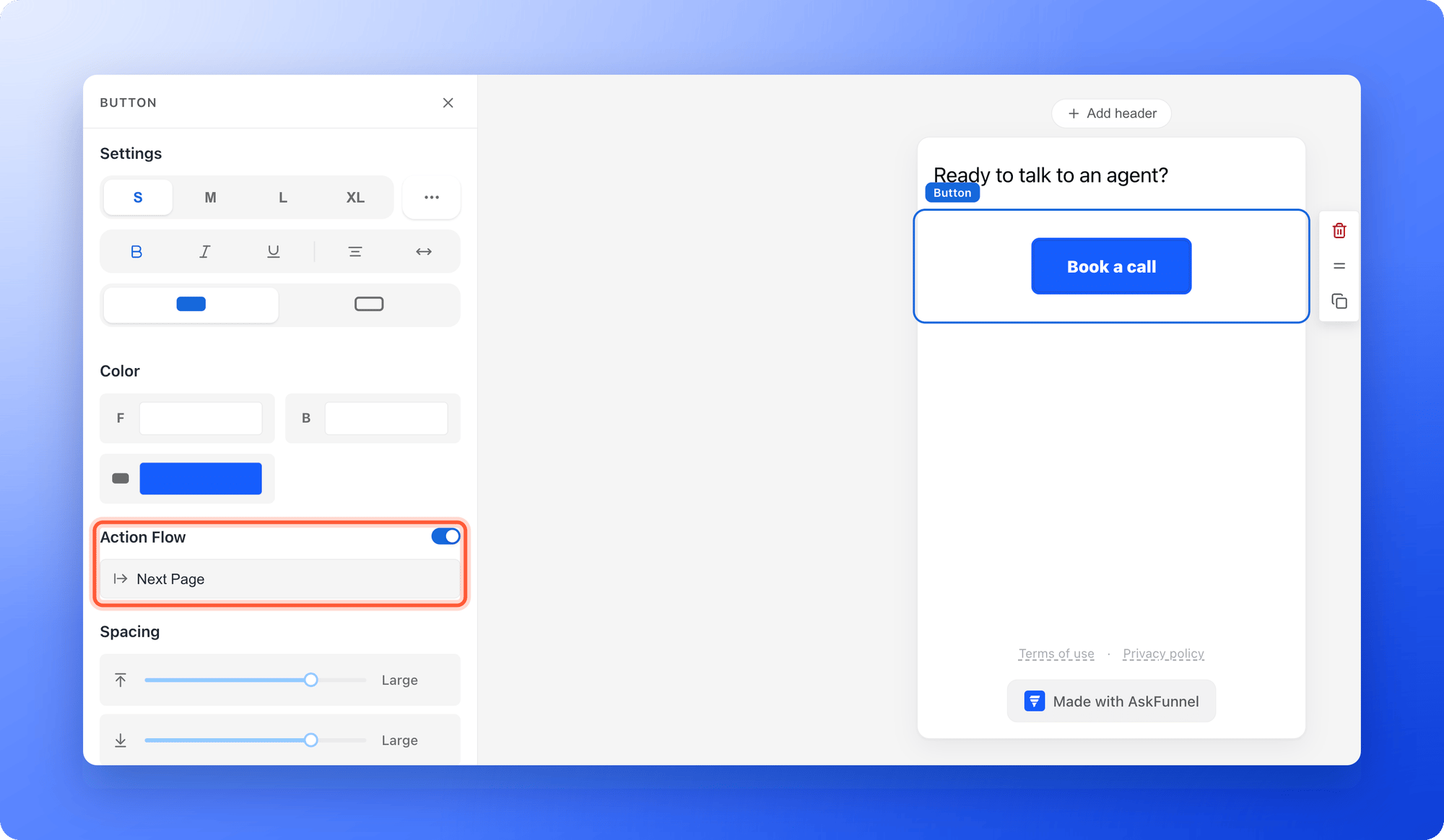
2. In the left panel, find **Action Flow** and turn on its switch.
3. A row appears that shows the destination, which starts as **Next Page**. Click that row. The **Action Flow** window opens.
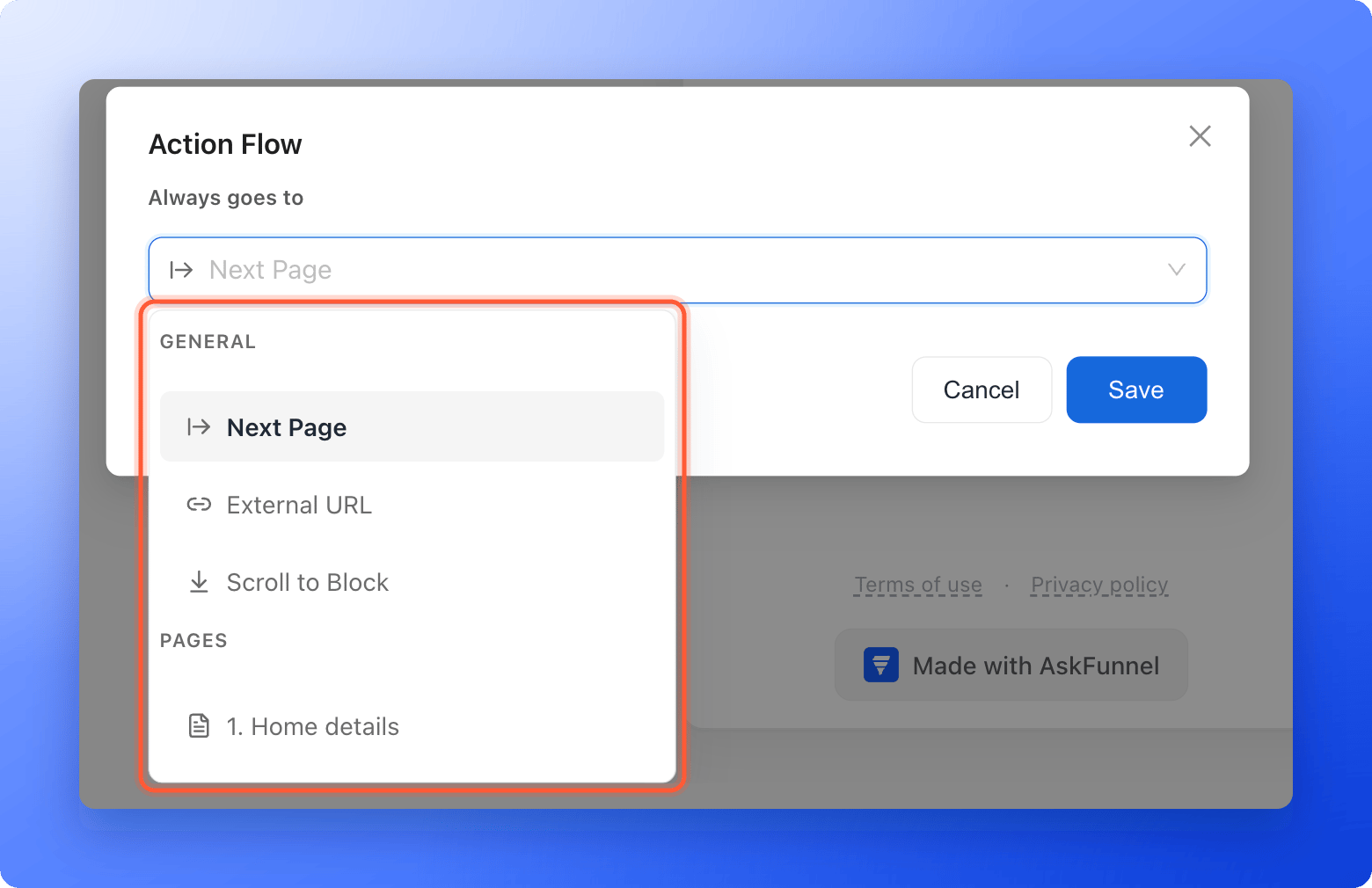
 Open the **Always goes to** list. It has two groups:
* **General:** **Next Page**, **External URL** and **Scroll to Block**.
* **Pages:** your pages, numbered 1, 2 and so on, and your result pages, marked with a flag and lettered A, B and so on.
Open the **Always goes to** list. It has two groups:
* **General:** **Next Page**, **External URL** and **Scroll to Block**.
* **Pages:** your pages, numbered 1, 2 and so on, and your result pages, marked with a flag and lettered A, B and so on.
 * **Next Page:** nothing more to do. Visitors go to the page after this one in your page list.
* **A page or result:** nothing more to do. Visitors go to that page.
* **External URL:** type the address in the box, for example `https://summitrealtygroup.com/book`. If you type example.com, AskFunnel adds https\:// when you click away. To open the link in a new browser tab, tick **Open link in new tab**.
* **Scroll to Block:** in **Select block to scroll to**, search for the block and click it. Each block shows its type and the first words of its text.
* **Next Page:** nothing more to do. Visitors go to the page after this one in your page list.
* **A page or result:** nothing more to do. Visitors go to that page.
* **External URL:** type the address in the box, for example `https://summitrealtygroup.com/book`. If you type example.com, AskFunnel adds https\:// when you click away. To open the link in a new browser tab, tick **Open link in new tab**.
* **Scroll to Block:** in **Select block to scroll to**, search for the block and click it. Each block shows its type and the first words of its text.
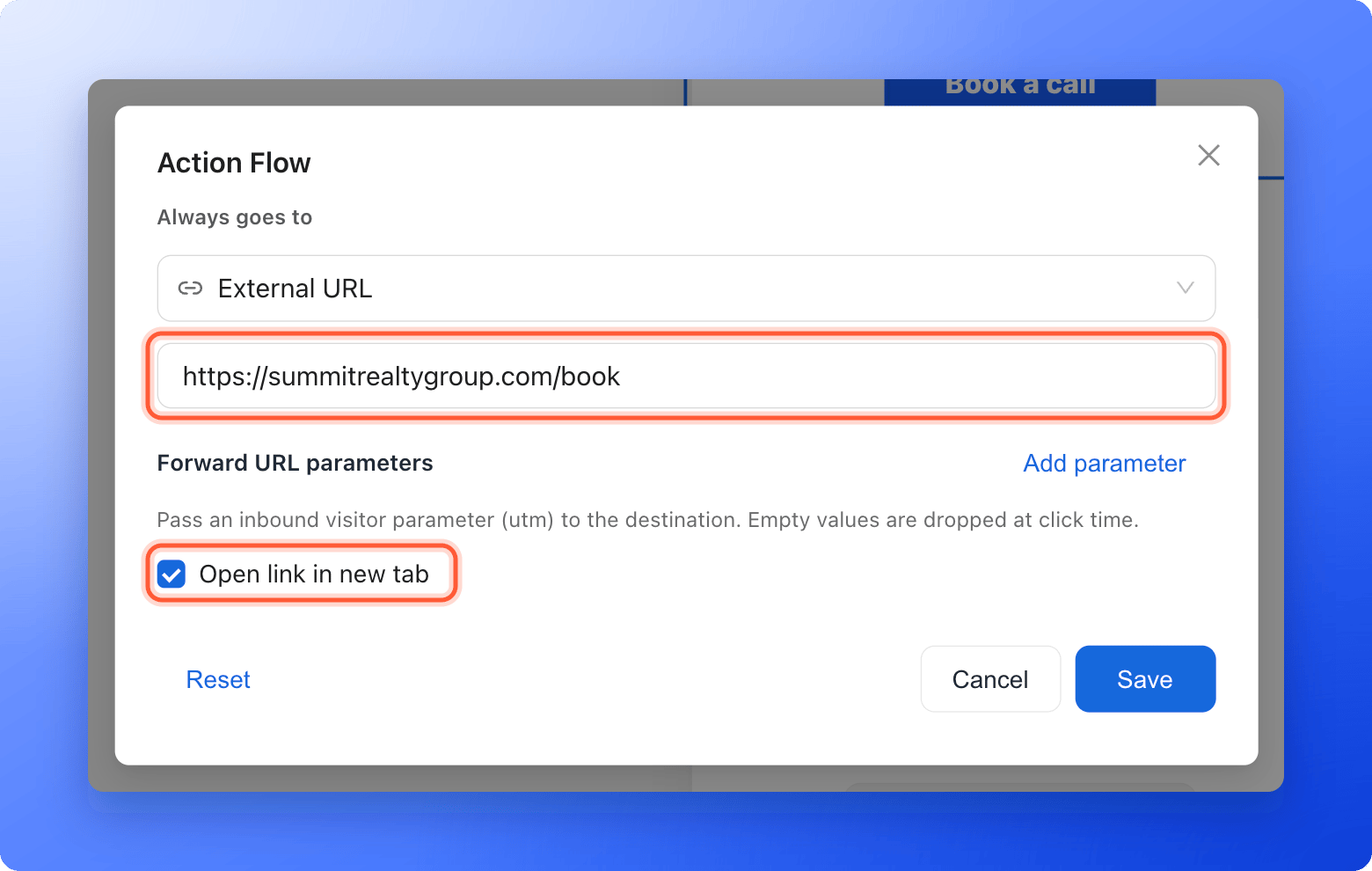 Click **"Save"**. To go back to the default, click **"Reset"** in the window. It shows when **External URL** is chosen.
Then click **"Publish Funnel"**, open the arrow next to it and click **"View live"**, and click your button or picture. See [Publish, unpublish and restore an earlier version](/funnels/publish-and-restore).
## Links to an email, a phone number or WhatsApp
Choose **External URL** and type the whole address, including the word at the start:
| You want | Type this | Example |
| - | - | - |
| A web page | The web address. | `https://summitrealtygroup.com/book` |
| A new email | `mailto:` and the email address, with nothing in between. | `mailto:info@summitrealtygroup.com` |
| A phone call | `tel:` and the number with its country code. | `tel:+12015550142` |
| A WhatsApp chat | Your WhatsApp chat link. It is a normal web address. | The link WhatsApp gives you for your number |
Email and phone links work best on a phone or on a computer that has a mail or calling app. Keep **Open link in new tab** off for these, because they do not open a web page.
To link a few words inside a text, select the words, click the link icon in the toolbar that appears above the text, and type the address when asked. Buttons and pictures use Action Flow as described above.
## How do I know it is working?
* Under **Action Flow**, the row shows where the block goes: **Next Page**, **External URL**, **Scroll to Block** or the name of a page.
* On your live funnel, clicking the button or picture takes you to the right place, opens the right web address, scrolls to the block, or opens a new email or call.
## Troubleshooting
Check that the **Action Flow** switch is on. In the builder, links never run, so test on your live funnel. For **External URL**, check that the address is filled in and starts with https\://, http\://, mailto: or tel:. An empty address or an unsafe one does nothing.
Click the row under **Action Flow** and check **Always goes to**. **Next Page** means the page after this one in your page list, so reordering your pages changes it. If the page you chose was deleted, the button goes to the next page instead. See [Manage your funnel pages](/funnels/manage-pages).
The address may be missing https\://. AskFunnel adds it when you click out of the box, so check that the box shows the full address, and publish again.
Choose a block on the same page as the button. The list also shows blocks from your other pages, but the link only scrolls. It does not take visitors to another page first. To send visitors to another page, choose that page under **Pages** instead.
Click the picture and turn on **Action Flow** in the left panel. Videos and icons have no Action Flow. Add a button next to them instead.
Use the **Forward URL parameters** setting under **External URL**. See [Pass UTM and custom URL parameters on to another page](/funnels/forward-url-parameters).
## What to do next
Keep your campaign tags when a button opens another page.
Let the answer to a question decide where visitors go.
Add, rename and reorder your pages.
Need help? Email [support@askfunnel.com](mailto:support@askfunnel.com).
Click **"Save"**. To go back to the default, click **"Reset"** in the window. It shows when **External URL** is chosen.
Then click **"Publish Funnel"**, open the arrow next to it and click **"View live"**, and click your button or picture. See [Publish, unpublish and restore an earlier version](/funnels/publish-and-restore).
## Links to an email, a phone number or WhatsApp
Choose **External URL** and type the whole address, including the word at the start:
| You want | Type this | Example |
| - | - | - |
| A web page | The web address. | `https://summitrealtygroup.com/book` |
| A new email | `mailto:` and the email address, with nothing in between. | `mailto:info@summitrealtygroup.com` |
| A phone call | `tel:` and the number with its country code. | `tel:+12015550142` |
| A WhatsApp chat | Your WhatsApp chat link. It is a normal web address. | The link WhatsApp gives you for your number |
Email and phone links work best on a phone or on a computer that has a mail or calling app. Keep **Open link in new tab** off for these, because they do not open a web page.
To link a few words inside a text, select the words, click the link icon in the toolbar that appears above the text, and type the address when asked. Buttons and pictures use Action Flow as described above.
## How do I know it is working?
* Under **Action Flow**, the row shows where the block goes: **Next Page**, **External URL**, **Scroll to Block** or the name of a page.
* On your live funnel, clicking the button or picture takes you to the right place, opens the right web address, scrolls to the block, or opens a new email or call.
## Troubleshooting
Check that the **Action Flow** switch is on. In the builder, links never run, so test on your live funnel. For **External URL**, check that the address is filled in and starts with https\://, http\://, mailto: or tel:. An empty address or an unsafe one does nothing.
Click the row under **Action Flow** and check **Always goes to**. **Next Page** means the page after this one in your page list, so reordering your pages changes it. If the page you chose was deleted, the button goes to the next page instead. See [Manage your funnel pages](/funnels/manage-pages).
The address may be missing https\://. AskFunnel adds it when you click out of the box, so check that the box shows the full address, and publish again.
Choose a block on the same page as the button. The list also shows blocks from your other pages, but the link only scrolls. It does not take visitors to another page first. To send visitors to another page, choose that page under **Pages** instead.
Click the picture and turn on **Action Flow** in the left panel. Videos and icons have no Action Flow. Add a button next to them instead.
Use the **Forward URL parameters** setting under **External URL**. See [Pass UTM and custom URL parameters on to another page](/funnels/forward-url-parameters).
## What to do next
Keep your campaign tags when a button opens another page.
Let the answer to a question decide where visitors go.
Add, rename and reorder your pages.
Need help? Email [support@askfunnel.com](mailto:support@askfunnel.com).