> ## Documentation Index
> Fetch the complete documentation index at: https://help.askfunnel.com/llms.txt
> Use this file to discover all available pages before exploring further.
# Pass UTM and custom URL parameters on to another page
> Keep your campaign tags when a button, image or form sends visitors to a booking page or another website.
Say your ad link has campaign tags and a button in your funnel sends visitors to a booking page on another website. Without help, that page never learns which ad the visitor came from. With **Forward URL parameters**, AskFunnel adds the tags from the visitor's link to the address the button opens, so the other page, or the tool behind it, can read them.
A URL parameter is a piece added to the end of a web address after a question mark, such as `?utm_source=facebook`. UTM parameters are five standard tags (source, medium, campaign, term and content) that show where a visit came from.
With forwarding, you can:
* **Keep your tags.** Pass the UTM source, medium, campaign, term and content on to the next page.
* **Pass your own tags.** Forward custom tags that start with `ps_`, for example `ps_agent`.
* **Name the parameters your way.** Choose the name the other page expects, such as `src` instead of `utm_source`.
* **Use it in several places.** It works for a button, a clickable image, the page a form sends visitors to, and a loading screen that redirects.
**Before you start**, you need:
* A funnel open in the builder, with a button or another block that opens a web address. See [Link buttons and images](/funnels/link-buttons-and-images).
* The address of the page that should receive the tags.
* Links to your funnel that carry the tags. See [Track campaigns with UTM links](/analytics/utm-tracking).
* A role that can edit funnels: Global Admin, Workspace Admin or Content Editor.
## Important to note
* Only the five UTM tags and tags that start with `ps_` can be forwarded. A visitor's answers, name, email and phone are never added to the address.
* A tag is only forwarded if the visitor arrived with it. If a tag is missing, that part is left out of the address instead of being sent empty.
* Tags are only added after the question mark of your address. Tags typed in the path or the domain part are left as they are.
* The tags are kept for one visit, in the visitor's browser tab. They are forgotten when the tab is closed. A visitor who later opens your funnel without the tags has nothing to forward.
* Forwarding does nothing in the builder. Test it on your live funnel.
## Forward tags to another page
1. Click the button, then turn on **Action Flow** in the left panel and click the row under it.
2. In the **Action Flow** window, open **Always goes to** and choose **External URL**.
3. Type the address of the page that should receive the visitor, for example `https://booking.summitrealtygroup.com/valuation`.
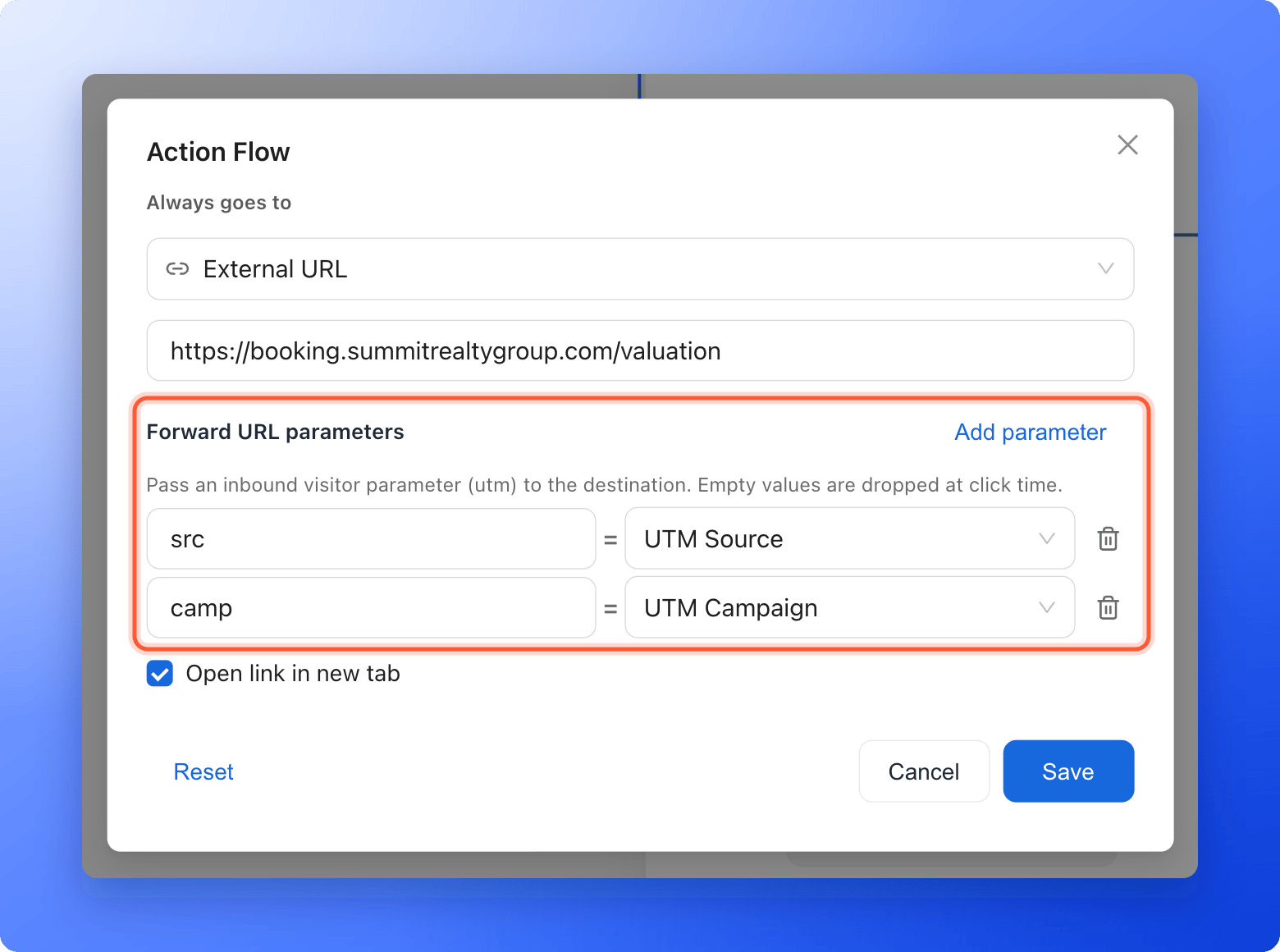
Under the address box, next to **Forward URL parameters**, click **"Add parameter"**. A row appears with a box for the parameter name, an equals sign and a list of tags.
1. In **Parameter name**, type the name that the other page expects, for example `src`.
2. In the list, choose the tag to put there: **UTM Source**, **UTM Medium**, **UTM Campaign**, **UTM Term** or **UTM Content**.
3. Click **"Add parameter"** again for each tag you want to forward. To remove a row, click the trash icon at its right.
The hint under the heading reminds you that empty values are dropped when the visitor clicks.
 Custom tags start with `ps_`. To forward one, type it into the address as a value that starts with an at sign, for example `https://booking.summitrealtygroup.com/valuation?agent=@ps_agent`. The visitor's link then needs `?ps_agent=maria`.
You can type the standard tags the same way instead of using the rows, for example `?src=@utm_source&camp=@utm_campaign`. The rows are only a guided way to write the same thing.
1. Click **"Save"**, then **"Publish Funnel"**.
2. Open your live funnel through a tagged link, for example `https://summit-realty.askfunnel.com/home-valuation-x7k2m9p4qa?utm_source=facebook&utm_campaign=spring_open_house`.
3. Click the button and look at the address of the page that opens.
It should look like `https://booking.summitrealtygroup.com/valuation?src=facebook&camp=spring_open_house`.
## How do I know it is working?
* After the click, the address bar of the next page shows your parameters with the values from the visitor's link.
* A tag the visitor did not have is not in the address at all.
* Special characters and spaces in a value are shown in an encoded form, for example `%20` for a space. This is normal and the other page reads them as the original text.
## Troubleshooting
Check these, in order:
* You opened your funnel through a link that has the tags, for example `?utm_source=facebook`. Link shorteners and some apps cut the tags off, so test the exact link you use in your ad.
* You tested on your live funnel, not in the builder.
* **Always goes to** is set to **External URL**, and each row has a **Parameter name** and a tag.
* You published again after saving.
**Parameter name** is the name the other page expects, so it must match exactly, including capital letters. Check what that tool or page asks for.
This is not possible. Only the five UTM tags and tags that start with `ps_` can be forwarded.
The tag must start with `ps_` in the visitor's link, for example `?ps_agent=maria`, and with the same name in your address after the at sign, `@ps_agent`. Other names are ignored.
AskFunnel remembers the tags for the visit, so a button on page 3 still forwards them. They are lost if the visitor closes the tab, or opens the funnel again later through a link without tags.
Forwarding only changes the address of the button. Your leads keep their own source, medium and campaign. See [See where a lead came from](/analytics/lead-insights).
## What to do next
Build the tagged links your ads and emails use.
Show a campaign tag or a name inside your headlines.
All the places a button or image can go.
Need help? Email [support@askfunnel.com](mailto:support@askfunnel.com).
Custom tags start with `ps_`. To forward one, type it into the address as a value that starts with an at sign, for example `https://booking.summitrealtygroup.com/valuation?agent=@ps_agent`. The visitor's link then needs `?ps_agent=maria`.
You can type the standard tags the same way instead of using the rows, for example `?src=@utm_source&camp=@utm_campaign`. The rows are only a guided way to write the same thing.
1. Click **"Save"**, then **"Publish Funnel"**.
2. Open your live funnel through a tagged link, for example `https://summit-realty.askfunnel.com/home-valuation-x7k2m9p4qa?utm_source=facebook&utm_campaign=spring_open_house`.
3. Click the button and look at the address of the page that opens.
It should look like `https://booking.summitrealtygroup.com/valuation?src=facebook&camp=spring_open_house`.
## How do I know it is working?
* After the click, the address bar of the next page shows your parameters with the values from the visitor's link.
* A tag the visitor did not have is not in the address at all.
* Special characters and spaces in a value are shown in an encoded form, for example `%20` for a space. This is normal and the other page reads them as the original text.
## Troubleshooting
Check these, in order:
* You opened your funnel through a link that has the tags, for example `?utm_source=facebook`. Link shorteners and some apps cut the tags off, so test the exact link you use in your ad.
* You tested on your live funnel, not in the builder.
* **Always goes to** is set to **External URL**, and each row has a **Parameter name** and a tag.
* You published again after saving.
**Parameter name** is the name the other page expects, so it must match exactly, including capital letters. Check what that tool or page asks for.
This is not possible. Only the five UTM tags and tags that start with `ps_` can be forwarded.
The tag must start with `ps_` in the visitor's link, for example `?ps_agent=maria`, and with the same name in your address after the at sign, `@ps_agent`. Other names are ignored.
AskFunnel remembers the tags for the visit, so a button on page 3 still forwards them. They are lost if the visitor closes the tab, or opens the funnel again later through a link without tags.
Forwarding only changes the address of the button. Your leads keep their own source, medium and campaign. See [See where a lead came from](/analytics/lead-insights).
## What to do next
Build the tagged links your ads and emails use.
Show a campaign tag or a name inside your headlines.
All the places a button or image can go.
Need help? Email [support@askfunnel.com](mailto:support@askfunnel.com).