> ## Documentation Index
> Fetch the complete documentation index at: https://help.askfunnel.com/llms.txt
> Use this file to discover all available pages before exploring further.
# Choose the right funnel format and goal
> Pick between a full funnel, a landing page with a form or a quiz with a form, and choose the goal that fits your offer.
Available on: **all plans** (Starter, Growth, Scale and Enterprise). Building with AI uses AI credits.
Two choices shape every funnel that AI builds for you. The **format** is the path a visitor takes. The **goal** is what you want them to do at the end. This page helps you choose both, in plain terms. The steps of the builder itself are in [Create a funnel with AI](/funnels/create-funnel-with-ai).
With the right choices, you can:
* **Match the funnel to your visitors.** Some people need to be warmed up. Others are ready to act.
* **Ask the right questions.** The goal decides what the quiz tries to find out.
* **Get a form that fits.** The goal decides what the form's button and your thank you screen say.
**Before you start**, you need:
* A rough idea of who your visitors are and where they come from, such as a cold ad, a message from a client or your email list.
* One sentence about what you want a visitor to do.
## The three formats
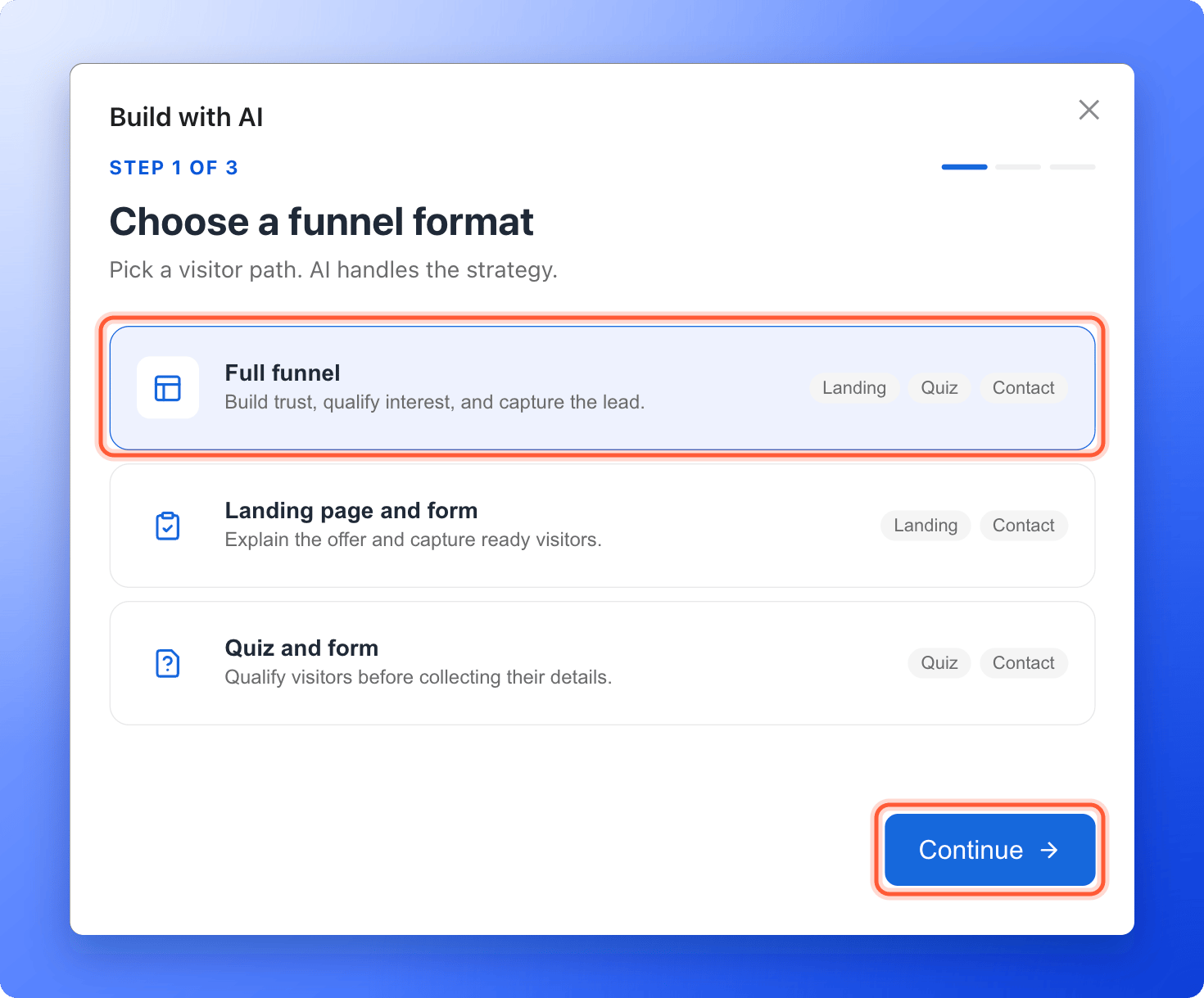 | Format | What the visitor sees | Choose it when |
| - | - | - |
| **Full funnel** | A **Welcome** page that explains your offer, then 4 to 6 quiz questions, then a contact form, then your thank you screen. | Visitors do not know you yet, for example people who click a cold ad. You need to explain, build trust and find out who is serious. |
| **Landing page and form** | A **Welcome** page that explains your offer, then a contact form, then your thank you screen. No questions. | Visitors already know what they want, or they come from someone who trusts you, such as a referral, your email list or a client message. |
| **Quiz and form** | 4 to 6 quiz questions, then a contact form, then your thank you screen. No welcome page. | Visitors already understand your offer, because your ad or your website explained it, and you want to sort them by their answers. |
Each choice has a cost:
* **Full funnel** is the longest path, so some visitors leave before the form.
* **Landing page and form** tells you the least about each lead.
* **Quiz and form** starts with a question, so there is no room to explain your offer first.
### Which format should I pick?
1. **Do visitors know you?** If not, start with **Full funnel**.
2. **Do you need to sort leads by their answers**, such as budget or timing? If yes, use **Full funnel** or **Quiz and form**. If not, **Landing page and form** is enough.
3. **Is your offer simple, and are visitors ready?** Choose **Landing page and form**, and keep the path short.
Not sure? Choose **Full funnel**. It is an editable draft, so you can delete pages you do not need. See [Manage your funnel pages](/funnels/manage-pages).
The template library only has full funnels. The other two formats come from the AI builder, or you build them yourself. See [Build a funnel from a blank page](/funnels/create-your-first-funnel).
## The six goals
Choose the goal that is closest to what you want. AI works out the rest.
| Goal | The visitor | The quiz tries to find out | Phone number |
| - | - | - | - |
| **Book appointments** | Asks for an appointment or a consultation | What it is about, how urgent it is and roughly when they want it | AI may make it required |
| **Request quotes** | Asks for a quote | The size of the job, the place if it affects the price, and the timeline | AI may make it required |
| **Capture leads** | Asks to be contacted about your service | What they need, whether you can help and how soon they want to act | AI may make it required |
| **Recommend an option** | Gets a recommendation based on their answers | The preferences and the situation that change which option fits | Optional |
| **Attract candidates** | Registers interest in a role | The kind of work they want, their experience and when they could start | Optional |
| **Grow an email list** | Signs up to get something by email | Which topic they care about | Optional |
AI writes the button of your contact form and your thank you screen to fit the goal. It is told not to promise anything it cannot know, such as how fast you reply, a price, a discount or a guaranteed result, and AskFunnel checks the draft for response times and guarantees.
## Important to note
* **Book appointments** builds a form where visitors ask for an appointment. It does not build a booking calendar, and your team follows up to agree a time. To let visitors pick a time themselves, add your own booking link. See [Let visitors book a call with Calendly or Cal.com](/integrations/calendars).
* You choose the format and the goal before the build. To change either one, build again, which uses AI credits again, or edit the draft by hand. See [How AI credits work](/billing/ai-credits).
* AI writes a first draft and can get details wrong. Read every page before you publish, and replace anything that is not true for your business.
## Starting points
These are examples, not rules. Your visitors and your offer come first.
| Your situation | Format | Goal |
| - | - | - |
| A clinic that runs ads to people who have never heard of it | **Full funnel** | **Book appointments** |
| An installer who wants only serious homeowners, with an ad that already explains the offer | **Quiz and form** | **Request quotes** |
| A company that hires, and posts its roles on social media | **Full funnel** | **Attract candidates** |
| A coach who shares a guide in social posts and wants emails | **Landing page and form** | **Grow an email list** |
| A shop that helps people choose the right product | **Quiz and form** | **Recommend an option** |
## Put your choice to work
Click **"Create Funnel"** on your funnels page, then **"Generate with AI"**, and choose your format and goal. The full steps are in [Create a funnel with AI](/funnels/create-funnel-with-ai).
## How do I know it is working?
* Your draft has the pages of the format you chose. A **Full funnel** and a **Landing page and form** start with a page called **Welcome**. A **Landing page and form** has no question pages. A **Quiz and form** has no **Welcome** page.
* The button of your contact form and the text of your thank you screen match your goal.
## Troubleshooting
Build again with another format, which uses AI credits again. Or edit the draft: delete the pages you do not need, or add new ones. See [Manage your funnel pages](/funnels/manage-pages) and [Build quiz questions](/funnels/quiz-questions).
AI writes between 4 and 6 questions for a **Full funnel** and a **Quiz and form**. Delete the ones you do not want in the builder. For no questions at all, choose **Landing page and form**.
Every form has a **Phone** field. For **Recommend an option**, **Attract candidates** and **Grow an email list**, AI keeps it optional. You can make any field optional or delete it. See [Set up your lead capture form](/funnels/lead-capture-forms).
Edit it in the builder. See [Customize your thank you screen](/funnels/thank-you-screen).
The template library has full funnels. See [Launch your first funnel](/getting-started/launch-your-first-funnel).
It depends on your visitors and your offer, so neither format always wins. Publish one, watch its **CVR** for a week, then try the other. See [Read your funnels list](/funnels/funnels-list) and [Read your funnel analytics](/analytics/funnel-analytics).
## What to do next
Answer three questions and let AI build a first draft.
Edit the questions AI wrote, or add your own.
Check what your form asks for.
Check every screen before your ads go live.
Need help? Email [support@askfunnel.com](mailto:support@askfunnel.com).
| Format | What the visitor sees | Choose it when |
| - | - | - |
| **Full funnel** | A **Welcome** page that explains your offer, then 4 to 6 quiz questions, then a contact form, then your thank you screen. | Visitors do not know you yet, for example people who click a cold ad. You need to explain, build trust and find out who is serious. |
| **Landing page and form** | A **Welcome** page that explains your offer, then a contact form, then your thank you screen. No questions. | Visitors already know what they want, or they come from someone who trusts you, such as a referral, your email list or a client message. |
| **Quiz and form** | 4 to 6 quiz questions, then a contact form, then your thank you screen. No welcome page. | Visitors already understand your offer, because your ad or your website explained it, and you want to sort them by their answers. |
Each choice has a cost:
* **Full funnel** is the longest path, so some visitors leave before the form.
* **Landing page and form** tells you the least about each lead.
* **Quiz and form** starts with a question, so there is no room to explain your offer first.
### Which format should I pick?
1. **Do visitors know you?** If not, start with **Full funnel**.
2. **Do you need to sort leads by their answers**, such as budget or timing? If yes, use **Full funnel** or **Quiz and form**. If not, **Landing page and form** is enough.
3. **Is your offer simple, and are visitors ready?** Choose **Landing page and form**, and keep the path short.
Not sure? Choose **Full funnel**. It is an editable draft, so you can delete pages you do not need. See [Manage your funnel pages](/funnels/manage-pages).
The template library only has full funnels. The other two formats come from the AI builder, or you build them yourself. See [Build a funnel from a blank page](/funnels/create-your-first-funnel).
## The six goals
Choose the goal that is closest to what you want. AI works out the rest.
| Goal | The visitor | The quiz tries to find out | Phone number |
| - | - | - | - |
| **Book appointments** | Asks for an appointment or a consultation | What it is about, how urgent it is and roughly when they want it | AI may make it required |
| **Request quotes** | Asks for a quote | The size of the job, the place if it affects the price, and the timeline | AI may make it required |
| **Capture leads** | Asks to be contacted about your service | What they need, whether you can help and how soon they want to act | AI may make it required |
| **Recommend an option** | Gets a recommendation based on their answers | The preferences and the situation that change which option fits | Optional |
| **Attract candidates** | Registers interest in a role | The kind of work they want, their experience and when they could start | Optional |
| **Grow an email list** | Signs up to get something by email | Which topic they care about | Optional |
AI writes the button of your contact form and your thank you screen to fit the goal. It is told not to promise anything it cannot know, such as how fast you reply, a price, a discount or a guaranteed result, and AskFunnel checks the draft for response times and guarantees.
## Important to note
* **Book appointments** builds a form where visitors ask for an appointment. It does not build a booking calendar, and your team follows up to agree a time. To let visitors pick a time themselves, add your own booking link. See [Let visitors book a call with Calendly or Cal.com](/integrations/calendars).
* You choose the format and the goal before the build. To change either one, build again, which uses AI credits again, or edit the draft by hand. See [How AI credits work](/billing/ai-credits).
* AI writes a first draft and can get details wrong. Read every page before you publish, and replace anything that is not true for your business.
## Starting points
These are examples, not rules. Your visitors and your offer come first.
| Your situation | Format | Goal |
| - | - | - |
| A clinic that runs ads to people who have never heard of it | **Full funnel** | **Book appointments** |
| An installer who wants only serious homeowners, with an ad that already explains the offer | **Quiz and form** | **Request quotes** |
| A company that hires, and posts its roles on social media | **Full funnel** | **Attract candidates** |
| A coach who shares a guide in social posts and wants emails | **Landing page and form** | **Grow an email list** |
| A shop that helps people choose the right product | **Quiz and form** | **Recommend an option** |
## Put your choice to work
Click **"Create Funnel"** on your funnels page, then **"Generate with AI"**, and choose your format and goal. The full steps are in [Create a funnel with AI](/funnels/create-funnel-with-ai).
## How do I know it is working?
* Your draft has the pages of the format you chose. A **Full funnel** and a **Landing page and form** start with a page called **Welcome**. A **Landing page and form** has no question pages. A **Quiz and form** has no **Welcome** page.
* The button of your contact form and the text of your thank you screen match your goal.
## Troubleshooting
Build again with another format, which uses AI credits again. Or edit the draft: delete the pages you do not need, or add new ones. See [Manage your funnel pages](/funnels/manage-pages) and [Build quiz questions](/funnels/quiz-questions).
AI writes between 4 and 6 questions for a **Full funnel** and a **Quiz and form**. Delete the ones you do not want in the builder. For no questions at all, choose **Landing page and form**.
Every form has a **Phone** field. For **Recommend an option**, **Attract candidates** and **Grow an email list**, AI keeps it optional. You can make any field optional or delete it. See [Set up your lead capture form](/funnels/lead-capture-forms).
Edit it in the builder. See [Customize your thank you screen](/funnels/thank-you-screen).
The template library has full funnels. See [Launch your first funnel](/getting-started/launch-your-first-funnel).
It depends on your visitors and your offer, so neither format always wins. Publish one, watch its **CVR** for a week, then try the other. See [Read your funnels list](/funnels/funnels-list) and [Read your funnel analytics](/analytics/funnel-analytics).
## What to do next
Answer three questions and let AI build a first draft.
Edit the questions AI wrote, or add your own.
Check what your form asks for.
Check every screen before your ads go live.
Need help? Email [support@askfunnel.com](mailto:support@askfunnel.com).