> ## Documentation Index
> Fetch the complete documentation index at: https://help.askfunnel.com/llms.txt
> Use this file to discover all available pages before exploring further.
# Rewrite, simplify and spell check your text with AI
> Select your words, click AI Edit and let AI rewrite, simplify or proofread them, or follow an instruction you type.
Available on: **all plans** (Starter, Growth, Scale and Enterprise). It needs an active plan or free trial and does **not** use AI credits.
Stuck on a headline, or not sure a sentence reads well? Select the words and ask AI to improve them. AI works on the text you selected, replaces it in place, and you can undo it. It is a quick way to polish your funnel text without leaving the builder.
With the AI text tools, you can:
* **Rewrite.** Improve how a text reads, without changing what it means.
* **Spell check.** Fix spelling, grammar and punctuation and change nothing else.
* **Simplify.** Make a text shorter and easier to read.
* **Give your own instruction.** Type what you want, for example "Make this friendlier" or "Shorten this to one sentence".
**Before you start**, you need:
* A funnel open in the builder. See [Launch your first funnel](/getting-started/launch-your-first-funnel).
* A role that can edit funnels: Global Admin, Workspace Admin or Content Editor.
* An active subscription or free trial.
## Important to note
* AI can get details wrong. Read the new text and check every claim, price, number and name before you publish.
* AI replaces the words you selected. Check bold, colors and links in the new text and apply them again if you need to. If you do not like the result, click the **Undo** icon at the right edge of the canvas.
* Only the words you select, and your instruction if you type one, are sent for the edit. Nothing else from your page is sent.
* The tools keep the language of your text. If the text already reads well, AI may give it back unchanged.
* You can run up to about 20 AI edits a minute. If you reach the limit, wait a minute and try again.
## Edit text with AI
In the builder, click into a headline or any text and select the words you want to change. A small toolbar appears above them.
The AI tools need selected text. If you only click into the text without selecting words, the menu shows **Select text to enable AI actions** and its choices are grayed out.
Click **AI Edit** at the left of the toolbar. A menu opens with **Rewrite**, **Spell check** and **Simplify**, and a box at the bottom that says **Edit with AI**.
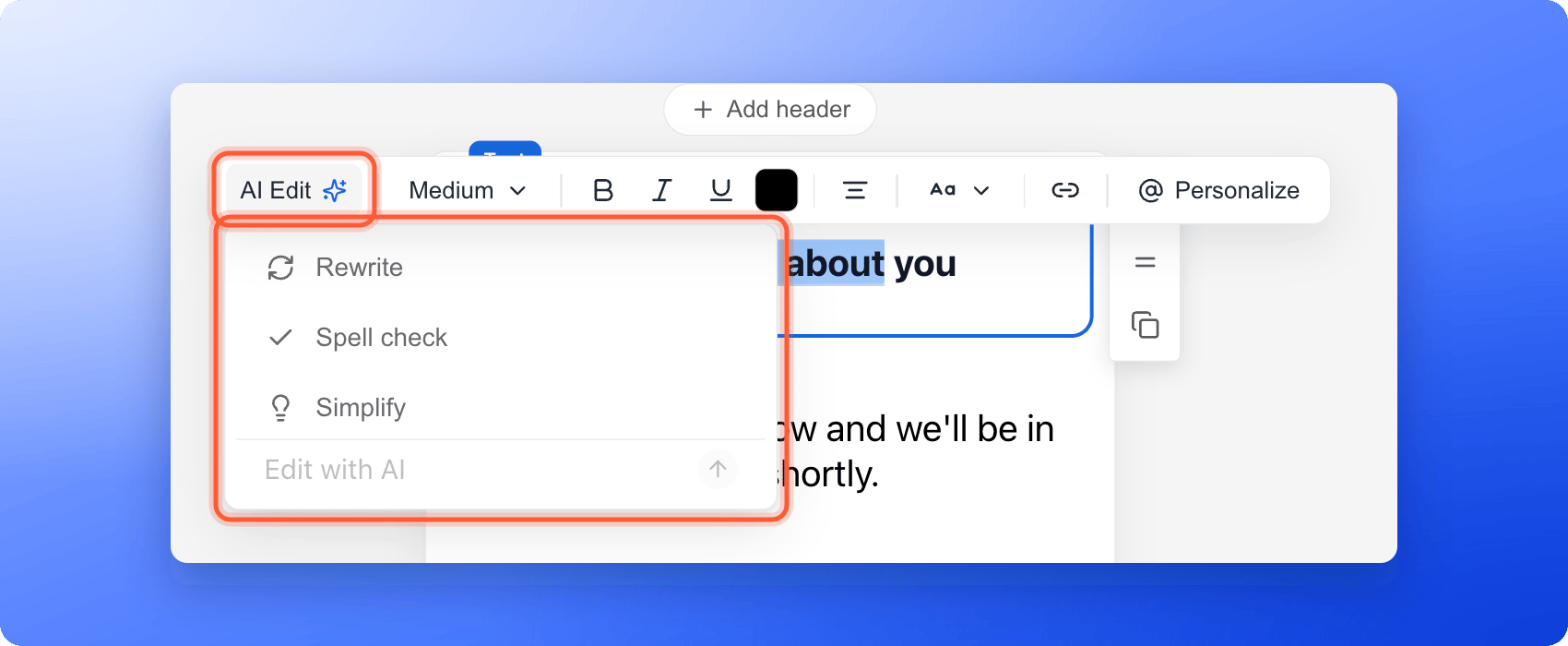 * **Rewrite**, **Spell check** or **Simplify:** click the one you want.
* **Your own instruction:** click the **Edit with AI** box, type what you want, then press Enter or click the arrow button.
While AI works, the button says **Working…**. When it finishes, your selected words are replaced with the new text.
Read the new text. If it is not right, click **Undo**, or select the words again and try another choice or a clearer instruction. Then click **"Publish Funnel"** when your changes are ready.
## Which tool should I use?
| You want to | Use |
| - | - |
| Fix typos, grammar and punctuation and keep your wording | **Spell check** |
| Make a text clearer and smoother | **Rewrite** |
| Cut a long text down to the essentials | **Simplify** |
| Change the tone, length or style in your own way | **Edit with AI**, with your instruction |
Short, clear instructions work best, for example "Make this sound more confident" or "Shorten this to 8 words". Select one sentence at a time so you stay in control of the result.
## How do I know it is working?
* After you choose a tool, the button shows **Working…** for a moment.
* Your selected words change to the new version on the canvas.
* **Undo** brings the old words back.
## Troubleshooting
Select some text first. The menu shows **Select text to enable AI actions** until you do.
The edit did not go through. Wait a few seconds and try again. If it keeps failing, check that your free trial or subscription is active on the **Plan** page.
The AI text tools need an active plan or free trial. A Global Admin can subscribe or resubscribe. See [Upgrade your plan](/billing/upgrade).
No. **Rewrite**, **Spell check**, **Simplify** and **Edit with AI** are free to use and do not take AI credits. Building a funnel and creating images do. See [How AI credits work](/billing/ai-credits).
Click **Undo**. **Spell check** only fixes spelling, grammar and punctuation, so it is the safest choice when the wording must stay exactly as it is.
The toolbar appears above text you are editing. Click into a headline or a text block and select some words. Contacts Managers cannot edit funnels, so they do not see it.
Yes. The same toolbar, with **AI Edit**, appears when you select text in an email of an automated flow. See [Send automated emails to new leads](/messages/automated-emails).
## What to do next
Let AI write a first draft of a whole funnel.
Text size, colors, your logo and pictures.
See what uses credits and what is free.
Need help? Email [support@askfunnel.com](mailto:support@askfunnel.com).
* **Rewrite**, **Spell check** or **Simplify:** click the one you want.
* **Your own instruction:** click the **Edit with AI** box, type what you want, then press Enter or click the arrow button.
While AI works, the button says **Working…**. When it finishes, your selected words are replaced with the new text.
Read the new text. If it is not right, click **Undo**, or select the words again and try another choice or a clearer instruction. Then click **"Publish Funnel"** when your changes are ready.
## Which tool should I use?
| You want to | Use |
| - | - |
| Fix typos, grammar and punctuation and keep your wording | **Spell check** |
| Make a text clearer and smoother | **Rewrite** |
| Cut a long text down to the essentials | **Simplify** |
| Change the tone, length or style in your own way | **Edit with AI**, with your instruction |
Short, clear instructions work best, for example "Make this sound more confident" or "Shorten this to 8 words". Select one sentence at a time so you stay in control of the result.
## How do I know it is working?
* After you choose a tool, the button shows **Working…** for a moment.
* Your selected words change to the new version on the canvas.
* **Undo** brings the old words back.
## Troubleshooting
Select some text first. The menu shows **Select text to enable AI actions** until you do.
The edit did not go through. Wait a few seconds and try again. If it keeps failing, check that your free trial or subscription is active on the **Plan** page.
The AI text tools need an active plan or free trial. A Global Admin can subscribe or resubscribe. See [Upgrade your plan](/billing/upgrade).
No. **Rewrite**, **Spell check**, **Simplify** and **Edit with AI** are free to use and do not take AI credits. Building a funnel and creating images do. See [How AI credits work](/billing/ai-credits).
Click **Undo**. **Spell check** only fixes spelling, grammar and punctuation, so it is the safest choice when the wording must stay exactly as it is.
The toolbar appears above text you are editing. Click into a headline or a text block and select some words. Contacts Managers cannot edit funnels, so they do not see it.
Yes. The same toolbar, with **AI Edit**, appears when you select text in an email of an automated flow. See [Send automated emails to new leads](/messages/automated-emails).
## What to do next
Let AI write a first draft of a whole funnel.
Text size, colors, your logo and pictures.
See what uses credits and what is free.
Need help? Email [support@askfunnel.com](mailto:support@askfunnel.com).