> ## Documentation Index
> Fetch the complete documentation index at: https://help.askfunnel.com/llms.txt
> Use this file to discover all available pages before exploring further.
# Set up lead scoring
> Give points to quiz answers and sort your leads into Cold, Warm and Hot so you know who to call first.
Lead scoring helps you follow up with the right people first. You give points to the quiz answers that signal a serious buyer. When someone finishes your funnel, AskFunnel adds up their points and labels the lead **Cold**, **Warm** or **Hot** in your leads table.
Setting it up has two parts:
1. **Set the score ranges** for Cold, Warm and Hot in your funnel settings.
2. **Give points** to answers in your quiz questions.
**Before you start**, you need:
* A funnel with at least one quiz question. See [Build quiz questions](/funnels/quiz-questions).
* A role that can open **"Funnel Settings"**: Global Admin, Workspace Admin or Content Editor.
## Important to note
* You need both parts. If no answer gives points, every lead scores 0 and lands in **Cold**.
* The leads table shows the **Cold**, **Warm** or **Hot** label, not the number of points.
* Points you change apply to new leads after you publish. If you change the ranges, the labels in your leads table follow the new ranges.
## Setup
1. From your funnel list, click the three dots (**...**) on your funnel's row, then click **"Funnel Settings"**.
2. On the left side menu, click **"Lead Scoring"**.
3. Turn on **Enable lead scoring**.
4. Enter the highest score that is still **Cold** next to **Score up to**, for example 10.
5. Enter the highest score that is still **Warm** in the second box of the **Warm** row, for example 25. The first box fills in for you (11).
6. **Hot** fills in for you. It means **Score above** your Warm number, here 25.
7. Click **"Save changes"** in the bar at the top.
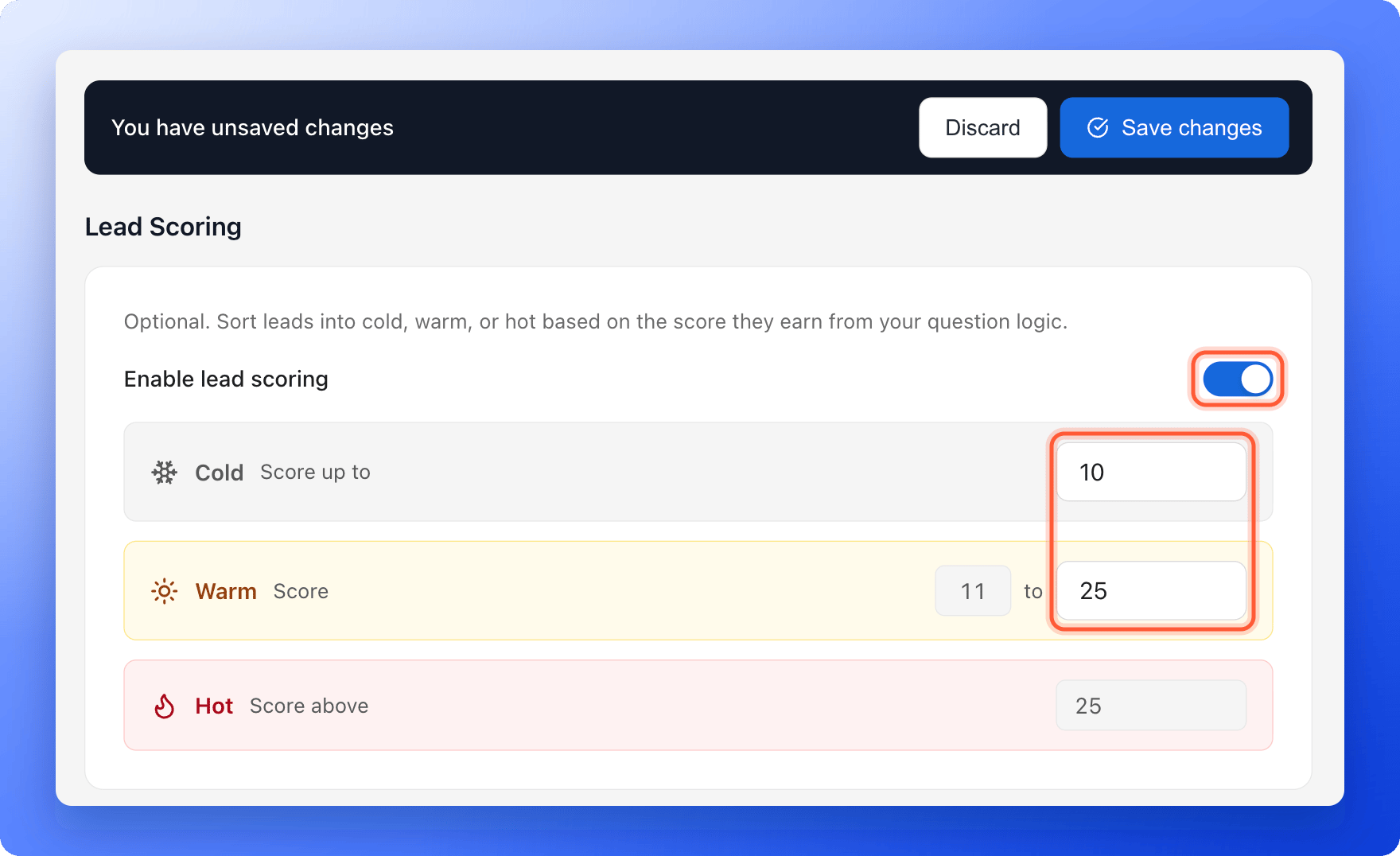 With these numbers, a lead with 10 points or fewer is **Cold**, 11 to 25 is **Warm**, and 26 or more is **Hot**.
You set points in the **Action Flow** of a quiz, as a rule under **Advanced Branching**. Rules only work in a quiz set to **Single**.
1. Open your funnel in the builder and go to the page with your quiz.
2. Click the quiz to select it and make sure it is set to **Single**.
3. In the left panel, find **Action Flow** and click the line under it. The **Action Flow** window opens.
4. Turn on **Advanced Branching**, then click **"Add a rule"**.
5. Under **If**, pick the question (by default this one), choose **is** and pick an answer, for example "Within one month".
6. Under **Then**, type the points next to **Score**, for example 25.
7. To score more answers, click **"Add rule"** and repeat. Click **"Save"** when you are done.
With these numbers, a lead with 10 points or fewer is **Cold**, 11 to 25 is **Warm**, and 26 or more is **Hot**.
You set points in the **Action Flow** of a quiz, as a rule under **Advanced Branching**. Rules only work in a quiz set to **Single**.
1. Open your funnel in the builder and go to the page with your quiz.
2. Click the quiz to select it and make sure it is set to **Single**.
3. In the left panel, find **Action Flow** and click the line under it. The **Action Flow** window opens.
4. Turn on **Advanced Branching**, then click **"Add a rule"**.
5. Under **If**, pick the question (by default this one), choose **is** and pick an answer, for example "Within one month".
6. Under **Then**, type the points next to **Score**, for example 25.
7. To score more answers, click **"Add rule"** and repeat. Click **"Save"** when you are done.
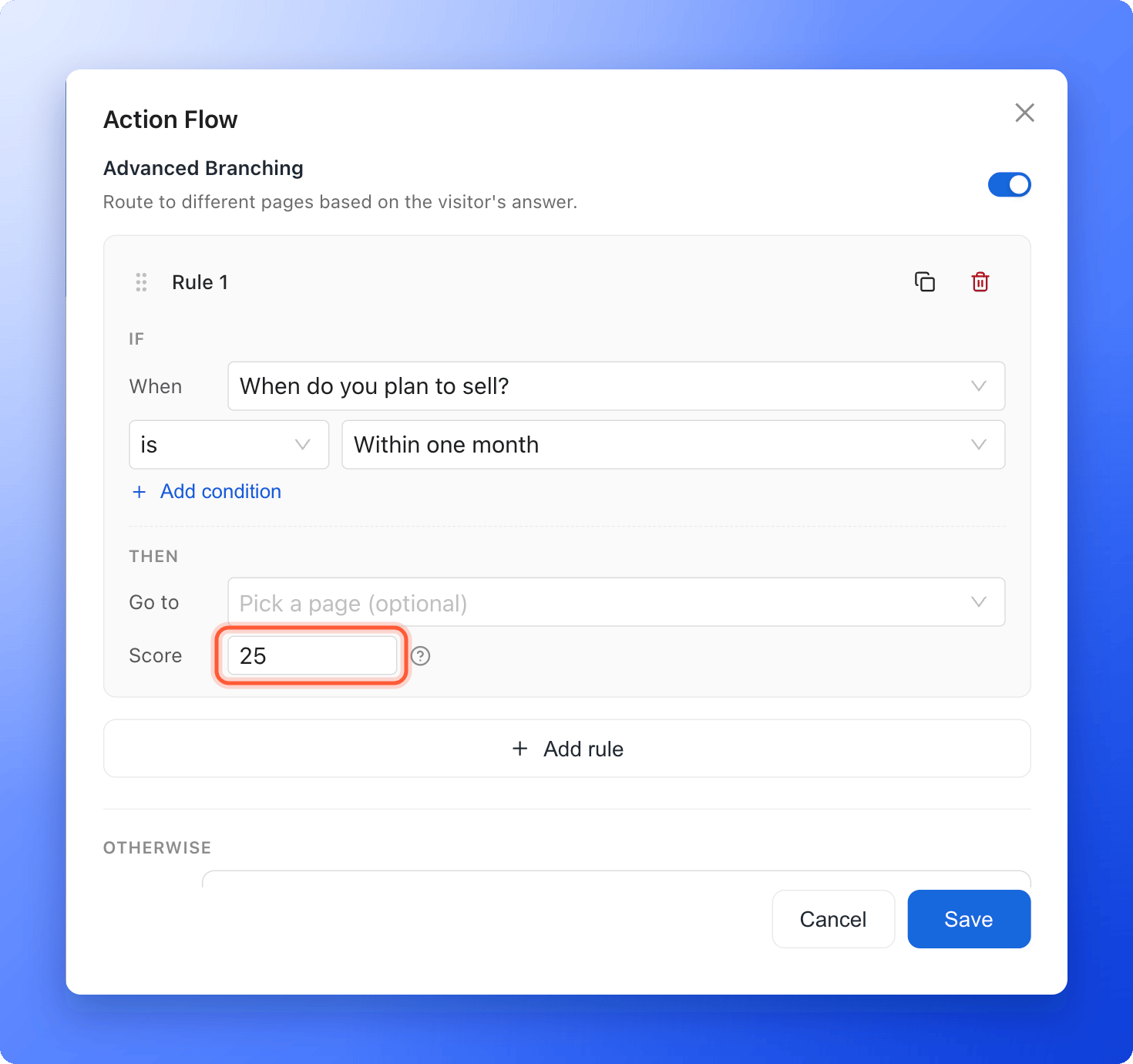 **Go to** is optional. Leave it empty to keep the normal route and only add points. Choose a page only if you also want to send people there.
A rule can look at an earlier question too. Under **When**, pick the question, and use **Add condition** to combine answers with **and** or **or**.
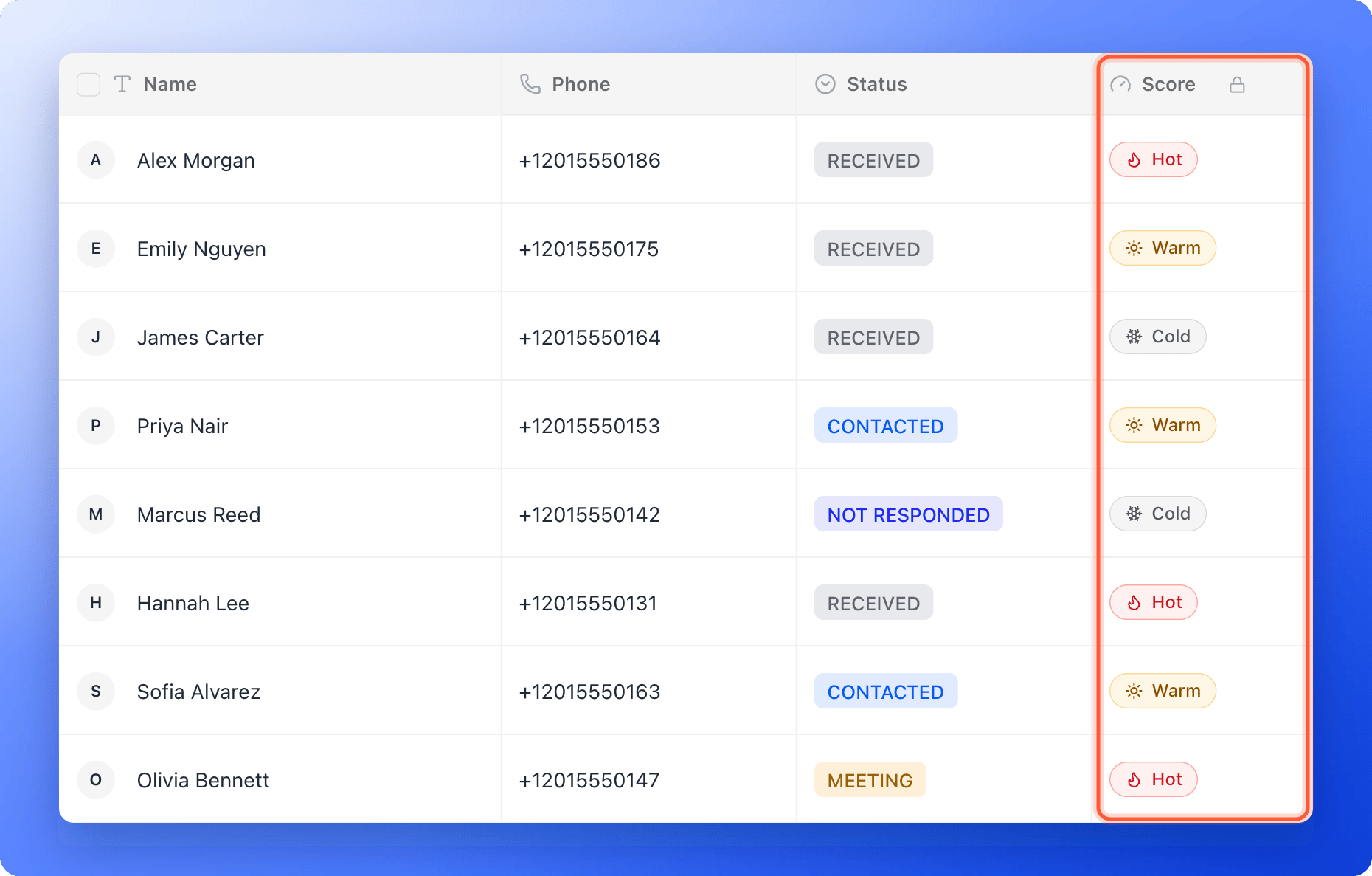
Click **"Publish Funnel"** at the top right. When people submit your form, the leads table gets a **Score** column with a **Cold**, **Warm** or **Hot** label for each lead.
**Go to** is optional. Leave it empty to keep the normal route and only add points. Choose a page only if you also want to send people there.
A rule can look at an earlier question too. Under **When**, pick the question, and use **Add condition** to combine answers with **and** or **or**.
Click **"Publish Funnel"** at the top right. When people submit your form, the leads table gets a **Score** column with a **Cold**, **Warm** or **Hot** label for each lead.
 ## How do I know it is working?
* In **Funnel Settings**, **Lead Scoring** shows your ranges after you save.
* In the builder, the **Action Flow** of your quiz shows how many rules you added, for example **2 rules**.
* Submit a test lead with your best answers, then open your leads table. The **Score** column should show **Hot**. See [View and manage your leads](/leads/view-and-manage-leads).
## How the points add up
AskFunnel adds the points of every rule that matches a lead's answers. Points are whole numbers from -10,000 to 10,000, and you can use a negative number to take points away. A question can have up to 20 rules.
For example, with the ranges above:
* "When do you plan to buy?" Within one month gives 25 points. Within three months gives 15.
* "What is your budget?" Above \$500,000 gives 10 points.
* A lead who picks "Within one month" and "Above \$500,000" has 35 points and is **Hot**.
* A lead who picks "Within three months" and a lower budget has 15 points and is **Warm**.
## Troubleshooting
No answer is giving points yet, or your **Cold** number is too high. Open the **Action Flow** of your quiz, check that each rule has a **Score** above 0, and check your ranges in **Funnel Settings**.
The column appears once you set your ranges or give points to answers. Without ranges you only see a number, not **Cold**, **Warm** or **Hot**. Turn on **Enable lead scoring** and click **"Save changes"**.
It is only available when the quiz is set to **Single**. Select the quiz, click **"Single"**, then open **Action Flow** again.
If it says **Enter both Cold and Warm values**, fill in both numbers, or turn off **Enable lead scoring**. If it says **Cold max must be lower than warm max**, the number in the **Warm** row must be higher than the number in the **Cold** row. For example, use 10 for Cold and 25 for Warm.
* **Can't match:** a person picks only one answer, so two **is** conditions joined by **and** are never both true. Use **or**, or use **is not**.
* **Always matches:** **is not** one answer **or** **is not** another is true for everyone. Use **and** if you mean any answer except those two.
* **Unavailable question:** the rule points to a question that was deleted or moved to a later page. Pick this question or an earlier one.
## What to do next
See each lead's label in the Score column.
Find the leads from a day, week or month.
Every new lead arrives with its answers and lead score.
Need help? Email [support@askfunnel.com](mailto:support@askfunnel.com).
## How do I know it is working?
* In **Funnel Settings**, **Lead Scoring** shows your ranges after you save.
* In the builder, the **Action Flow** of your quiz shows how many rules you added, for example **2 rules**.
* Submit a test lead with your best answers, then open your leads table. The **Score** column should show **Hot**. See [View and manage your leads](/leads/view-and-manage-leads).
## How the points add up
AskFunnel adds the points of every rule that matches a lead's answers. Points are whole numbers from -10,000 to 10,000, and you can use a negative number to take points away. A question can have up to 20 rules.
For example, with the ranges above:
* "When do you plan to buy?" Within one month gives 25 points. Within three months gives 15.
* "What is your budget?" Above \$500,000 gives 10 points.
* A lead who picks "Within one month" and "Above \$500,000" has 35 points and is **Hot**.
* A lead who picks "Within three months" and a lower budget has 15 points and is **Warm**.
## Troubleshooting
No answer is giving points yet, or your **Cold** number is too high. Open the **Action Flow** of your quiz, check that each rule has a **Score** above 0, and check your ranges in **Funnel Settings**.
The column appears once you set your ranges or give points to answers. Without ranges you only see a number, not **Cold**, **Warm** or **Hot**. Turn on **Enable lead scoring** and click **"Save changes"**.
It is only available when the quiz is set to **Single**. Select the quiz, click **"Single"**, then open **Action Flow** again.
If it says **Enter both Cold and Warm values**, fill in both numbers, or turn off **Enable lead scoring**. If it says **Cold max must be lower than warm max**, the number in the **Warm** row must be higher than the number in the **Cold** row. For example, use 10 for Cold and 25 for Warm.
* **Can't match:** a person picks only one answer, so two **is** conditions joined by **and** are never both true. Use **or**, or use **is not**.
* **Always matches:** **is not** one answer **or** **is not** another is true for everyone. Use **and** if you mean any answer except those two.
* **Unavailable question:** the rule points to a question that was deleted or moved to a later page. Pick this question or an earlier one.
## What to do next
See each lead's label in the Score column.
Find the leads from a day, week or month.
Every new lead arrives with its answers and lead score.
Need help? Email [support@askfunnel.com](mailto:support@askfunnel.com).