> ## Documentation Index
> Fetch the complete documentation index at: https://help.askfunnel.com/llms.txt
> Use this file to discover all available pages before exploring further.
# Funnel settings overview and deleting a funnel
> See what each tab of your funnel's settings does, which changes need Save changes and how to delete a funnel.
**Funnel Settings** is the one place for everything that belongs to a single funnel but is not part of its pages: where its leads go, which tracking it uses, how its link looks when shared, its cookie banner, its lead scoring and its web addresses. This page is a map of the tabs. It also shows which changes need **"Save changes"** and how to delete a funnel.
| Tab | What you do there | Guide |
| - | - | - |
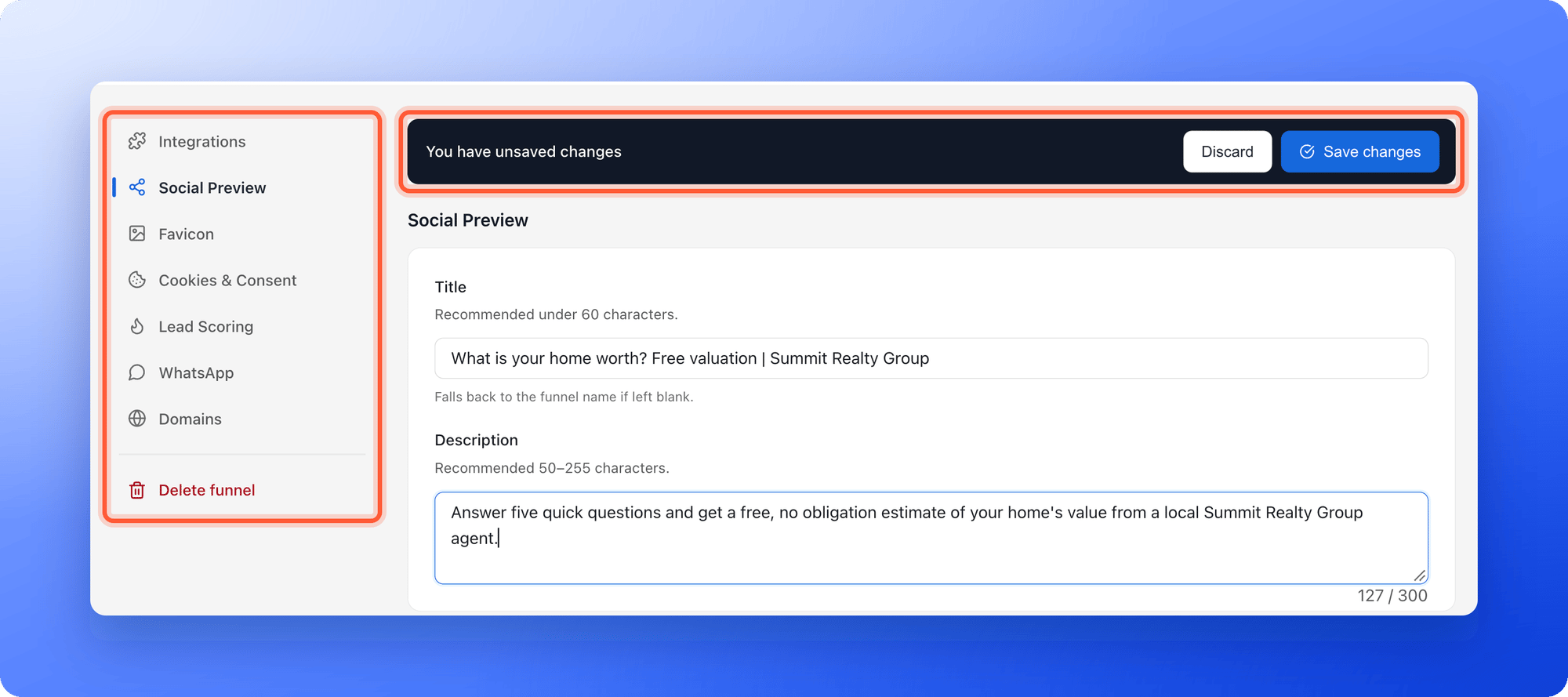
| **Integrations** | Under **Send leads to**, connect webhooks, GoHighLevel and Google Sheets. Under **Tracking**, connect Meta Pixel, Google Analytics and TikTok Pixel. | [Webhooks](/integrations/webhooks), [HighLevel](/integrations/highlevel), [Google Sheets](/integrations/google-sheets), [Meta Pixel](/integrations/meta-pixel), [Google Analytics](/integrations/google-analytics), [TikTok Pixel](/integrations/tiktok-pixel) |
| **Social Preview** | Set the title, description and picture people see when they share your link. | [Social preview and favicon](/funnel-settings/social-preview-and-favicon) |
| **Favicon** | Set the small icon in the browser tab. | [Social preview and favicon](/funnel-settings/social-preview-and-favicon) |
| **Cookies & Consent** | Turn the cookie banner on or off and choose how much visitor activity is tracked. | [Cookies and consent](/funnel-settings/cookies-and-consent) |
| **Lead Scoring** | Set the score ranges that label leads Cold, Warm or Hot. | [Lead scoring](/funnel-settings/lead-scoring) |
| **WhatsApp** | Write the message that is typed in for you when you open a WhatsApp chat with a lead. | [Message a lead on WhatsApp](/messages/whatsapp-template) |
| **Domains** | Choose which web addresses open this funnel. | [Custom domain](/funnel-settings/custom-domain) |
| **Delete funnel** | Remove the funnel. Only Global Admins and Workspace Admins see this tab. | [Delete a funnel](#delete-a-funnel) |
**Before you start**, you need:
* A funnel, and a role that can open **"Funnel Settings"**: Global Admin, Workspace Admin or Content Editor. Contacts Managers see **You don't have access to funnel settings**.
* To delete a funnel, a Global Admin or Workspace Admin role.
## Important to note
* Most changes need **"Save changes"**. Switching to another tab before you save asks you to discard your edits first.
* Saved changes go live right away. You do not need to publish the funnel again. When the funnel is live, you see **Settings saved. Your live funnel is updated.**
* Under **Send leads to**, only Workspace Admins and Global Admins can make changes. Content Editors see the cards marked **Admins only**.
* Deleting a funnel cannot be undone from the app. Its leads, notes and analytics are permanently deleted after 30 days.
## Open Funnel Settings
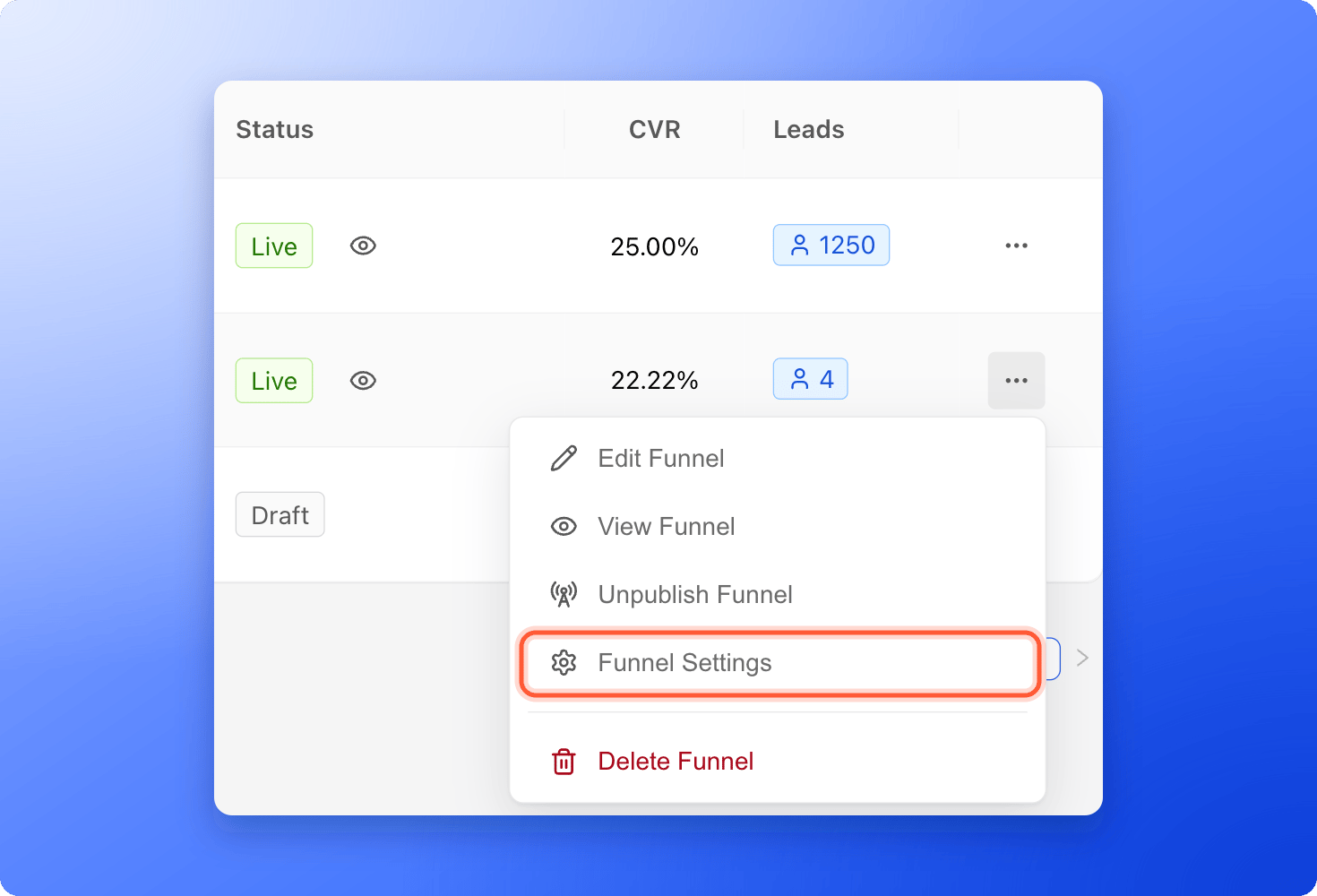
* **From your funnels list:** click the three dots (**...**) on the funnel's row, then click **"Funnel Settings"**.
* **From the builder:** click the gear icon at the top right.
 The page is titled **Funnel Settings**, with your funnel's name under it. Click a tab on the left side menu. The page opens on **Integrations**.
 ## Which changes need Save changes
When you change something that needs saving, a bar with **You have unsaved changes** appears at the top, with **"Discard"** and **"Save changes"**. Click **"Save changes"** to keep your edits. If a value is not valid, AskFunnel shows **Fix the highlighted fields before saving.**
These changes need **"Save changes"**:
* The settings of Meta Pixel, Google Analytics and TikTok Pixel under **Integrations**.
* **Social Preview** and **Favicon**.
* The cookie banner in **Cookies & Consent**.
* **Lead Scoring** and **WhatsApp**.
These changes save right away:
* **Analytics tracking depth** in **Cookies & Consent**. You see **Analytics tracking depth updated**.
* Webhooks, GoHighLevel and Google Sheets under **Send leads to**.
* Choosing which domains a funnel uses in **Domains**. You see **Funnel domains updated**.
## Delete a funnel
Delete a funnel you will never use again, such as a finished campaign or a test. If you may want it back, take it offline instead. See [Publish, unpublish and restore an earlier version](/funnels/publish-and-restore).
You can no longer open the funnel's leads in the dashboard after you delete it. [Export your leads](/leads/export-contacts) first.
* **From your funnels list:** click the three dots (**...**) on the funnel's row, then click **"Delete Funnel"**. It is the red item at the bottom.
* **From Funnel Settings:** click **"Delete funnel"** at the bottom of the left side menu, then click the red **"Delete funnel"** button.
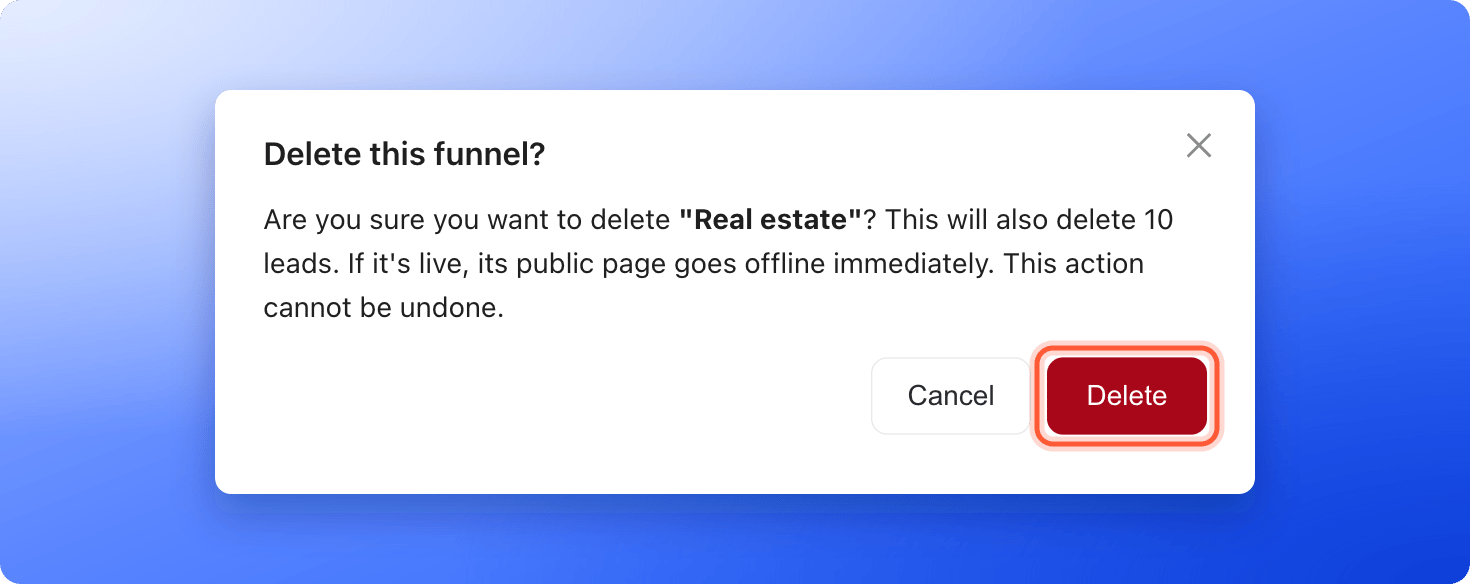
A window titled **Delete this funnel?** explains what happens. From your funnels list, it also shows how many leads and notes are linked to the funnel, if there are any. Click **"Delete"** to confirm, or **"Cancel"** to keep the funnel. From **Funnel Settings**, you see **Funnel deleted** and go back to your funnels list. From the list, the funnel's row disappears.
## Which changes need Save changes
When you change something that needs saving, a bar with **You have unsaved changes** appears at the top, with **"Discard"** and **"Save changes"**. Click **"Save changes"** to keep your edits. If a value is not valid, AskFunnel shows **Fix the highlighted fields before saving.**
These changes need **"Save changes"**:
* The settings of Meta Pixel, Google Analytics and TikTok Pixel under **Integrations**.
* **Social Preview** and **Favicon**.
* The cookie banner in **Cookies & Consent**.
* **Lead Scoring** and **WhatsApp**.
These changes save right away:
* **Analytics tracking depth** in **Cookies & Consent**. You see **Analytics tracking depth updated**.
* Webhooks, GoHighLevel and Google Sheets under **Send leads to**.
* Choosing which domains a funnel uses in **Domains**. You see **Funnel domains updated**.
## Delete a funnel
Delete a funnel you will never use again, such as a finished campaign or a test. If you may want it back, take it offline instead. See [Publish, unpublish and restore an earlier version](/funnels/publish-and-restore).
You can no longer open the funnel's leads in the dashboard after you delete it. [Export your leads](/leads/export-contacts) first.
* **From your funnels list:** click the three dots (**...**) on the funnel's row, then click **"Delete Funnel"**. It is the red item at the bottom.
* **From Funnel Settings:** click **"Delete funnel"** at the bottom of the left side menu, then click the red **"Delete funnel"** button.
A window titled **Delete this funnel?** explains what happens. From your funnels list, it also shows how many leads and notes are linked to the funnel, if there are any. Click **"Delete"** to confirm, or **"Cancel"** to keep the funnel. From **Funnel Settings**, you see **Funnel deleted** and go back to your funnels list. From the list, the funnel's row disappears.
 * A live funnel goes offline immediately, and visitors can no longer open its link.
* The funnel and its leads disappear from the dashboard, and there is no undo button. If you delete a funnel by mistake, email [support@askfunnel.com](mailto:support@askfunnel.com) within 30 days.
* Leads you already sent to other tools stay there.
## How do I know it is working?
* After a save, the **You have unsaved changes** bar disappears and you see **Settings saved**.
* After a delete, the funnel is gone from your list. From **Funnel Settings**, you also see **Funnel deleted**.
## Troubleshooting
Your role cannot open funnel settings. Contacts Managers work with leads, not with funnel settings. Ask a Global Admin or Workspace Admin to change your role. See [What a Contacts Manager can see and do](/workspaces/contacts-manager).
Only Global Admins and Workspace Admins can delete funnels. Content Editors can edit a funnel and its settings, but not delete it.
From your funnels list, a funnel with more than 400 leads cannot be deleted. Export the leads first, then email support to archive the funnel. See [Export your leads](/leads/export-contacts).
Deleting needs a Global Admin or Workspace Admin role in this workspace. Ask one of them to delete the funnel.
Try again in a minute. If it keeps happening, check that your plan is active, then email support. See [Check your plan and usage](/billing/plan-and-usage).
There is no undo button. Within 30 days, email [support@askfunnel.com](mailto:support@askfunnel.com) with the name of the funnel and its workspace, and we can restore it with its leads and notes. You then publish it again and reconnect its integrations. After 30 days it is permanently deleted and cannot be restored.
No. A deleted funnel is taken offline, so it no longer uses one of your live funnels.
## What to do next
Choose the title, picture and icon people see.
Decide whether visitors see a cookie banner.
Put your funnels on your own web address.
Understand every column and menu of your funnels list.
Need help? Email [support@askfunnel.com](mailto:support@askfunnel.com).
* A live funnel goes offline immediately, and visitors can no longer open its link.
* The funnel and its leads disappear from the dashboard, and there is no undo button. If you delete a funnel by mistake, email [support@askfunnel.com](mailto:support@askfunnel.com) within 30 days.
* Leads you already sent to other tools stay there.
## How do I know it is working?
* After a save, the **You have unsaved changes** bar disappears and you see **Settings saved**.
* After a delete, the funnel is gone from your list. From **Funnel Settings**, you also see **Funnel deleted**.
## Troubleshooting
Your role cannot open funnel settings. Contacts Managers work with leads, not with funnel settings. Ask a Global Admin or Workspace Admin to change your role. See [What a Contacts Manager can see and do](/workspaces/contacts-manager).
Only Global Admins and Workspace Admins can delete funnels. Content Editors can edit a funnel and its settings, but not delete it.
From your funnels list, a funnel with more than 400 leads cannot be deleted. Export the leads first, then email support to archive the funnel. See [Export your leads](/leads/export-contacts).
Deleting needs a Global Admin or Workspace Admin role in this workspace. Ask one of them to delete the funnel.
Try again in a minute. If it keeps happening, check that your plan is active, then email support. See [Check your plan and usage](/billing/plan-and-usage).
There is no undo button. Within 30 days, email [support@askfunnel.com](mailto:support@askfunnel.com) with the name of the funnel and its workspace, and we can restore it with its leads and notes. You then publish it again and reconnect its integrations. After 30 days it is permanently deleted and cannot be restored.
No. A deleted funnel is taken offline, so it no longer uses one of your live funnels.
## What to do next
Choose the title, picture and icon people see.
Decide whether visitors see a cookie banner.
Put your funnels on your own web address.
Understand every column and menu of your funnels list.
Need help? Email [support@askfunnel.com](mailto:support@askfunnel.com).