> ## Documentation Index
> Fetch the complete documentation index at: https://help.askfunnel.com/llms.txt
> Use this file to discover all available pages before exploring further.
# Set up cookies and visitor consent
> Choose whether visitors see a cookie banner before tracking starts, and how much visitor activity AskFunnel tracks.
Decide how your funnel handles visitor consent, so tracking starts only when you want it to. If you run ads or measure your traffic, this matters. Cookies are small files a website saves in a visitor's browser. In **Funnel Settings**, **Cookies & Consent** lets you choose two things for each funnel:
* **Cookie banner:** whether visitors see a cookie notice and must agree before your tracking pixels (small pieces of code from ad platforms such as Meta) and detailed analytics start.
* **Analytics tracking depth:** how much of a visitor's activity AskFunnel records.
This page explains what the settings do. It is not legal advice. The rules depend on where your visitors live and which tools you use. If you are not sure what you need, ask a legal professional.
**Before you start**, you need:
* A funnel, and a role that can open **"Funnel Settings"**: Global Admin, Workspace Admin or Content Editor.
## Important to note
* These settings belong to one funnel, so set them for each funnel you run. New funnels start with **No banner**.
* With **No banner**, visitors are never asked, so AskFunnel treats consent as given. That means **Detailed (with consent)** tracks every visitor, exactly like **Detailed (always on)**. Choose **Show banner** if you need visitors to agree first.
* If a visitor's browser sends the Global Privacy Control signal (a browser setting that tells websites not to track), AskFunnel keeps non essential tracking off for that visitor, whichever option you choose.
## Choose your settings
1. From your funnel list, click the three dots (**...**) on your funnel's row, then click **"Funnel Settings"**. Inside the builder, you can click the gear icon at the top right instead.
2. On the left side menu, click **"Cookies & Consent"**.
Under **Cookie banner**, click one of the two cards:
* **Show banner:** visitors accept first, and pixels load after. A cookie notice appears at the bottom right of your funnel.
* **No banner:** pixels load for every visitor and no notice appears.
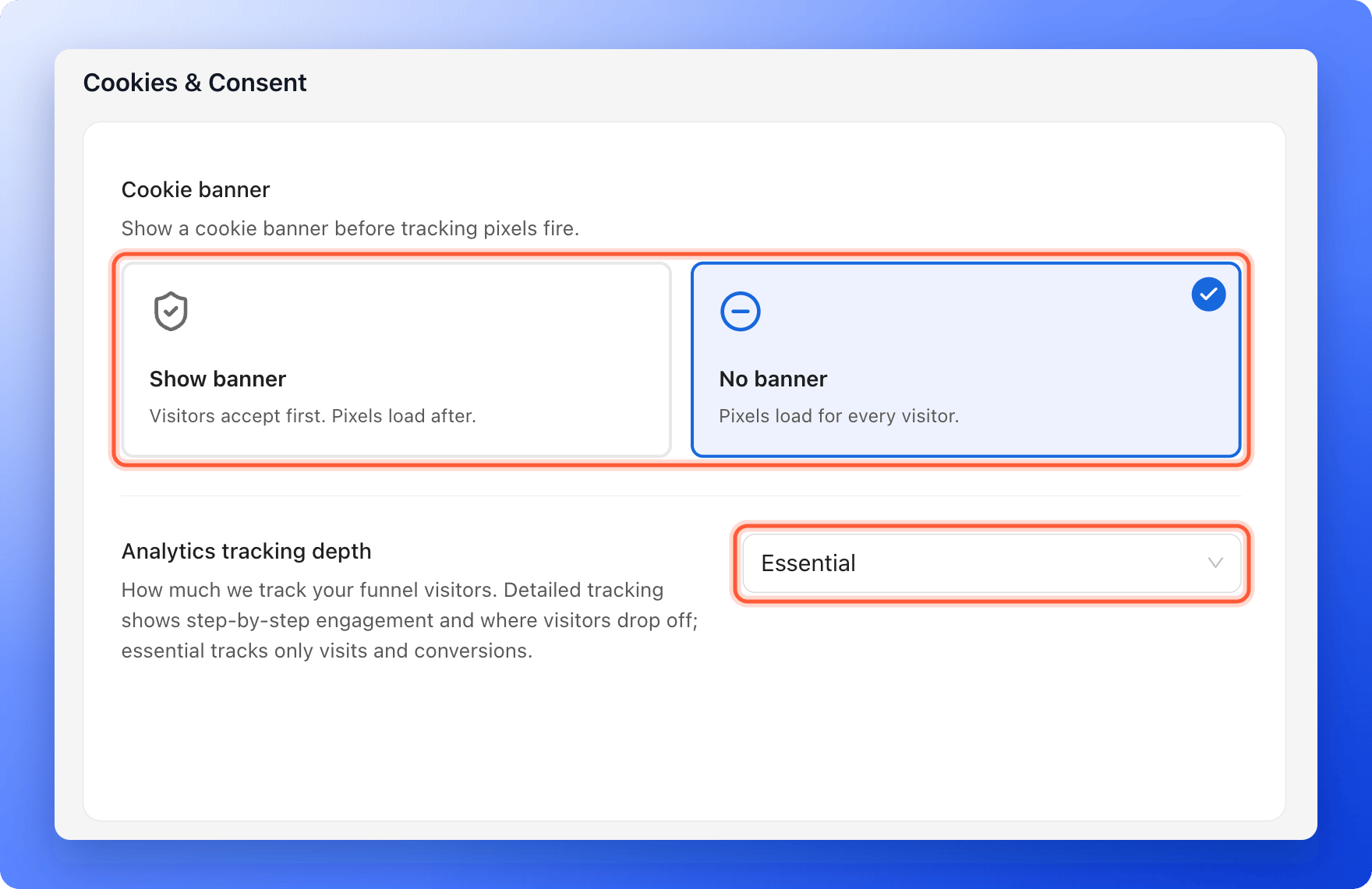 Open the **Analytics tracking depth** list and pick one:
* **Essential:** visits and conversions only. This is the lightest option.
* **Detailed (with consent):** step by step activity and where visitors drop off, recorded after the visitor accepts the banner. The list says to use it for visitors from the EU or UK.
* **Detailed (always on):** full tracking without waiting for consent. Use it only where the privacy laws that apply to your visitors do not require consent first.
This choice saves as soon as you pick it. You see **Analytics tracking depth updated**.
After you change the banner, a bar with **You have unsaved changes** appears at the top. Click **"Save changes"**. You see **Settings saved. Your live funnel is updated.** You do not need to publish again.
* You can also open the same settings from the builder: click the footer at the bottom of a page, then click the gear next to **Cookie banner**.
* Link your own privacy policy in the footer of your funnel. Click the footer and use the gear next to **Privacy policy**.
* Tracking pixels you add under **Integrations** follow the banner choice. See [Meta Pixel](/integrations/meta-pixel), [Google Analytics](/integrations/google-analytics) and [TikTok Pixel](/integrations/tiktok-pixel).
## What visitors see with the banner
With **Show banner**, visitors see a **Cookie notice** with three buttons: **Accept all**, **Reject non-essential** and **Manage preferences**. In the preferences they can switch **Preferences**, **Analytics** and **Marketing** cookies on or off. **Essential** cookies are always on. AskFunnel remembers their choice for 365 days, and your funnel footer shows a **Manage Cookies** link so they can change it.
A video from YouTube or Vimeo does not autoplay with **Show banner**. It waits behind a play button until the visitor accepts marketing cookies or clicks play.
## How do I know it is working?
1. Open your live funnel in a private browser window, where you have not made a cookie choice before.
2. With **Show banner**, the **Cookie notice** appears at the bottom right. Click **"Accept all"** and continue through the funnel.
3. With **No banner**, no notice appears.
4. To test again, close the private window and open a new one. Your choice is stored in the browser.
## Troubleshooting
Check that **Show banner** is selected and that you clicked **"Save changes"**. If you already chose an option in that browser, the notice does not come back, so try a private window. Some automated browsers and crawlers never see the banner.
With **Show banner**, a pixel starts only after you accept. If your browser sends the Global Privacy Control signal, pixels stay off even if you accept. Try another browser or turn the setting off for the test.
The link only shows when the funnel uses **Show banner**.
With **Show banner**, YouTube and Vimeo videos wait for the visitor to accept marketing cookies or click play. Videos you upload yourself are not affected.
Step by step activity needs **Detailed (with consent)** or **Detailed (always on)**. With **Essential**, you only see visits and conversions. With **Show banner**, it also needs visitors to accept.
## What to do next
Track which ads bring leads.
See every lead with its answers.
Visitors, conversions and where people drop off.
Need help? Email [support@askfunnel.com](mailto:support@askfunnel.com).
Open the **Analytics tracking depth** list and pick one:
* **Essential:** visits and conversions only. This is the lightest option.
* **Detailed (with consent):** step by step activity and where visitors drop off, recorded after the visitor accepts the banner. The list says to use it for visitors from the EU or UK.
* **Detailed (always on):** full tracking without waiting for consent. Use it only where the privacy laws that apply to your visitors do not require consent first.
This choice saves as soon as you pick it. You see **Analytics tracking depth updated**.
After you change the banner, a bar with **You have unsaved changes** appears at the top. Click **"Save changes"**. You see **Settings saved. Your live funnel is updated.** You do not need to publish again.
* You can also open the same settings from the builder: click the footer at the bottom of a page, then click the gear next to **Cookie banner**.
* Link your own privacy policy in the footer of your funnel. Click the footer and use the gear next to **Privacy policy**.
* Tracking pixels you add under **Integrations** follow the banner choice. See [Meta Pixel](/integrations/meta-pixel), [Google Analytics](/integrations/google-analytics) and [TikTok Pixel](/integrations/tiktok-pixel).
## What visitors see with the banner
With **Show banner**, visitors see a **Cookie notice** with three buttons: **Accept all**, **Reject non-essential** and **Manage preferences**. In the preferences they can switch **Preferences**, **Analytics** and **Marketing** cookies on or off. **Essential** cookies are always on. AskFunnel remembers their choice for 365 days, and your funnel footer shows a **Manage Cookies** link so they can change it.
A video from YouTube or Vimeo does not autoplay with **Show banner**. It waits behind a play button until the visitor accepts marketing cookies or clicks play.
## How do I know it is working?
1. Open your live funnel in a private browser window, where you have not made a cookie choice before.
2. With **Show banner**, the **Cookie notice** appears at the bottom right. Click **"Accept all"** and continue through the funnel.
3. With **No banner**, no notice appears.
4. To test again, close the private window and open a new one. Your choice is stored in the browser.
## Troubleshooting
Check that **Show banner** is selected and that you clicked **"Save changes"**. If you already chose an option in that browser, the notice does not come back, so try a private window. Some automated browsers and crawlers never see the banner.
With **Show banner**, a pixel starts only after you accept. If your browser sends the Global Privacy Control signal, pixels stay off even if you accept. Try another browser or turn the setting off for the test.
The link only shows when the funnel uses **Show banner**.
With **Show banner**, YouTube and Vimeo videos wait for the visitor to accept marketing cookies or click play. Videos you upload yourself are not affected.
Step by step activity needs **Detailed (with consent)** or **Detailed (always on)**. With **Essential**, you only see visits and conversions. With **Show banner**, it also needs visitors to accept.
## What to do next
Track which ads bring leads.
See every lead with its answers.
Visitors, conversions and where people drop off.
Need help? Email [support@askfunnel.com](mailto:support@askfunnel.com).