> ## Documentation Index
> Fetch the complete documentation index at: https://help.askfunnel.com/llms.txt
> Use this file to discover all available pages before exploring further.
# What happens when you reach your monthly lead limit
> Leads over your limit are saved but locked. See what you can and cannot see, and how to unlock them.
Every plan includes a number of leads each month. When you reach it, AskFunnel does not turn your funnels off and does not lose anyone. Visitors can still fill in your form as usual. The extra leads are saved, but **locked**: they stay hidden until you add capacity. This page explains what that means, so a lead that seems to be missing does not worry you.
Your monthly limit depends on your plan:
| | Starter | Growth | Scale | Enterprise |
| - | - | - | - | - |
| **Leads per month** | 100 | 300 | 1,000 | 5,000+ |
You can also buy extra leads without changing plan. See [Choose the right plan](/billing/choose-a-plan).
**Before you start**, you need:
* For reading this page, nothing.
* To unlock leads, a Global Admin role (the organization owner, or anyone they gave that role to). Only a Global Admin can change the plan or add capacity.
## Important to note
* A locked lead is saved in full, but it is hidden from your **Leads** table and from exports.
* While a lead is locked, it is not sent anywhere. It does not reach your webhook, Google Sheets, HighLevel or Meta server events, it does not trigger team alerts, and it does not start automated emails.
* When a lead unlocks, it is sent to your webhook, Google Sheets and HighLevel automatically, oldest first. Meta server events, team alerts and automated emails are not sent for it.
* Deleting leads does not unlock others. Only more capacity does.
* Your visitors notice nothing. They still see your thank you screen.
## How the limit works
* **What counts as a lead.** Every form submission is one lead.
* **Your whole organization shares the limit.** Leads from all of your workspaces and funnels are added together.
* **The count resets on the first day of each calendar month** in UTC (standard world time), not on your billing date.
* **The first leads of the month are visible.** With a limit of 100, leads 1 to 100 show in your table. From lead 101 on, new leads are locked until the month ends or you add capacity.
* **Leads you add capacity for come back oldest first.** A new month does not bring back leads that were locked in an earlier month. Only more capacity does.
## What you see in AskFunnel
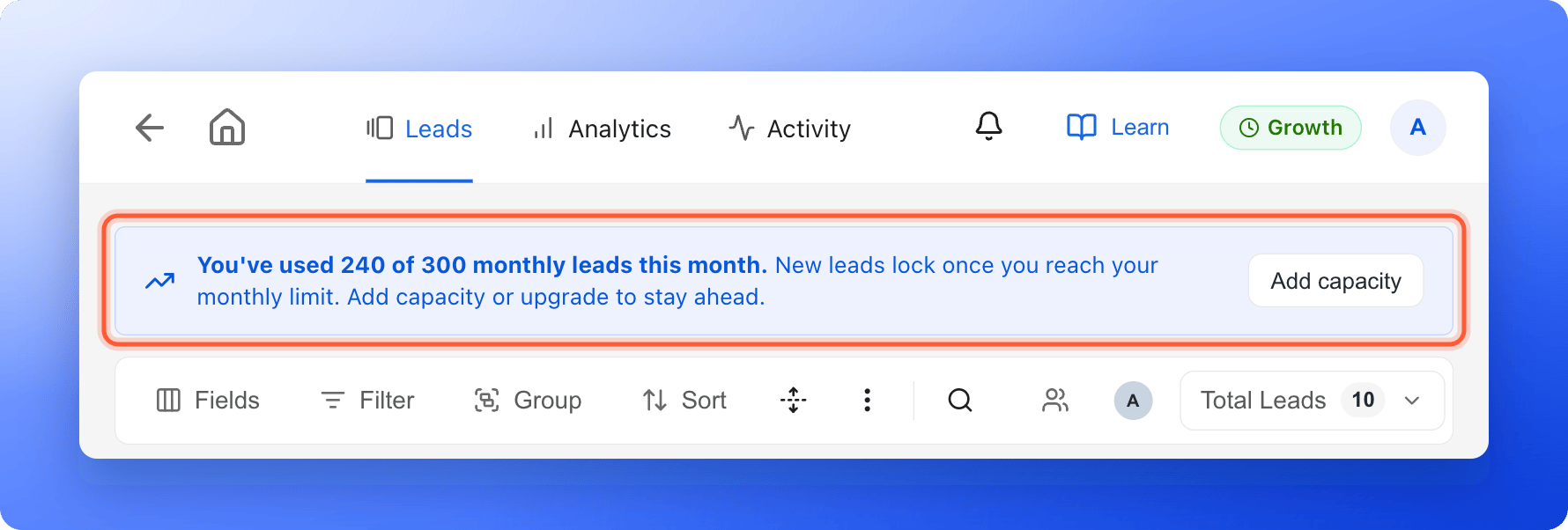
* **At 80% of your limit,** a banner appears above the **Leads** table. It says **You've used 240 of 300 monthly leads this month.** (with your own numbers) and **New leads lock once you reach your monthly limit.** A Global Admin also sees an **"Add capacity"** button.
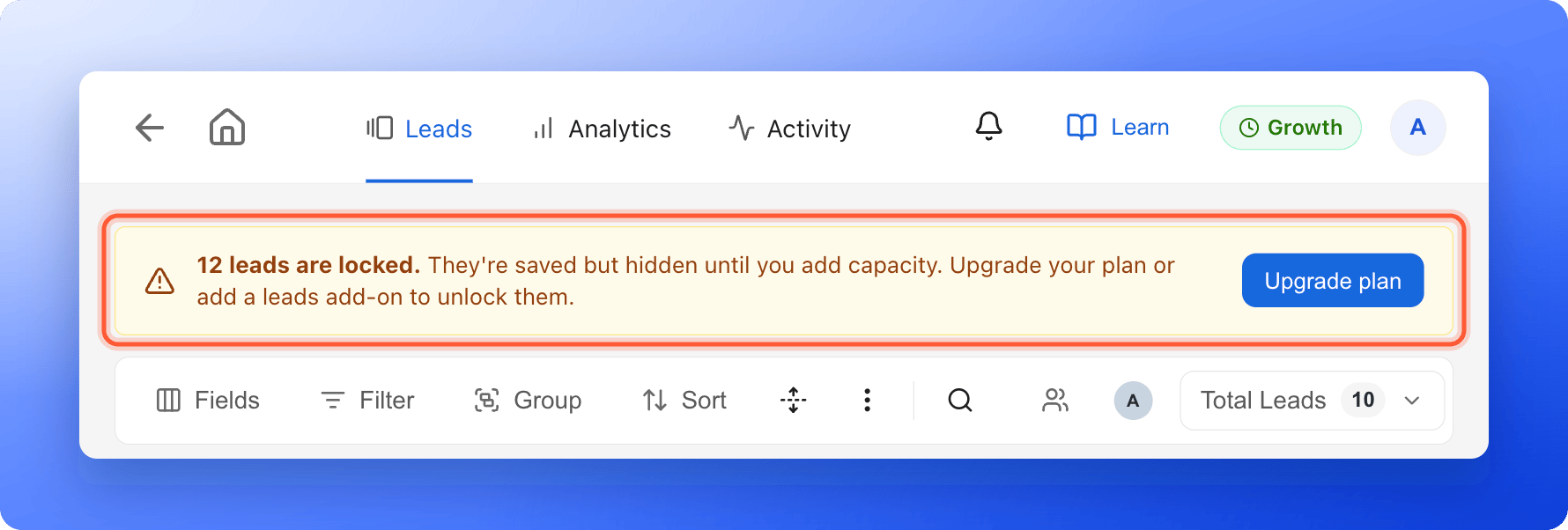
* **Once leads are locked,** a warning banner says **12 leads are locked.** (with your own number) and **They're saved but hidden until you add capacity.** A Global Admin also sees an **"Upgrade plan"** button. Everyone else sees **Ask a Global Admin to upgrade the plan or add a leads add-on.**
* **In the plan badge** in the top right corner, the **Leads / month** row shows how many you have used, for example **240/300**. See [Check your plan and usage](/billing/plan-and-usage).
 ## Unlock your leads
1. Click your profile picture in the top right corner.
2. Under **Subscription**, click **"Plan"**.
3. Click **"Change plan"**.
You can also click **"Upgrade plan"** or **"Add capacity"** in the banner. The page is titled **Change your plan** on a paid plan and **Choose your plan** during a free trial.
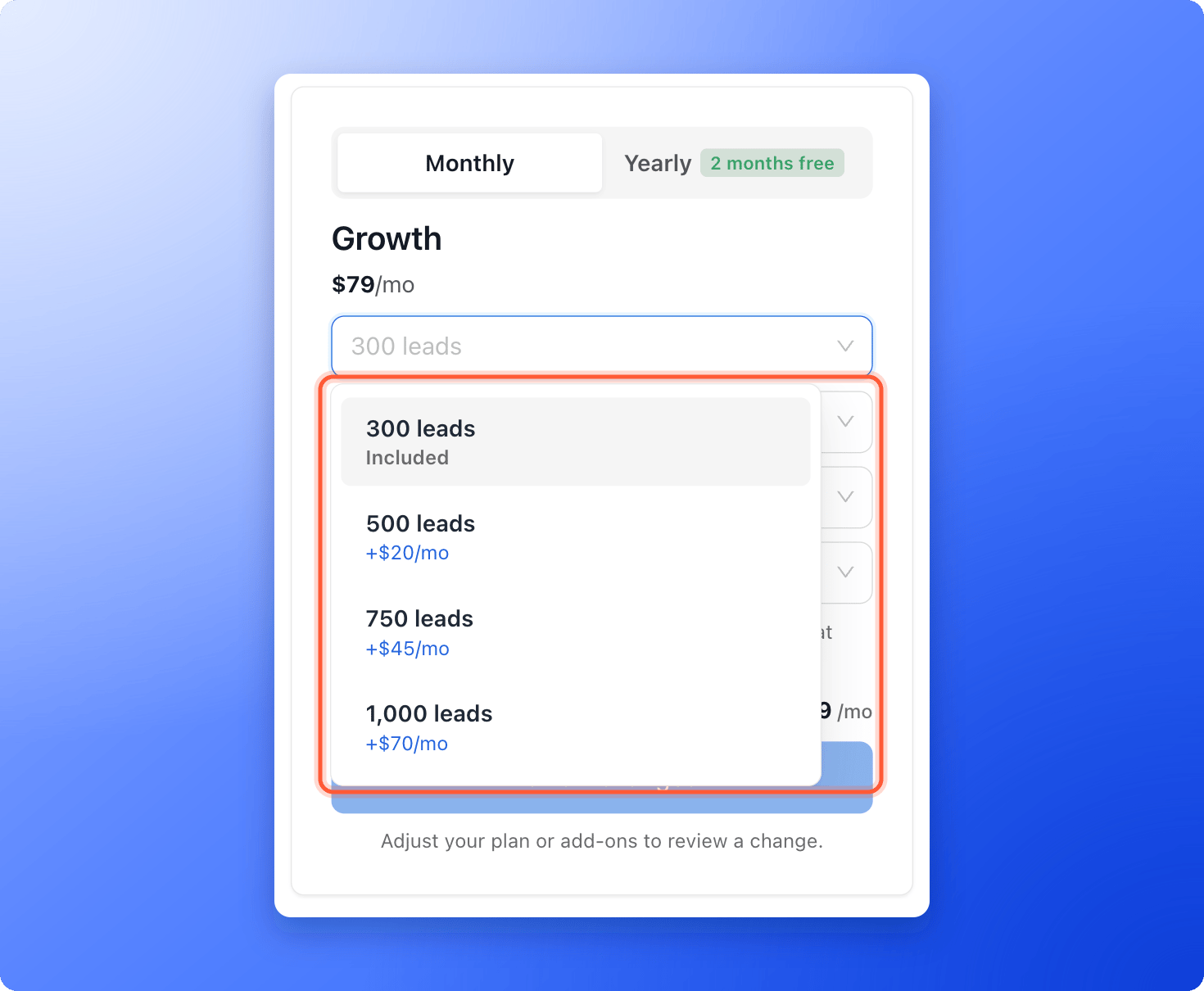
1. To stay on your plan, open the **Leads** drop-down list on the right. Each option shows **Included** or its extra monthly price.
2. Pick a larger amount. Or click **"Select"** under a bigger plan.
3. Click **"Review changes"**, then **"Confirm & pay"**.
## Unlock your leads
1. Click your profile picture in the top right corner.
2. Under **Subscription**, click **"Plan"**.
3. Click **"Change plan"**.
You can also click **"Upgrade plan"** or **"Add capacity"** in the banner. The page is titled **Change your plan** on a paid plan and **Choose your plan** during a free trial.
1. To stay on your plan, open the **Leads** drop-down list on the right. Each option shows **Included** or its extra monthly price.
2. Pick a larger amount. Or click **"Select"** under a bigger plan.
3. Click **"Review changes"**, then **"Confirm & pay"**.
 The full steps, including what you are charged, are in [Upgrade your plan](/billing/upgrade).
Open your funnel's **Leads** tab. Locked leads come back **oldest first**, as far as your new capacity allows. Allow a few minutes. The number in the banner gets smaller as leads unlock, and the banner goes away when none are left.
## If your trial or subscription has ended
When a free trial or a paid plan ends, new leads are still saved, but they are locked until you subscribe again. When you subscribe, they unlock, oldest first, as far as your plan allows. You subscribe on the **Choose your plan** page. See [Upgrade your plan](/billing/upgrade).
## How do I know it is working?
* The warning banner is gone, or shows a smaller number.
* **Total Leads** above the table goes up.
* New leads show in the table as soon as they arrive.
## Troubleshooting
Look for the warning banner above the table. If it says leads are locked, the lead is saved but hidden, and it comes back when you add capacity. If there is no banner, check your filters, search and date range. See [View and manage your leads](/leads/view-and-manage-leads).
Deleting leads does not free up room. Your monthly count only goes up, so you cannot delete your way under the limit. Add capacity instead.
Leads unlock as far as your new capacity allows, oldest first. If you have more locked leads than the new room, the rest stay locked until you add more, for example a bigger leads amount. Also allow a few minutes. If the banner is still there after that, email support.
A new month gives you a fresh count for new leads. It does not release leads that were locked earlier. Add capacity to unlock them.
Locked leads are not sent while they are locked. Add capacity and they unlock, then they are sent to your connected tools automatically, oldest first, within about 15 minutes. If a lead still does not arrive, open the destination's **"Delivery log"** to see why.
Analytics counts every form submission, including locked leads. The **Leads** table hides them. See [Why your lead and analytics numbers differ](/analytics/why-numbers-differ).
Only Global Admins can change the plan. If you are not one, ask your organization owner or another Global Admin to add capacity.
## What to do next
Add leads or move to a bigger plan.
See how much of each limit you have used.
Download your leads as a file.
Need help? Email [support@askfunnel.com](mailto:support@askfunnel.com).
The full steps, including what you are charged, are in [Upgrade your plan](/billing/upgrade).
Open your funnel's **Leads** tab. Locked leads come back **oldest first**, as far as your new capacity allows. Allow a few minutes. The number in the banner gets smaller as leads unlock, and the banner goes away when none are left.
## If your trial or subscription has ended
When a free trial or a paid plan ends, new leads are still saved, but they are locked until you subscribe again. When you subscribe, they unlock, oldest first, as far as your plan allows. You subscribe on the **Choose your plan** page. See [Upgrade your plan](/billing/upgrade).
## How do I know it is working?
* The warning banner is gone, or shows a smaller number.
* **Total Leads** above the table goes up.
* New leads show in the table as soon as they arrive.
## Troubleshooting
Look for the warning banner above the table. If it says leads are locked, the lead is saved but hidden, and it comes back when you add capacity. If there is no banner, check your filters, search and date range. See [View and manage your leads](/leads/view-and-manage-leads).
Deleting leads does not free up room. Your monthly count only goes up, so you cannot delete your way under the limit. Add capacity instead.
Leads unlock as far as your new capacity allows, oldest first. If you have more locked leads than the new room, the rest stay locked until you add more, for example a bigger leads amount. Also allow a few minutes. If the banner is still there after that, email support.
A new month gives you a fresh count for new leads. It does not release leads that were locked earlier. Add capacity to unlock them.
Locked leads are not sent while they are locked. Add capacity and they unlock, then they are sent to your connected tools automatically, oldest first, within about 15 minutes. If a lead still does not arrive, open the destination's **"Delivery log"** to see why.
Analytics counts every form submission, including locked leads. The **Leads** table hides them. See [Why your lead and analytics numbers differ](/analytics/why-numbers-differ).
Only Global Admins can change the plan. If you are not one, ask your organization owner or another Global Admin to add capacity.
## What to do next
Add leads or move to a bigger plan.
See how much of each limit you have used.
Download your leads as a file.
Need help? Email [support@askfunnel.com](mailto:support@askfunnel.com).