> ## Documentation Index
> Fetch the complete documentation index at: https://help.askfunnel.com/llms.txt
> Use this file to discover all available pages before exploring further.
# How the 14-day free trial works
> Try AskFunnel free for 14 days on Starter, Growth or Scale, with no credit card.
Available on: **Starter, Growth and Scale**. Enterprise has no self-serve trial.
Try a plan free for 14 days. Every new AskFunnel account can do it. You do not need a credit card, and you are never charged unless you choose to subscribe.
With the free trial, you can:
* **Try any self-serve plan.** Pick Starter, Growth or Scale. You get that plan's limits and features for the whole trial. See [Choose the right plan](/billing/choose-a-plan) to compare them.
* **Start without a card.** Nothing is charged when the trial starts, and nothing is charged when it ends.
* **Switch plans for free.** During the trial you can move to a different plan at no cost. Your trial end date stays the same.
* **Subscribe when you are ready.** You can subscribe at any point in the 14 days.
**Before you start**, you need:
* A permanent email address. Temporary email addresses cannot start a trial, and you get one free trial.
## Important to note
* Every trial includes 100 AI credits per month, whichever plan you try. The plan's full allowance unlocks when you subscribe.
* Subscribing ends the trial. If you subscribe on day 5, you are charged that day and the remaining trial days end.
## Start your free trial
Sign up and answer the quick setup questions. See [Create your account](/getting-started/create-account) if you need a walkthrough.
On the last setup screen, **Welcome to AskFunnel!**, you see the message "Pick a plan to start your 14-day free trial. No credit card required."
Use the **Monthly** and **Yearly** switch at the top to see prices for each billing cycle. The switch only sets the cycle we suggest when you subscribe later. You can change it then.
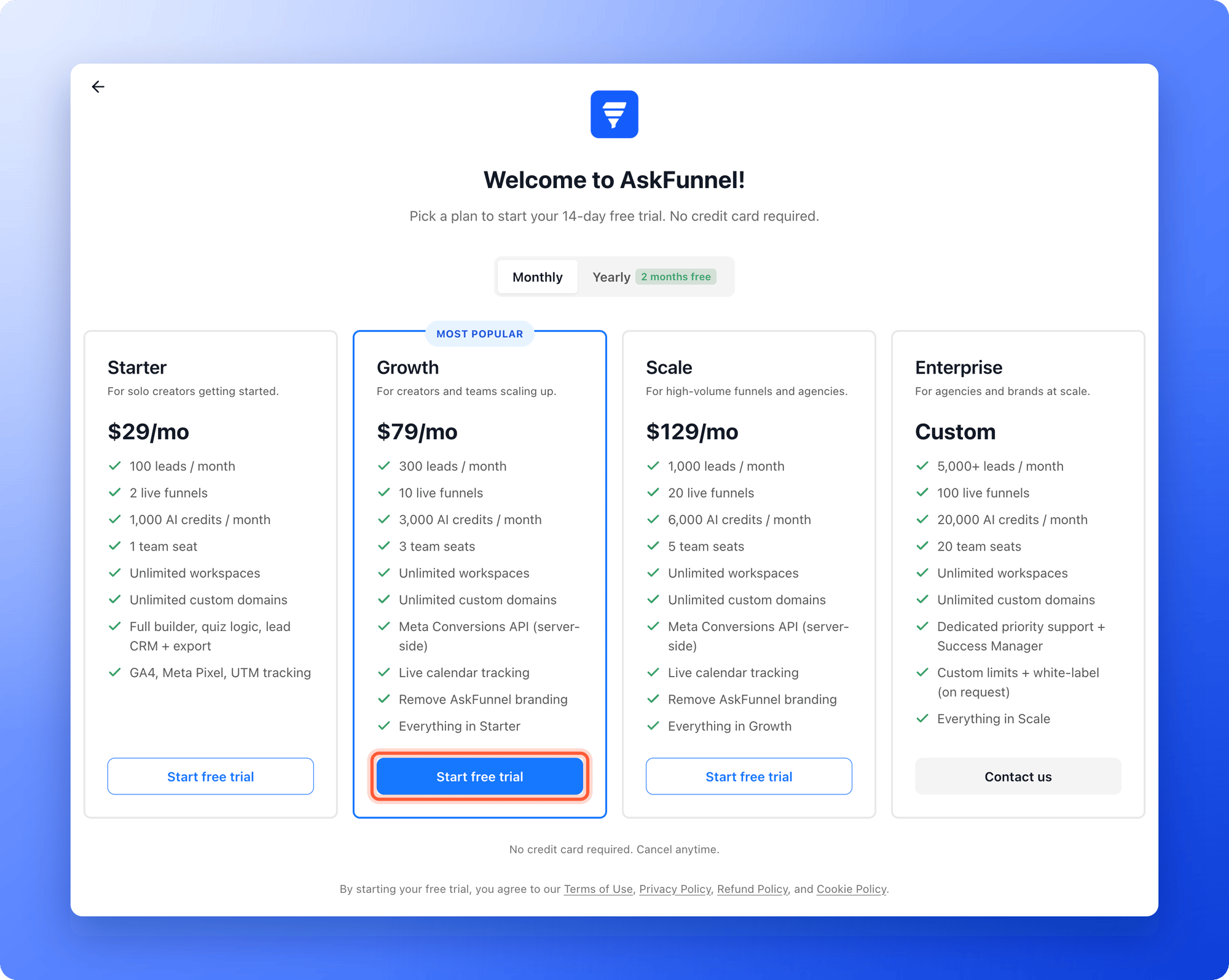 Click **"Start free trial"** under the plan you want. Your trial starts right away and you land in your dashboard. Enterprise is set up with our team, so click **"Contact us"** on the Enterprise plan to book a call.
## Check how many days you have left
* The plan badge in the top right corner of the dashboard shows the days left, for example **14d left**. Click it to see your usage.
* In **Settings**, under **Subscription**, open **"Plan"**. It shows **Your trial ends on** and the date.
See [Check your plan and usage](/billing/plan-and-usage) for details.
## Subscribe during your trial
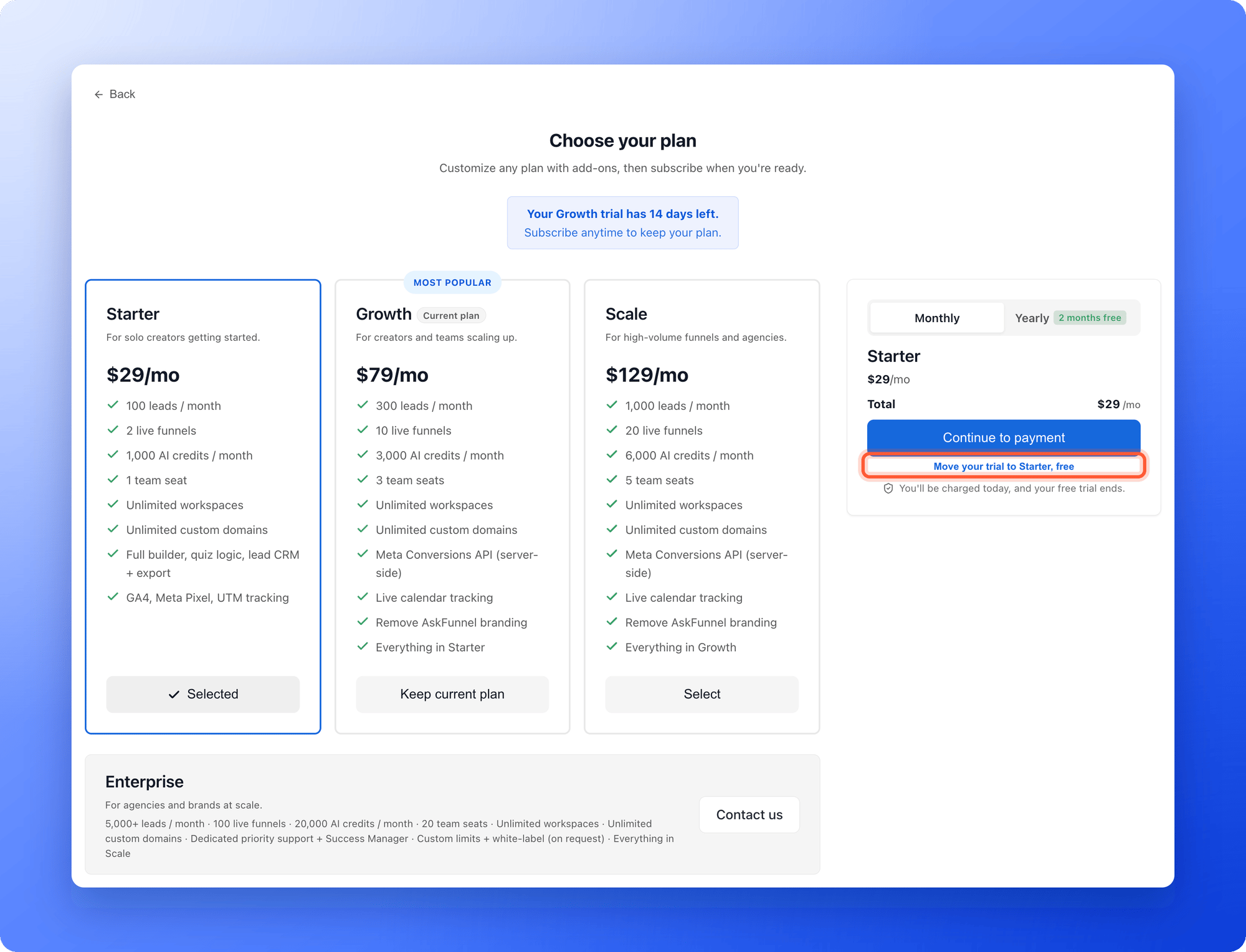
When you are ready to keep your plan, click your profile picture and, under **Subscription**, click **"Plan"**, then **"Change plan"**. Pick your plan and click **"Continue to payment"**. You are charged the same day and your trial ends. The full steps are in [Upgrade your plan](/billing/upgrade).
If you only want to try a different plan, select it and click **"Move your trial to \[plan name], free"** instead. There is no charge.
Click **"Start free trial"** under the plan you want. Your trial starts right away and you land in your dashboard. Enterprise is set up with our team, so click **"Contact us"** on the Enterprise plan to book a call.
## Check how many days you have left
* The plan badge in the top right corner of the dashboard shows the days left, for example **14d left**. Click it to see your usage.
* In **Settings**, under **Subscription**, open **"Plan"**. It shows **Your trial ends on** and the date.
See [Check your plan and usage](/billing/plan-and-usage) for details.
## Subscribe during your trial
When you are ready to keep your plan, click your profile picture and, under **Subscription**, click **"Plan"**, then **"Change plan"**. Pick your plan and click **"Continue to payment"**. You are charged the same day and your trial ends. The full steps are in [Upgrade your plan](/billing/upgrade).
If you only want to try a different plan, select it and click **"Move your trial to \[plan name], free"** instead. There is no charge.
 ## What happens when the trial ends
If you do not subscribe, you are not charged, because no payment method was ever saved. Here is what you see:
* **Trial ended.** The plan badge changes to **Trial ended**, and you have a grace period of 7 days to subscribe while you can still use your account.
* **Locked dashboard.** After the grace period, the dashboard shows **Your free trial has ended**. A Global Admin can click **"Upgrade plan"** to subscribe. Your data stays safe and comes back the moment you subscribe.
* **Paused funnels.** We email you before your live funnels are paused. Paused funnels stop collecting leads until you subscribe.
## Troubleshooting
You will not be charged automatically. A free trial has no payment method on file, so nothing can be charged. You are only charged after you subscribe and pay on the checkout page.
Each person gets one free trial, so a second one cannot be started with the same account or email address. You can subscribe to a plan instead. If you think this is a mistake, email support and we will look into it.
Trials are limited to 100 AI credits per month, and the plan badge menu shows this limit. When you subscribe, your plan's full monthly allowance applies.
Only Global Admins (the organization owner, or anyone they gave that role to) can change plans. Ask your Global Admin to subscribe.
## What to do next
A short checklist to test what matters before your 14 days are up.
Compare price, limits and features.
Subscribe when you are ready.
Need help? Email [support@askfunnel.com](mailto:support@askfunnel.com).
## What happens when the trial ends
If you do not subscribe, you are not charged, because no payment method was ever saved. Here is what you see:
* **Trial ended.** The plan badge changes to **Trial ended**, and you have a grace period of 7 days to subscribe while you can still use your account.
* **Locked dashboard.** After the grace period, the dashboard shows **Your free trial has ended**. A Global Admin can click **"Upgrade plan"** to subscribe. Your data stays safe and comes back the moment you subscribe.
* **Paused funnels.** We email you before your live funnels are paused. Paused funnels stop collecting leads until you subscribe.
## Troubleshooting
You will not be charged automatically. A free trial has no payment method on file, so nothing can be charged. You are only charged after you subscribe and pay on the checkout page.
Each person gets one free trial, so a second one cannot be started with the same account or email address. You can subscribe to a plan instead. If you think this is a mistake, email support and we will look into it.
Trials are limited to 100 AI credits per month, and the plan badge menu shows this limit. When you subscribe, your plan's full monthly allowance applies.
Only Global Admins (the organization owner, or anyone they gave that role to) can change plans. Ask your Global Admin to subscribe.
## What to do next
A short checklist to test what matters before your 14 days are up.
Compare price, limits and features.
Subscribe when you are ready.
Need help? Email [support@askfunnel.com](mailto:support@askfunnel.com).