> ## Documentation Index
> Fetch the complete documentation index at: https://help.askfunnel.com/llms.txt
> Use this file to discover all available pages before exploring further.
# Billing, renewals and invoices
> See when you are charged, how monthly and yearly billing work and where to download your invoices.
AskFunnel bills in advance, every month or every year, and renews automatically until you cancel. Payments are handled by Paddle, our payment provider. Paddle is the merchant of record (the company that sells to you), so it collects tax and issues your invoices.
**Before you start**, you need:
* A Global Admin role. Only Global Admins can open **Billing**. That is the organization owner, or anyone they gave that role to.
## Important to note
* Prices do not include tax. Tax is added at checkout where it applies, and shown on your invoice.
* Fees are non-refundable, except where the law requires it. If you were charged by mistake, see the troubleshooting section below.
## Find and download your invoices
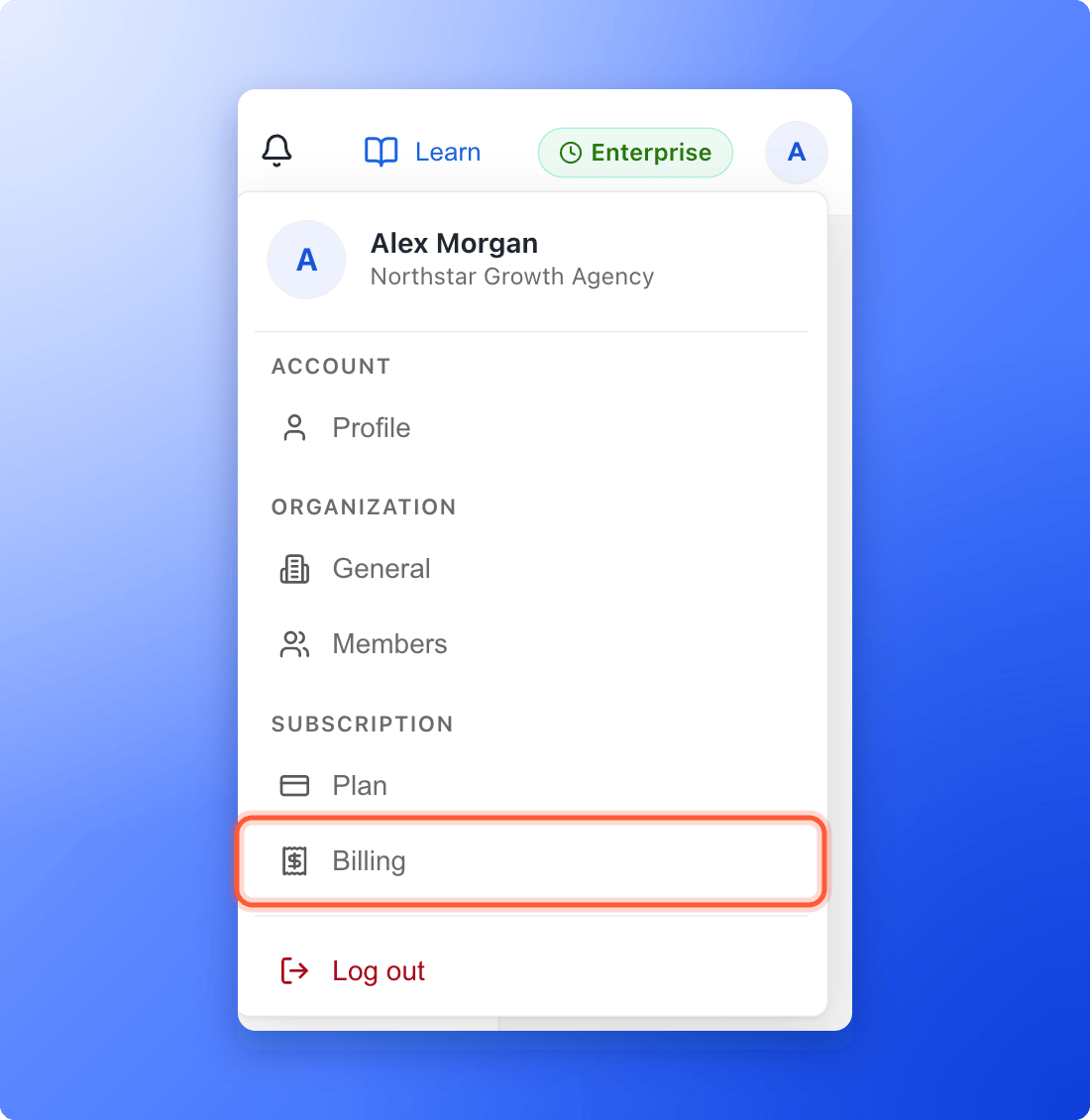
1. Click your profile picture in the top right corner.
2. Under **Subscription**, click **"Billing"**.
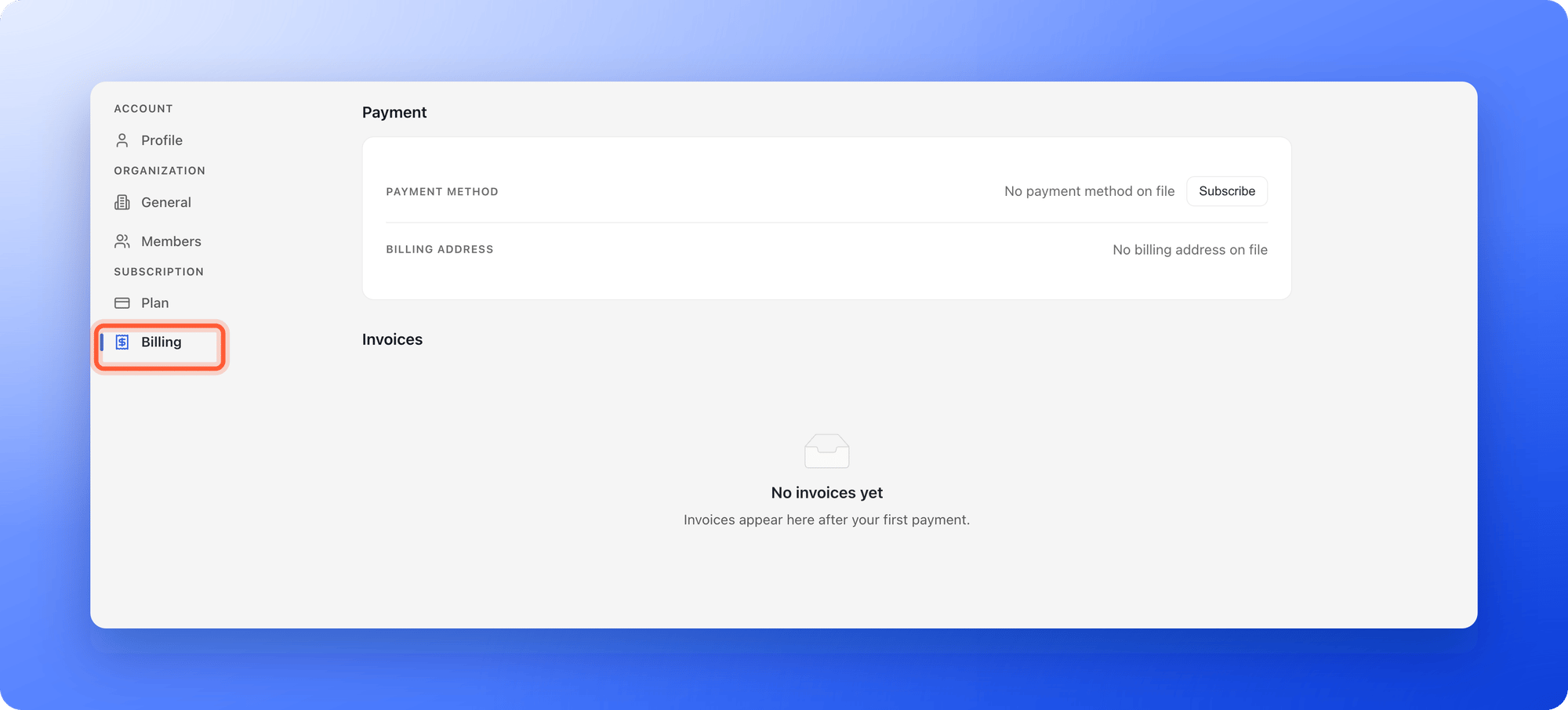
 Before your first payment, the **Invoices** section says **No invoices yet**.
 Scroll to **Invoices**. Each row shows the **Date**, the **Amount** you paid, including tax, and the **Status**, which reads **Paid**.
Click **"Download"** at the end of the row. The invoice opens as a PDF in a new browser tab, where you can save or print it.
The top of the **Billing** page also shows your **Payment method** and your **Billing address**. The address comes from your latest payment.
## When you are charged
* **During a free trial:** never. No payment method is saved, so there is nothing to charge.
* **When you subscribe:** the same day. Your free trial ends at that point.
* **At each renewal:** automatically, on the same date every month or year, at the price in effect then. Your next date is on the **Plan** page, next to **Renews on**.
* **When you upgrade:** a prorated amount for the rest of the current period, the same day. See [Upgrade your plan](/billing/upgrade).
* **When you downgrade:** nothing today. The lower price starts at your next renewal. See [Downgrade your plan](/billing/downgrade).
* **If a payment fails:** we try again, and you keep access for 7 days from the first failed payment. Update your card on the **Billing** page to fix it. See [Add or update your payment method](/billing/payment-methods).
## Monthly and yearly billing
* **Monthly:** you pay once a month. Starter is $29, Growth is $79 and Scale is \$129, plus any add-ons and tax.
* **Yearly:** you pay once a year, and the price is 10 times the monthly price, so you get 2 months free. That is $290 for Starter, $790 for Growth and \$1,290 for Scale, plus any add-ons and tax.
To change your cycle, go to **Plan**, click **"Change plan"** and use the **Monthly** and **Yearly** switch. Switching to yearly takes effect right away, and you pay for the year now. Switching to monthly takes effect when your yearly period ends.
## Troubleshooting
Invoices appear after your first payment. If you are on a free trial, you have not been charged yet. If you have paid and still see this, email support.
The invoice opens in a new tab, so your browser may have blocked the pop-up. Allow pop-ups for the AskFunnel dashboard and click **"Download"** again. If you see **Couldn't open the invoice. Please try again.**, wait a moment and retry.
The **Invoices** list shows your most recent 24 paid invoices. Email support for older ones.
Add your VAT number on the checkout page before you pay. See [Add a discount code or VAT number](/billing/discount-codes-and-vat). For an invoice you already have, email support.
Paddle is our payment provider and processes card and PayPal payments for AskFunnel, so your bank or card statement shows a line that starts with **PADDLE.NET**\* rather than AskFunnel. The amount and date match your AskFunnel invoice. If you do not recognize a charge, check your invoices on the **Billing** page first, then email support with the date and amount.
Your total can include tax, add-ons you bought and a prorated amount for an upgrade in the middle of a period. The **Amount** column shows the full total.
Subscription fees are non-refundable except where the law requires it. If you were charged by mistake, email support with your account email and a short description. Refunds for online payments are issued by Paddle to the original payment method and usually appear within 5 to 10 business days. See the [Refund Policy](https://askfunnel.com/refund-policy).
## What to do next
Pay by card or PayPal, and change it later.
Enter them at checkout.
See your renewal date and limits.
Need help? Email [support@askfunnel.com](mailto:support@askfunnel.com).
Scroll to **Invoices**. Each row shows the **Date**, the **Amount** you paid, including tax, and the **Status**, which reads **Paid**.
Click **"Download"** at the end of the row. The invoice opens as a PDF in a new browser tab, where you can save or print it.
The top of the **Billing** page also shows your **Payment method** and your **Billing address**. The address comes from your latest payment.
## When you are charged
* **During a free trial:** never. No payment method is saved, so there is nothing to charge.
* **When you subscribe:** the same day. Your free trial ends at that point.
* **At each renewal:** automatically, on the same date every month or year, at the price in effect then. Your next date is on the **Plan** page, next to **Renews on**.
* **When you upgrade:** a prorated amount for the rest of the current period, the same day. See [Upgrade your plan](/billing/upgrade).
* **When you downgrade:** nothing today. The lower price starts at your next renewal. See [Downgrade your plan](/billing/downgrade).
* **If a payment fails:** we try again, and you keep access for 7 days from the first failed payment. Update your card on the **Billing** page to fix it. See [Add or update your payment method](/billing/payment-methods).
## Monthly and yearly billing
* **Monthly:** you pay once a month. Starter is $29, Growth is $79 and Scale is \$129, plus any add-ons and tax.
* **Yearly:** you pay once a year, and the price is 10 times the monthly price, so you get 2 months free. That is $290 for Starter, $790 for Growth and \$1,290 for Scale, plus any add-ons and tax.
To change your cycle, go to **Plan**, click **"Change plan"** and use the **Monthly** and **Yearly** switch. Switching to yearly takes effect right away, and you pay for the year now. Switching to monthly takes effect when your yearly period ends.
## Troubleshooting
Invoices appear after your first payment. If you are on a free trial, you have not been charged yet. If you have paid and still see this, email support.
The invoice opens in a new tab, so your browser may have blocked the pop-up. Allow pop-ups for the AskFunnel dashboard and click **"Download"** again. If you see **Couldn't open the invoice. Please try again.**, wait a moment and retry.
The **Invoices** list shows your most recent 24 paid invoices. Email support for older ones.
Add your VAT number on the checkout page before you pay. See [Add a discount code or VAT number](/billing/discount-codes-and-vat). For an invoice you already have, email support.
Paddle is our payment provider and processes card and PayPal payments for AskFunnel, so your bank or card statement shows a line that starts with **PADDLE.NET**\* rather than AskFunnel. The amount and date match your AskFunnel invoice. If you do not recognize a charge, check your invoices on the **Billing** page first, then email support with the date and amount.
Your total can include tax, add-ons you bought and a prorated amount for an upgrade in the middle of a period. The **Amount** column shows the full total.
Subscription fees are non-refundable except where the law requires it. If you were charged by mistake, email support with your account email and a short description. Refunds for online payments are issued by Paddle to the original payment method and usually appear within 5 to 10 business days. See the [Refund Policy](https://askfunnel.com/refund-policy).
## What to do next
Pay by card or PayPal, and change it later.
Enter them at checkout.
See your renewal date and limits.
Need help? Email [support@askfunnel.com](mailto:support@askfunnel.com).