> ## Documentation Index
> Fetch the complete documentation index at: https://help.askfunnel.com/llms.txt
> Use this file to discover all available pages before exploring further.
# See where a lead came from
> Open a lead's Tracking tab to see their source, device, landing page and time on your funnel, then add notes for your team.
Check where a lead came from, what device they used and how long they spent in your funnel before you call or write, so your follow-up fits the lead. AskFunnel keeps this for every lead, next to their name and phone number.
**Before you start**, you need:
* A role that can see leads: Global Admin, Workspace Admin or Contacts Manager.
* A funnel with at least one lead. See [View and manage your leads](/leads/view-and-manage-leads).
## Open a lead's tracking details
In your funnel's **Leads** tab, hover over the lead's name and click the **"Open lead"** icon. A panel opens on the right.
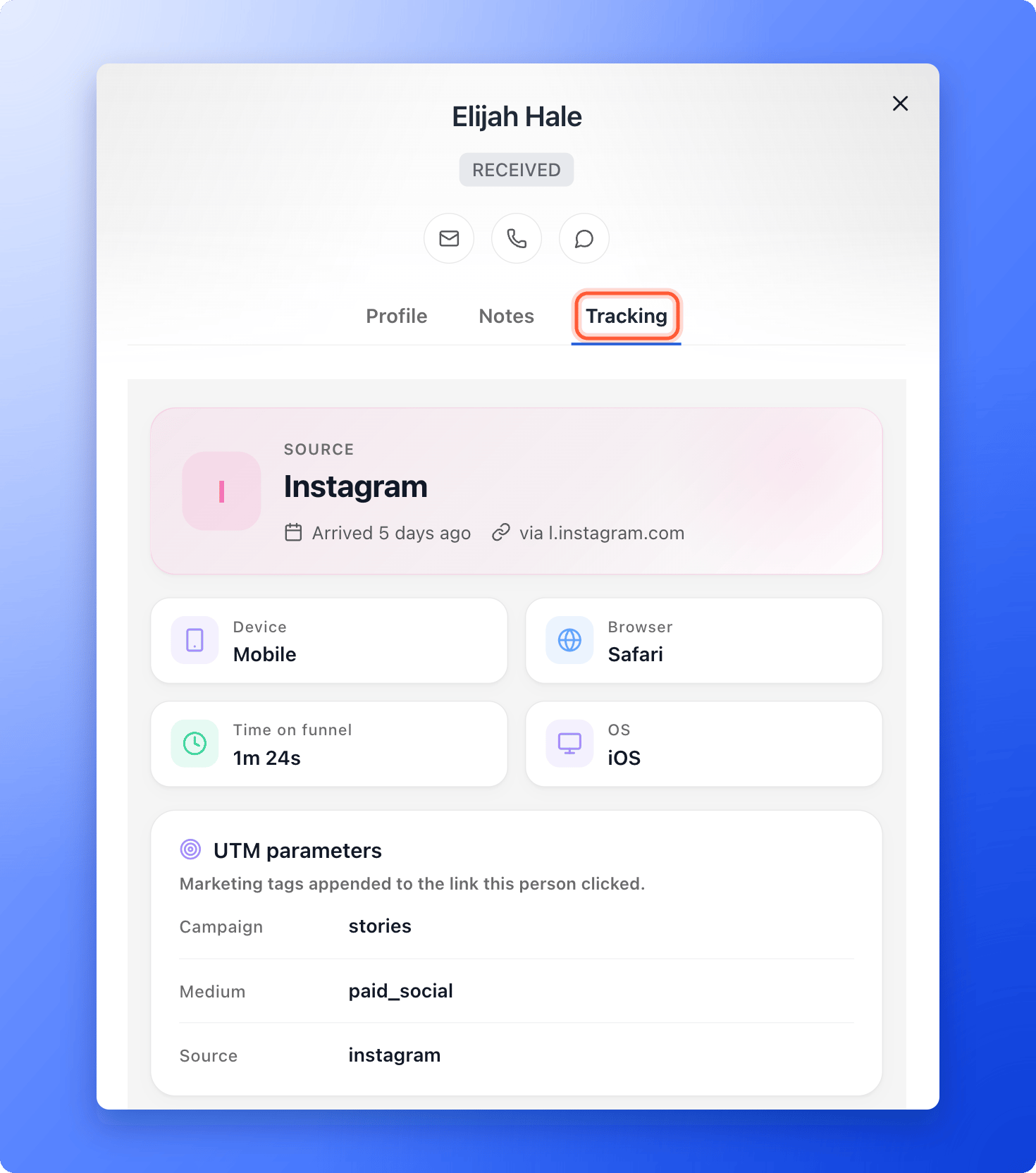
The panel has three tabs: **Profile**, **Notes** and **Tracking**. Click **Tracking**.
 ## Keep notes and update the lead
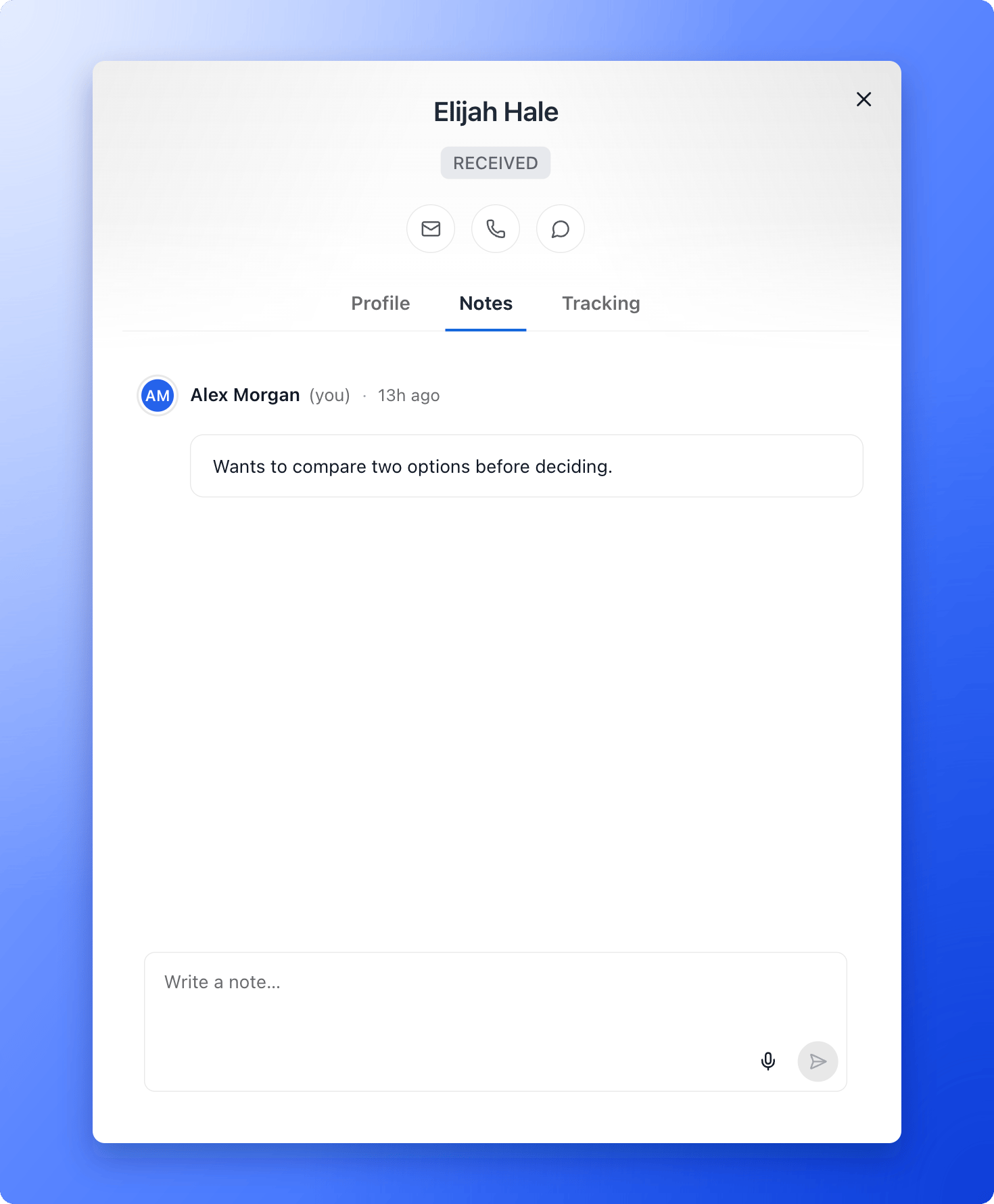
* **Write a note:** open the **Notes** tab, type in **Write a note...** and click the send arrow. Each note shows who wrote it and when. You can edit or delete your own notes, but not a teammate's.
## Keep notes and update the lead
* **Write a note:** open the **Notes** tab, type in **Write a note...** and click the send arrow. Each note shows who wrote it and when. You can edit or delete your own notes, but not a teammate's.
 * **Change the status:** click the status at the top of the panel. See [Track leads with statuses](/leads/contact-status).
* **Add tags or change details:** use the **Profile** tab. Click any field to edit it, for example **Tags** or **Preferred time**.
* **Contact the lead:** use the email, call and WhatsApp icons at the top of the panel. See [Message a lead on WhatsApp](/messages/whatsapp-template).
* **See their emails:** in **Profile**, the **Email flows** section lists every [automated email](/messages/automated-emails) flow the lead is in and what was sent.
Notes and status changes also appear in your team's [activity log](/analytics/activity-log), so nobody has to ask who called whom.
## What the Tracking tab shows
* **Source:** a headline with where the lead arrived from (for example a social network or a search engine), when they arrived, and the campaign name if your link had one. With no campaign tags, it shows the site they came from, or **Direct / Unknown**.
* **Device, Browser, OS and Time on funnel:** four tiles. **Time on funnel** is how long the lead spent before they submitted. A long time can mean strong interest, or that the funnel was hard to follow, so read it next to their answers.
* **UTM parameters:** the marketing tags on the link the lead clicked (source, medium, campaign, term and content). AskFunnel captures them automatically.
* **Device & environment:** device type, browser, operating system, language and time zone.
* **Landing & session:** the **Referrer** (the page that sent them), the **Landing URL** (the page they arrived on) and **Time on page**.
Click **Show advanced** for technical details: the **Screen** size, **Page title**, **Session ID**, the Meta click and pixel IDs (**Click & pixel IDs**) and **Show raw user agent**. Click **Hide advanced** to tuck them away. If support asks for a session ID, it is here.
If a lead shows **No tracking data captured**, they may have submitted before tracking was turned on, or used a browser that blocks visitor analytics. Their details are still saved in **Profile**.
## What to do next
See every status change, note and funnel update in one timeline.
Visitors, conversions and where people drop off.
Need help? Email [support@askfunnel.com](mailto:support@askfunnel.com).
* **Change the status:** click the status at the top of the panel. See [Track leads with statuses](/leads/contact-status).
* **Add tags or change details:** use the **Profile** tab. Click any field to edit it, for example **Tags** or **Preferred time**.
* **Contact the lead:** use the email, call and WhatsApp icons at the top of the panel. See [Message a lead on WhatsApp](/messages/whatsapp-template).
* **See their emails:** in **Profile**, the **Email flows** section lists every [automated email](/messages/automated-emails) flow the lead is in and what was sent.
Notes and status changes also appear in your team's [activity log](/analytics/activity-log), so nobody has to ask who called whom.
## What the Tracking tab shows
* **Source:** a headline with where the lead arrived from (for example a social network or a search engine), when they arrived, and the campaign name if your link had one. With no campaign tags, it shows the site they came from, or **Direct / Unknown**.
* **Device, Browser, OS and Time on funnel:** four tiles. **Time on funnel** is how long the lead spent before they submitted. A long time can mean strong interest, or that the funnel was hard to follow, so read it next to their answers.
* **UTM parameters:** the marketing tags on the link the lead clicked (source, medium, campaign, term and content). AskFunnel captures them automatically.
* **Device & environment:** device type, browser, operating system, language and time zone.
* **Landing & session:** the **Referrer** (the page that sent them), the **Landing URL** (the page they arrived on) and **Time on page**.
Click **Show advanced** for technical details: the **Screen** size, **Page title**, **Session ID**, the Meta click and pixel IDs (**Click & pixel IDs**) and **Show raw user agent**. Click **Hide advanced** to tuck them away. If support asks for a session ID, it is here.
If a lead shows **No tracking data captured**, they may have submitted before tracking was turned on, or used a browser that blocks visitor analytics. Their details are still saved in **Profile**.
## What to do next
See every status change, note and funnel update in one timeline.
Visitors, conversions and where people drop off.
Need help? Email [support@askfunnel.com](mailto:support@askfunnel.com).